
System Design
Step-by-Step Framework to Answer Any System Design Interview Question
Most candidates know system design is “open-ended,” but few have a repeatable way to attack any problem in the interview. They jump straight into microservic...

Most candidates know system design is “open-ended,” but few have a repeatable way to attack any problem in the interview. They jump straight into microservices, NoSQL, and Kafka, and then wonder why the conversation feels chaotic.
A good system design framework gives you structure: a way to turn a vague prompt like “Design Twitter” into a clear, collaborative, and technically deep discussion. This post walks through a step-by-step system design framework you can use in any architecture interview, from junior to senior levels.
We’ll focus on how to answer system design questions, not just what components to mention. The goal is to think and communicate like an experienced engineer designing a real system.
1. What Interviewers Actually Evaluate in System Design
Before jumping into the framework, it helps to understand what’s being tested. In most system design interviews, interviewers are looking for:
- Requirements thinking – Can you clarify the problem and prioritize correctly?
- Architecture fundamentals – Do you understand core building blocks: clients, APIs, storage, caching, queues, etc.?
- Tradeoff analysis – Can you compare options and justify decisions (SQL vs NoSQL, sync vs async)?
- Scalability & reliability – Do you know how systems behave under load and how to keep them available?
- Communication & structure – Can you drive the conversation, not just answer questions?
A good system design interview structure makes all of these visible. The rest of this post builds that structure.
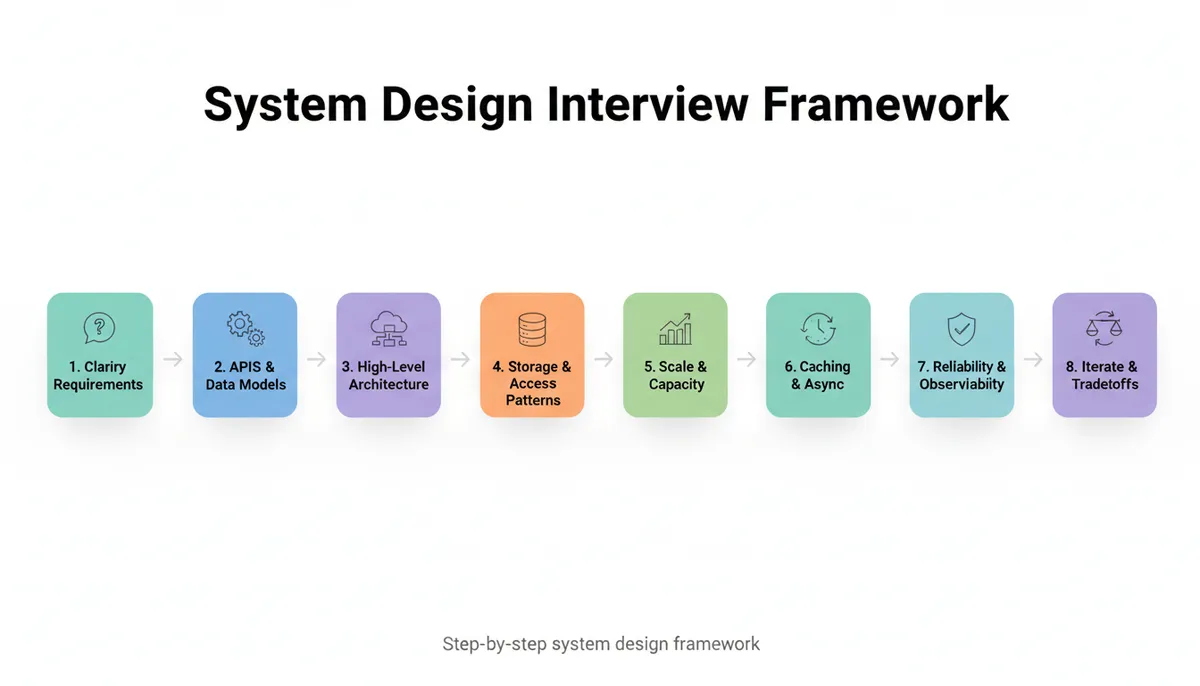
2. The 8-Step System Design Framework
Here’s the high-level framework we’ll unpack:
- Clarify the problem and scope
- Define APIs and core data models
- Establish high-level architecture
- Plan data storage and access patterns
- Design for scale (traffic, throughput, capacity)
- Add caching, async processing, and performance optimizations
- Address reliability, consistency, and observability
- Iterate, refine, and discuss tradeoffs
Think of this as a checklist you can adapt to any prompt: “Design a URL shortener,” “Design Instagram,” or “Design a log aggregation system.”
3. Step 1 – Clarify the Problem and Scope
Why this matters
The biggest red flag in system design interviews is jumping straight into components without understanding what you’re designing. Real-world architecture work starts with questions, not diagrams.
Interviewers want to see you:
- Identify functional requirements (what the system does)
- Uncover non-functional requirements (scale, latency, availability)
- Make explicit tradeoffs about what’s in and out of scope
A reusable question checklist
When you hear the prompt, pause and ask targeted questions. For example, for “Design a URL shortener like bit.ly”:
-
Users and use cases
- Who are the users? Anonymous or authenticated?
- Do we support custom aliases (e.g., /my-brand)?
- Do we need analytics (click counts, geo, referrer)?
-
Scale
- How many URLs created per day?
- Peak read QPS (redirects per second)?
- Expected growth over 1–2 years?
-
Constraints
- Latency: How fast must redirects be? (<100 ms?)
- Availability: Is occasional downtime acceptable?
- Data retention: Do URLs expire?
-
Scope boundaries
- Do we need an admin dashboard?
- Should we handle abuse detection, spam prevention?
You don’t need exact numbers; rough orders of magnitude are enough. If the interviewer doesn’t give numbers, propose reasonable assumptions and confirm:
“I’ll assume we handle 100M new URLs per month and peak 50K redirects per second. Does that sound reasonable?”
This immediately signals structured thinking.
4. Step 2 – Define APIs and Core Data Models
Once the problem is clear, define what the system exposes and stores. This grounds the design in concrete contracts.
4.1 API design
Start with the external interfaces. For a URL shortener:
-
POST /shorten- Request:
{ "long_url": "https://example.com/very/long/path", "custom_alias": "optional" } - Response:
{ "short_url": "https://sho.rt/abc123" }
- Request:
-
GET /{short_code}- Redirects to the long URL
- Returns 301/302
-
GET /stats/{short_code}- Response:
{ "clicks": 1234, "unique_users": 567 }(if analytics in scope)
- Response:
You don’t need production-ready API docs; the goal is to show you’re thinking in terms of clear boundaries.
4.2 Core data models
Next, sketch key entities. For the same example:
TEXT
For more complex systems (e.g., design Instagram), you might have:
- User
- Post
- Media
- FollowRelationship
- FeedItem
You don’t need every field; capture what’s essential to the requirements.
5. Step 3 – Establish a High-Level Architecture
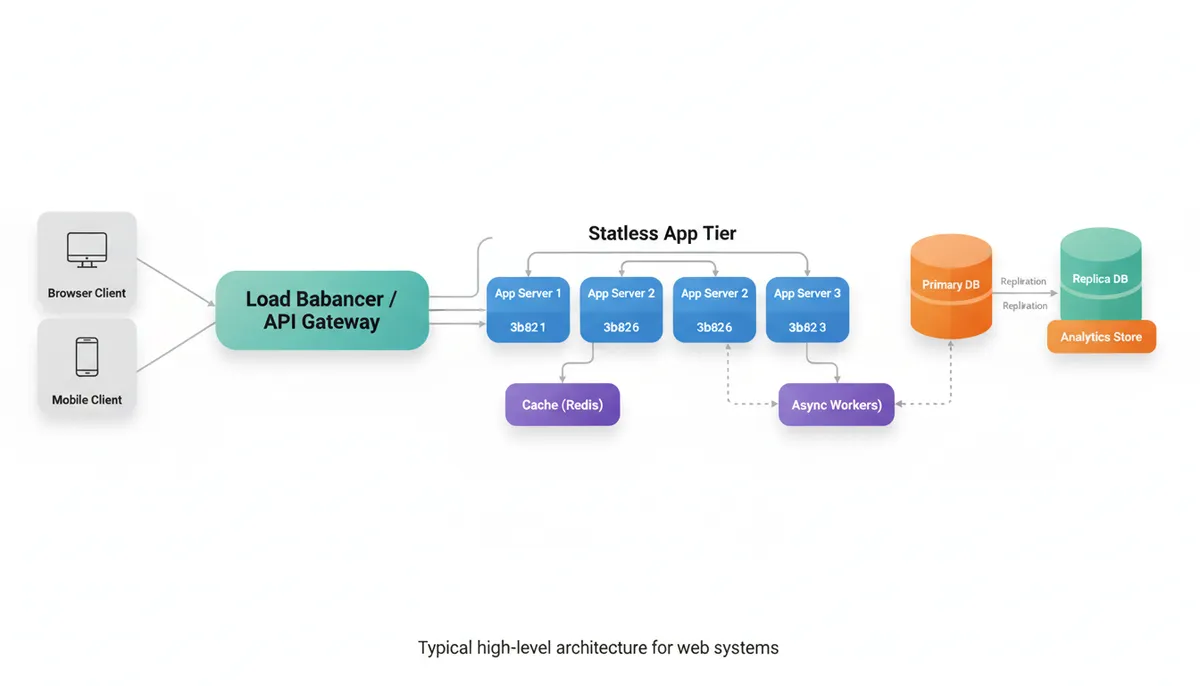
Now you can propose a system design framework for how components interact. Keep it simple first, then evolve.
5.1 Start with a minimal architecture
For the URL shortener:
- Clients – Web browsers, mobile apps
- API Gateway / Load Balancer
- Application servers – Handle shorten + redirect requests
- Database – Store URL mappings
- Cache – Speed up redirects
- (Optional) Analytics pipeline – For click stats
Draw this on the whiteboard or describe clearly:
“Clients send requests through a load balancer to stateless application servers. These talk to a primary database for URL mappings and use a cache for hot entries. Analytics events are sent asynchronously to a separate pipeline.”
5.2 Use standard building blocks
Most architecture interview guides converge on a similar set of components:
- Load balancers / API gateways
- Stateless application services
- Databases (relational, document, key-value, columnar)
- Caches (Redis, Memcached)
- Message queues / streams (Kafka, SQS, Pub/Sub)
- Object storage (S3, GCS)
- Search engines (Elasticsearch, OpenSearch)
- Background workers / cron jobs
You don’t get points for buzzwords; you get points for using the right tool for the problem and explaining why. This approach aligns well with the principles outlined in the Ultimate System Design Roadmap: 120 Topics to Master Every Interview, which emphasizes mastering core components and their interactions.
6. Step 4 – Plan Data Storage and Access Patterns
At this stage, you know what you’re storing and roughly how components interact. Now decide where and how you’ll store data.
6.1 Choose storage technologies
For each major entity, ask:
- Do we need strong consistency?
- What are the access patterns (reads vs writes, point lookups vs range scans)?
- How large is the dataset? How fast is it growing?
Example decisions:
- URL shortener:
- Primary store: Relational DB or key-value store
- Access pattern:
short_code → long_url(point lookup) - Strong consistency needed to avoid wrong redirects
- Social feed:
- Posts: document store or relational DB
- Feed: precomputed timelines in key-value store
- Search: Elasticsearch
Make your reasoning explicit:
“Since our main operation is a key lookup by short code and we need strict correctness of redirects, a relational DB or a distributed key-value store works. I’ll start with a relational DB for simplicity and discuss sharding later if needed.”
6.2 Model read/write paths
Describe typical operations:
-
Write path (creating a short URL)
- Client → API → App Server
- App validates URL, generates
short_code - App writes
URLMappingto DB - App optionally writes to cache
-
Read path (redirect)
- Client hits
GET /{short_code} - App checks cache:
- Hit → return long URL (302 redirect)
- Miss → query DB, populate cache, return redirect
- Client hits
This shows you understand access patterns, not just schema.
7. Step 5 – Design for Scale and Capacity
This is where many candidates get hand-wavy. A strong architecture interview guide teaches you to reason quantitatively, even with rough numbers.
7.1 Estimate scale
Use back-of-the-envelope math:
Example (URL shortener):
- Assumption: 100M new URLs/month ≈ ~40/s writes
- Assumption: 50K redirects/s at peak
- Each mapping: ~200 bytes (short code, URL, metadata)
- Storage growth:
- 100M * 200B ≈ 20GB/month ≈ 240GB/year (before replication, indexes)
You don’t need perfect math; you need reasonable orders of magnitude.
7.2 Identify bottlenecks
With these numbers:
- DB writes: 40/s → trivial for a single node
- DB reads: 50K/s → too high for a single DB without help
- Cache: If 90% cache hit ratio:
- 45K/s served by cache
- 5K/s go to DB → more manageable
Explain:
“Reads dominate writes by three orders of magnitude, so we’ll rely heavily on caching to protect the database. We can also add read replicas or partitioning if needed.”
7.3 Horizontal vs vertical scaling
Discuss:
- Stateless app servers: easy to scale horizontally behind load balancers
- Databases:
- Vertical scaling up to a point
- Then read replicas and sharding
- Caches:
- Horizontal scale with consistent hashing
You don’t have to design full sharding schemes unless asked, but mention the strategy:
“If the DB becomes a bottleneck, we can shard URL mappings by hash(short_code) across multiple DB instances.”
8. Step 6 – Add Caching, Async Processing, and Performance Optimizations
Once baseline scalability is covered, discuss performance improvements.
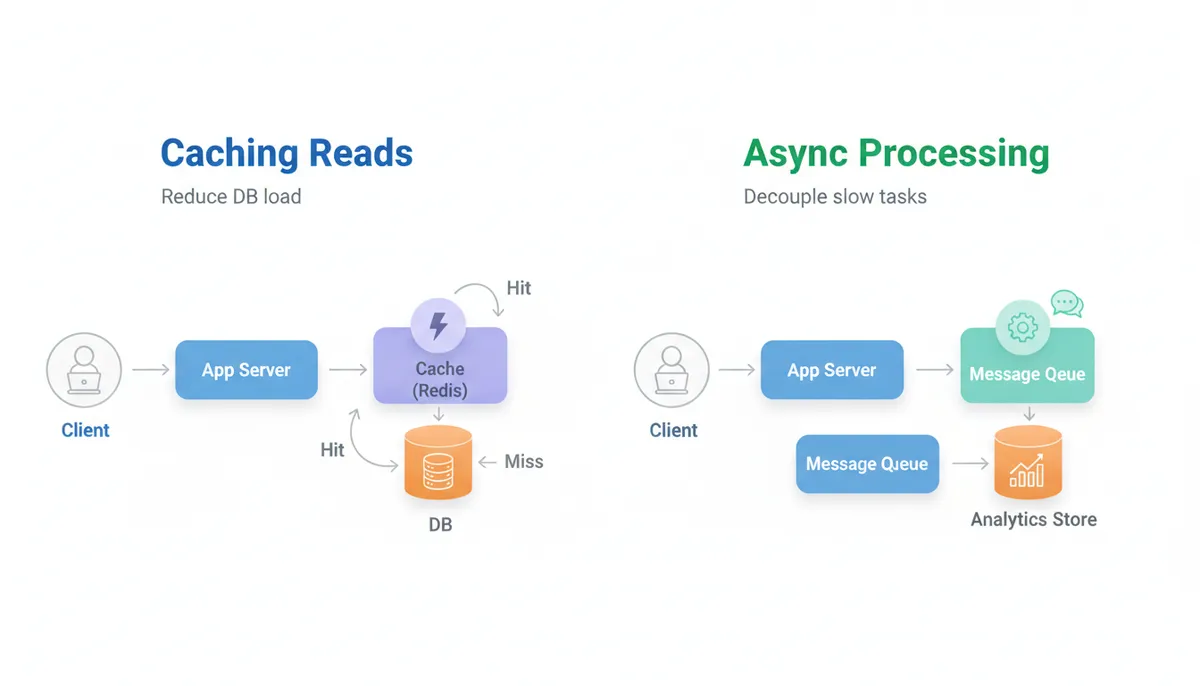
8.1 Caching strategy
Key questions:
- What to cache?
- Where to cache (client, CDN, app, DB)?
- Expiration and invalidation?
For the URL shortener:
- Cache
short_code → long_urlin Redis - Use TTL (e.g., 1 day) or LRU eviction
- Handle cache misses gracefully
For a social feed:
- Cache user timelines
- Cache profile data
- Use write-through or write-back strategies
8.2 Asynchronous processing
Identify operations that don’t need to be synchronous:
- Log writes and analytics
- Email / push notifications
- Feed fan-out
- Image processing, video transcoding
Pattern:
- App publishes event to a message queue (Kafka, SQS, Pub/Sub)
- Background workers consume and process
- Results stored in separate stores
Describe the benefits:
“By decoupling analytics from the write path with a queue, we keep user-facing latency low even under spikes.”
This approach to asynchronous processing and caching is a common pattern in scalable system design and is well covered in comprehensive system design resources like the Best Platforms for System Design Interview Prep: Where to Practice Architecture Thinking.
9. Step 7 – Address Reliability, Consistency, and Observability
At senior levels, this part often differentiates strong candidates.
9.1 Reliability and fault tolerance
Discuss:
- Redundancy: multiple instances of each component
- Replication: multi-AZ or multi-region databases
- Failover: what happens if a node or region goes down?
Examples:
- Run app servers across multiple availability zones
- Use a managed DB with automatic failover
- For read-heavy systems, use read replicas and route traffic
Mention SLAs or SLOs if relevant:
“If we target 99.9% availability, we must avoid single points of failure. That means redundant load balancers, multiple app instances, and DB replicas.”
9.2 Consistency vs availability
Show that you understand the tradeoff:
- Do we need strong consistency (e.g., banking transactions)?
- Is eventual consistency acceptable (e.g., like counts, analytics)?
For the URL shortener:
- Redirect correctness: strong consistency (never wrong URL)
- Analytics: eventual consistency is fine
You can briefly reference CAP theorem without overdoing it:
“For redirects we prioritize consistency over availability of stale data: better to serve 500 than send users to the wrong destination. For analytics, we accept eventual consistency to keep the main path fast and available.”
9.3 Observability: logging, metrics, tracing
Describe what you’d monitor:
-
Metrics:
- QPS, latency percentiles (P50, P95, P99)
- Error rates (4xx, 5xx)
- Cache hit ratio
- DB CPU, connections, replication lag
-
Logging:
- Structured logs for requests and errors
- Correlation IDs for tracing across services
-
Tracing:
- Distributed tracing (e.g., OpenTelemetry) for multi-service flows
This shows you think beyond “it works on my machine.”
10. Step 8 – Iterate, Refine, and Discuss Tradeoffs
The interview is a conversation. After presenting a first-pass design, you should:
-
Ask for focus:
“We’ve sketched the overall system. Would you like to dive deeper into data modeling, scaling the database, or the analytics pipeline?”
-
Explore alternatives:
- SQL vs NoSQL
- Precomputed vs on-the-fly feeds
- Push vs pull models
-
Discuss tradeoffs explicitly:
- Complexity vs flexibility
- Latency vs freshness
- Cost vs reliability
Example:
“We could precompute user feeds at write-time, which gives faster reads but higher write amplification and storage. Alternatively, we compute feeds on read, which simplifies writes but increases read latency. For a Twitter-like product with far more reads than writes, I’d lean toward precomputation plus caching.”
This is the point where senior candidates distinguish themselves: they don’t just list technologies; they reason about why.
11. Applying the Framework: Mini Walkthrough
Let’s quickly apply this system design framework to a different problem: “Design a rate limiter for an API.”
11.1 Clarify requirements
- Limit: e.g., 100 requests per minute per user
- Scope: per API key? per IP? per user ID?
- Scale: peak QPS, number of users
- Behavior on limit exceeded: 429 Too Many Requests
- Deployment: distributed across many servers
11.2 APIs and data
-
Exposed API: internal library or service that other services call:
bool allowRequest(userId, apiKey, endpoint)
-
Data:
- For each key: window start time, request count
11.3 High-level architecture
- Each app server calls a centralized rate limiting service or a shared distributed cache (e.g., Redis) to check limits.
11.4 Storage and access patterns
- Use Redis as a central store:
- Key pattern:
rate:{userId}:{minute}→ count - Operations: increment and check
- Key pattern:
11.5 Scale and capacity
- Assume 10K QPS
- Redis can handle high throughput with in-memory operations
- Use clustering and sharding by key hash for scale
11.6 Caching and performance
- Redis is effectively the cache + store
- Use atomic operations (INCR, EXPIRE) to avoid race conditions
11.7 Reliability and consistency
- If Redis is down:
- Fail-open vs fail-closed behavior?
- You might choose fail-open to avoid blocking all traffic, but log and alert.
11.8 Tradeoffs
- Centralized limiter:
- Pros: accurate global limits
- Cons: extra network hop, dependency on Redis availability
- Local in-process limiter:
- Pros: no network hop
- Cons: inaccurate in a distributed environment
Walking through this in the interview, step by step, demonstrates a consistent, structured approach.
12. Common Mistakes in System Design Interviews
Even strong coders stumble on architecture interviews due to a few recurring issues.
12.1 Jumping straight to technology
- Starting with: “We’ll use Kafka, Cassandra, and Kubernetes…”
- Instead of: “Let’s clarify requirements, then pick tools.”
Fix: Follow the step-by-step structure: requirements → APIs → architecture → scaling.
12.2 Ignoring constraints and numbers
- Saying “we’ll just use a database and cache” without:
- QPS estimates
- Data size
- Read/write ratios
Fix: Always propose rough numbers and adjust if the interviewer pushes back.
12.3 Overcomplicating the initial design
- Designing multi-region, multi-cloud, fully event-driven systems for small-scale prompts.
Fix: Start simple, then say:
“This works for moderate scale. If we need to handle 100x traffic, we can evolve it by adding X and Y.”
12.4 Not driving the conversation
- Waiting for the interviewer to ask about every aspect.
- Getting stuck in one area (e.g., database schema) for 30 minutes.
Fix: Use your framework as a roadmap and narrate where you are:
“We’ve covered APIs and storage. Next I’ll talk about scaling and caching.”
12.5 Hand-wavy tradeoffs
- “We’ll use NoSQL because it’s more scalable.”
- “We’ll use microservices for flexibility.”
Fix: Be specific:
- What consistency model?
- What failure modes?
- What operational complexity?
13. Best Practices and Actionable Tips
To make this system design interview structure second nature:
13.1 Practice with varied prompts
Use the same framework on different problems:
- Design a news feed
- Design a chat system
- Design a logging/metrics platform
- Design a notification system
Each time, explicitly walk through:
- Requirements
- APIs & models
- Architecture
- Storage
- Scale
- Caching & async
- Reliability
- Tradeoffs
13.2 Time management in a 45–60 minute interview
Rough allocation:
- 5–10 min: Clarify requirements, APIs, data models
- 10–15 min: High-level architecture
- 10–15 min: Scaling, storage, caching
- 10–15 min: Reliability, consistency, deep dives
- 5 min: Recap and tradeoffs
Check in periodically:
“We’ve spent ~15 minutes on the high-level design. Would you like to go deeper into storage or into the async pipeline?”
13.3 Develop “default patterns”
Just like DSA has patterns (sliding window, two pointers, etc.), system design has recurring patterns:
- Write-heavy systems: queues + workers, write buffering
- Read-heavy systems: caching, precomputation, denormalization
- Real-time systems: streaming, websockets, pub/sub
- Search-heavy systems: index building, search clusters
Recognizing which pattern applies reduces cognitive load and helps you move faster. If you’re already using pattern-based learning for algorithms (e.g., via a structured DSA patterns sheet), apply the same mindset to system design.
13.4 Practice articulating tradeoffs aloud
You’re judged not just on the design, but on how you explain it. When practicing:
- Say “Option A vs Option B”
- For each, list 2–3 pros and cons
- End with a clear choice and rationale
This is also where AI-driven mock interviews (like those at AI Interview Practice: Free Mock Interview Simulator with Real-Time Feedback for Technical Interviews) can help you get real-time feedback on your explanations and structure.
14. Key Takeaways
- A system design framework keeps you from getting lost in open-ended interviews.
- Always start with requirements, not technologies.
- Define APIs and core data models early to anchor the discussion.
- Build from a simple high-level architecture, then layer on:
- Storage choices and access patterns
- Capacity estimates and scaling
- Caching and async processing
- Reliability, consistency, and observability
- Treat the interview as a collaborative design session:
- Ask clarifying questions
- Check in about priorities
- Discuss tradeoffs explicitly
- Practice the same structure across many prompts until it becomes automatic.
If you internalize this step-by-step approach, you’ll spend less time worrying about “what to say next” and more time demonstrating how you think—exactly what system design interviews are meant to evaluate.