
Interview
Adobe Coding Interview Questions: Patterns and Prep Guide (2026)
Prepare for Adobe coding interview questions with a pattern-first plan for the online test and live rounds, plus focused technical discussion practice.
Adobe coding interview questions reward breadth before specialisation. Reported accounts describe an online test that combines data structures and algorithms with core computer-science multiple-choice material, followed by live technical discussions that can move between coding, object-oriented design, system design, frontend fundamentals, and your own project decisions.
That makes pattern recognition especially valuable. You need to identify a familiar algorithmic shape quickly, but you also need enough engineering vocabulary to explain why your solution is maintainable, testable, and appropriate for the constraints. Adobe's interview kit holds 63 mapped DSA questions and 1 low-level design problems evidenced at Adobe, giving you a company-focused way to practise the coding patterns that matter most.
The practical message is simple: prepare for a broad technical conversation, not a narrow puzzle contest. Build speed on core DSA patterns, refresh OS, DBMS, and networking fundamentals, and rehearse explaining technical choices from projects you have actually worked on.
The pattern mix to prepare for
The strongest way to approach Adobe coding interview questions is by pattern family. A topic label such as “arrays” is too broad to help under time pressure. Recognition becomes faster when you associate the wording and constraints with a reusable approach.
For array and string problems, focus on hashing, two pointers, sliding windows, prefix reasoning, and sorting-based scans. These are high-return families because they test whether you can replace a brute-force nested loop with a structure that tracks what matters. When the prompt mentions a contiguous segment, a window whose state changes as you move, or repeated values and fast lookup, the intended direction is often visible before you write any code.
For ordered input or a monotonic condition, practise binary search beyond simple lookup. In interviews, the key question is often not “does this value exist?” but “what is the smallest, largest, first, or last value that satisfies a condition?” Candidates lose time when they know binary search as a memorised template but cannot define the invariant that makes it correct. For a useful refresher, read binary search patterns for coding interviews.
Tree and graph questions call for a different kind of recognition. Decide first whether the structure is asking for traversal, reachability, shortest unweighted distance, dependency ordering, or connected components. That decision tells you whether breadth-first search, depth-first search, recursion, an explicit stack, or a visited set belongs in the solution. The guide to graph traversal patterns with DFS and BFS is useful for making that choice deliberately rather than by habit.
Dynamic programming is worth revising too, but avoid treating it as a bag of formulas. Look for repeated subproblems, choices that create overlapping future states, and a state that can be expressed with a small set of changing variables. Your explanation should include the state, transition, base case, and iteration order. If that framework feels uncertain, work through dynamic programming patterns for interviews.
The difficulty mix is best understood as progressive reasoning rather than a chase for obscure tricks. Start with clean implementations of familiar patterns. Then move to variants where the recognition signal is less obvious, constraints force a more efficient approach, or the interviewer asks you to adapt the solution. This is the difference between recalling a solution and demonstrating engineering judgement.
The reported Adobe round shape
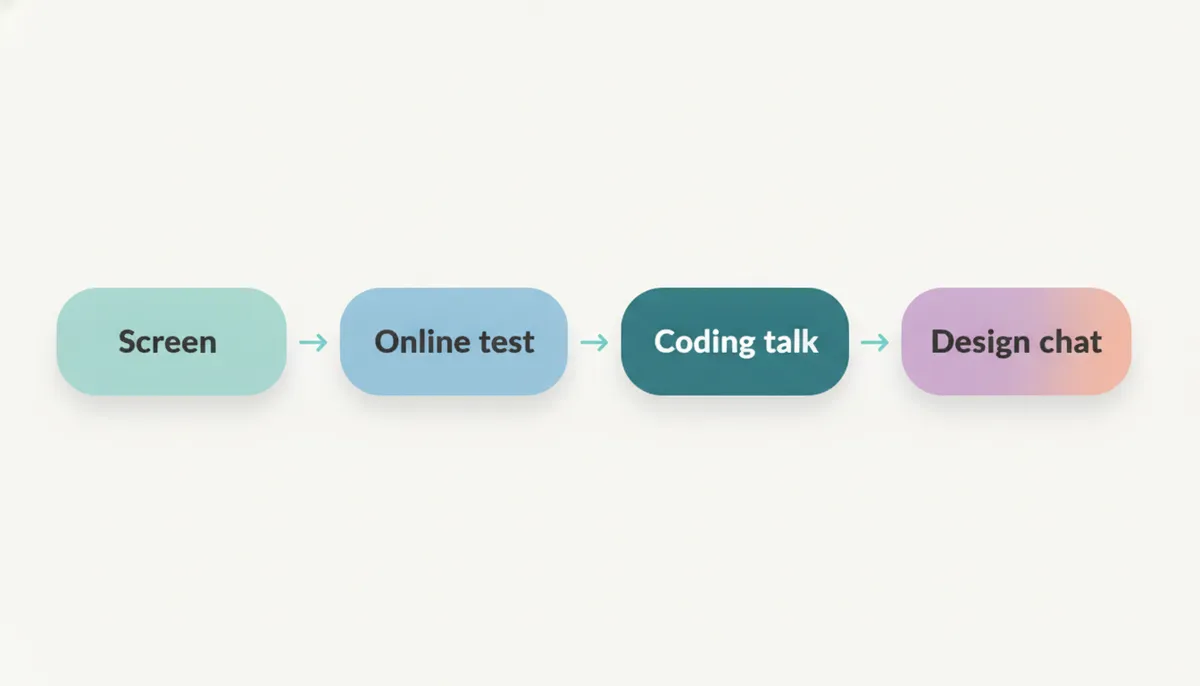
Reported accounts describe a recruiter screen, an online assessment on HackerRank, a hiring-manager conversation focused on project depth, and technical rounds. The overall process is reported to vary by role and team, so treat this as a useful shape rather than a fixed script.
The online test is commonly reported as combining medium-level DSA work with multiple-choice questions on operating systems, databases, and networking. That blend is an important signal: Adobe preparation should not stop at coding practice. You should be comfortable explaining common system concepts precisely, including process and thread behaviour, database indexing and transactions, networking basics, and the trade-offs behind familiar engineering decisions.
The hiring-manager screen is reported to probe ownership and business impact, not merely implementation detail. Be ready to discuss what you decided, which constraint made the work difficult, how you assessed success, and what you would change now. A polished project story is not a memorised speech; it is evidence that you understand your work well enough to reason about it under follow-up questions.
Technical rounds are commonly reported to include coding and a system-design discussion. Some roles may also bring in frontend, graphics, machine-learning, or cloud-domain fundamentals. That means your preparation should preserve optionality. You do not need to predict every turn in advance, but you do need a reliable way to move from clarification to a structured answer.
The online test: recognition speed matters
The online test is where recognition speed has the clearest payoff. It does not mean rushing into code. It means seeing the likely pattern early enough that you can spend your time validating it, implementing carefully, and checking edge cases.
A good internal sequence is:
- Identify the input shape and constraint that rules out brute force.
- Name the pattern you think fits before you code.
- State the invariant or data structure that will carry the solution.
- Check a small example, including an awkward boundary case.
- Implement the simplest correct version of that plan.
- Reserve time to test empty input, duplicates, extreme values, and off-by-one boundaries.
This habit matters because many candidates recognise a technique halfway through an implementation, after they have already committed to an unsuitable approach. Pattern work shortens that gap. The DSA Patterns Sheet is free to browse and groups preparation around reusable solution shapes rather than disconnected prompts.
Do not neglect the multiple-choice component. Review core concepts until you can distinguish related ideas without relying on vague familiarity. For example, you should be able to explain what a database index improves and what it costs, when a process differs from a thread, what a cache changes about consistency, and how network requests fail in practice.
The Operating Systems Sheet, DBMS Sheet, and Computer Networks Sheet are free to browse. Use them for targeted refreshers after coding practice, not as a reason to postpone coding until every theory topic feels complete.
💡 Pro Tip: Keep a short error log while practising. Record the recognition signal you missed, not just the final answer. “I saw a sorted input but did not test for a monotonic condition” is more useful than “review binary search”.
Live coding: communicate the solution, not just the code
In a live Adobe technical round, a correct answer that arrives silently is less persuasive than a well-reasoned answer the interviewer can follow. Reported loops are broad, and broad loops reward candidates who can make their thinking inspectable.
Start by clarifying the problem. Ask about input limits, mutation rules, duplicate handling, ordering, expected complexity, and failure cases where relevant. Then describe a baseline approach briefly before explaining why you are choosing a better one. This shows that your solution is deliberate rather than accidental.
As you code, narrate the moving parts: what each pointer means, what the hash map stores, why a condition preserves correctness, or how a recursive call changes the problem. Once the main implementation is complete, test with examples aloud. If you spot a bug, treat the correction as normal engineering work rather than trying to hide it.
The interviewer is also likely to care about code quality. Use clear names, avoid clever compression, separate helper logic where it improves readability, and be precise about time and space complexity. The article on what interviewers actually look for in live coding interviews offers a useful rubric for practising this part of the round.
A strong close sounds like this: explain the complexity, name the edge cases you tested, and mention the most natural follow-up optimisation or extension. That final minute often demonstrates more maturity than another minute of typing.
Design and technical discussion: prepare for breadth
Reported accounts describe a system-design discussion in Adobe technical rounds. For some roles, domain knowledge in graphics, ML, cloud, or frontend may also be relevant. The right response is not to memorise a universal architecture; it is to practise structuring ambiguous discussions.
Begin with requirements. Separate functional needs from quality attributes such as latency, reliability, privacy, scale, cost, and maintainability. Confirm what matters most before proposing components. Then sketch the core flow, identify data ownership, and explain the trade-offs you are making.
At a lower level, object-oriented design discussions test whether responsibilities are placed sensibly. You should be able to identify entities, their behaviour, their relationships, and the places where variation genuinely warrants an interface or strategy. The kind of design problem evidenced at Adobe is best used to practise those habits, not as a claim that one exact prompt will recur.
Adobe's interview kit lets you move between the mapped DSA set and its design practice without losing the company context. For wider structure, the Low Level Design Sheet and System Design Sheet are free to browse.
The key distinction is scope. Low-level design asks how classes, objects, interfaces, and interactions should work. System design asks how services, storage, communication, reliability, and scale fit together. Read low-level design versus high-level design in interviews if you need a cleaner mental boundary.
A focused preparation plan
Build the pattern base
Start with the most reusable DSA families: hashing, two pointers, sliding window, binary search, linked lists, stacks and queues, trees, graphs, recursion, and dynamic programming. Do not move on just because you have solved a prompt once. Revisit the pattern in a changed context until you can explain why it fits.
Use in-browser code practice to write complete solutions rather than merely reading editorials. A pattern is not learned until you can implement it from a blank editor, test it, and explain its complexity.
Add timed recognition work
Once the foundations are stable, practise under a timer. Mix problem families so that you cannot guess the solution from the category heading. After every session, label the trigger you should have noticed earlier. This is how recognition speed becomes reliable.
Work through Adobe's interview kit in cycles: solve independently, compare your reasoning with the editorial, then return later without notes. The goal is not to remember a specific answer. It is to recognise the family and reconstruct the approach.
Refresh computer-science fundamentals
Pair coding sessions with compact review blocks for OS, DBMS, and networking. Explain each concept aloud in plain language. If you cannot describe a trade-off without jargon, it is unlikely to hold up under follow-up questions.
Make a small list of concepts that connect naturally to your project stories: caching, indexing, concurrency, API failures, observability, data consistency, and performance bottlenecks. These bridges make technical discussion feel coherent rather than fragmented.
Rehearse projects and design
Prepare a small set of project narratives. For each one, know the context, your individual ownership, the decision you made, the alternative you rejected, the measurable outcome, and the lesson you took forward. Avoid saying “we” when the interviewer is asking about your contribution.
Then rehearse coding and design discussions aloud. AI mock interviews can help you practise clarifying requirements, narrating trade-offs, and recovering when a follow-up changes the problem.
Common mistakes to avoid
Treating the test as DSA-only. The reported online format includes CS fundamentals. A candidate who prepares only patterns may lose avoidable ground on concepts they use at work.
Coding before clarifying. Assumptions about duplicates, ordering, input size, or mutation can invalidate an otherwise good solution. Ask early.
Recognising a pattern without proving it fits. Naming “sliding window” is not enough. Explain what state the window maintains and why moving its boundaries remains correct.
Overengineering design. A design discussion is not improved by adding abstractions with no clear purpose. Start with a simple, coherent model and extend it when a requirement demands it.
Giving shallow project answers. The hiring-manager conversation is reported to examine ownership and impact. Be specific about the decisions you made and the evidence behind them.
Practising only alone. Silent solving can hide unclear communication. Schedule sessions where you explain every decision from clarification through testing.
Frequently asked questions
Does Adobe use an online assessment?
Reported accounts describe an online HackerRank assessment before later interviews. It commonly combines DSA coding with multiple-choice material on OS, DBMS, and networking.
What patterns should I study for Adobe coding interview questions?
Prioritise hashing, two pointers, sliding windows, binary search, trees, graphs, recursion, and dynamic programming. The value comes from recognising when each family fits.
Are Adobe coding rounds only about algorithms?
No. Reported accounts describe a broader technical mix that can include OOP, system design, frontend fundamentals, and role-specific domain discussion alongside DSA.
How should I prepare for the multiple-choice part?
Refresh operating systems, databases, and networking through concepts and trade-offs. Practise explaining each topic clearly rather than relying on definitions alone.
What does recognition speed mean in coding interviews?
It means identifying the likely solution pattern quickly enough to spend more time on validation, implementation, tests, and explanation. It is trained through mixed practice and review.
Does Adobe have a system-design round?
Reported accounts describe a system-design discussion in technical rounds. The exact emphasis can vary by role, level, and team.
How important are projects in the Adobe interview process?
Reported accounts describe a hiring-manager screen that probes ownership and business impact. Prepare detailed examples of decisions, constraints, outcomes, and lessons from your work.
Should I practise low-level design?
Yes, especially if your role or experience level makes design discussion likely. Focus on responsibilities, interfaces, extensibility, and explaining trade-offs clearly.
How do I practise explaining solutions aloud?
Narrate your approach before coding, state complexity, explain important invariants, and test edge cases verbally. A mock interview is useful because it adds interruptions and follow-up questions.
Where to start
The best first step is to build a repeatable pattern-recognition routine, then connect it to the broader technical discussion Adobe interviews are reported to include. Solve with intent, review the signal you missed, and practise saying your reasoning out loud.
Open Adobe's interview kit to practise the 63 mapped DSA questions and 1 low-level design problems evidenced at Adobe. Combine that work with the free sheets for fundamentals and an AI mock interview when you are ready to rehearse under realistic conversational pressure.
Interview processes vary by role, team, and location. Confirm the current round structure with your recruiter, then prepare for the broad technical bar with a pattern-first plan.
Topics
Related on Thita
Your next step
Practise with AI mock interviews
A spoken interview that asks follow-up questions, runs your code and ends with a written report.