
System Design
Beginner-Friendly System Design Concepts Every Engineer Should Know
System design can feel intimidating when you’re starting out. Diagrams full of boxes and arrows, buzzwords like “horizontal scalability” and “eventual consis...
System design can feel intimidating when you’re starting out. Diagrams full of boxes and arrows, buzzwords like “horizontal scalability” and “eventual consistency,” and interview questions about designing Twitter or Uber.
The good news: most of system design boils down to a small set of core ideas. If you understand these system design basics and distributed systems fundamentals, you can reason about almost any architecture, and you’ll be much better prepared for both real-world work and system design interviews.
This guide walks through beginner-friendly system design concepts every engineer should know, with concrete examples and mental models you can reuse.
1. What Is System Design, Really?
System design is the process of defining the architecture, components, and interfaces of a software system to meet specific functional and non-functional requirements.
At a high level, you’re answering:
- What should the system do? (functional requirements)
- How well should it do it? (non-functional requirements: scalability, reliability, latency, cost, etc.)
- How do the pieces fit together? (architecture, components, data flow)
Instead of thinking about “designing Instagram,” think:
- Who are the users?
- What operations are they doing?
- How many times per second?
- What data is stored?
- What happens when something fails?
System design for beginners starts with breaking big, vague problems into smaller, concrete ones.
2. Core Building Blocks of Modern Systems
Before diving into distributed systems fundamentals, you need a vocabulary for the basic components.
2.1 Clients, Servers, and Requests
Most systems follow a client–server model:
- Client: sends requests (browser, mobile app, other services).
- Server: receives requests, processes them, and returns responses.
Example: A user opens your web app.
- Browser (client) sends HTTP GET
/feed. - Web server receives request, fetches data from a database.
- Server returns HTML/JSON to the client.
This basic request–response flow underlies everything else.
2.2 Stateless vs Stateful Services
-
Stateless service: does not keep user-specific data in memory between requests.
- Example: An API that returns data based only on the request parameters.
- Easy to scale horizontally—just add more instances.
-
Stateful service: keeps data in memory across requests.
- Example: A chat server holding active WebSocket connections and in-memory session data.
- Harder to scale and recover from failures.
Beginner tip: Prefer stateless services for your application layer; push state to databases, caches, or external session stores.
2.3 Databases: OLTP vs OLAP, SQL vs NoSQL
Two high-level categories:
-
OLTP (Online Transaction Processing): handle lots of small, concurrent operations.
- Typical for user-facing apps:
INSERT,UPDATE,SELECTby primary key. - Examples: MySQL, PostgreSQL.
- Typical for user-facing apps:
-
OLAP (Online Analytical Processing): handle large, complex queries for analytics.
- Data warehouses, columnar stores: BigQuery, Snowflake, Redshift.
For system design basics, focus on OLTP.
SQL (relational):
- Strong schema, ACID transactions, joins.
- Good for consistency and structured data.
NoSQL (non-relational):
- Key-value, document, wide-column, graph stores.
- Often trade strict consistency or complex queries for scalability or flexibility.
- Examples: MongoDB (document), Cassandra (wide-column), Redis (key-value).
Beginners often over-focus on “SQL vs NoSQL.” The better question: what are your access patterns? How will data be read and written?
3. Scalability Concepts: Vertical vs Horizontal
Scalability concepts are central to system design. You’ll hear “scale” in almost every design discussion.
3.1 What Is Scalability?
Scalability is a system’s ability to handle increased load by adding resources.
- Load can be:
- Requests per second (RPS)
- Concurrent users
- Data volume
- Throughput (MB/s, messages/s)
You want to grow capacity without rewriting everything.
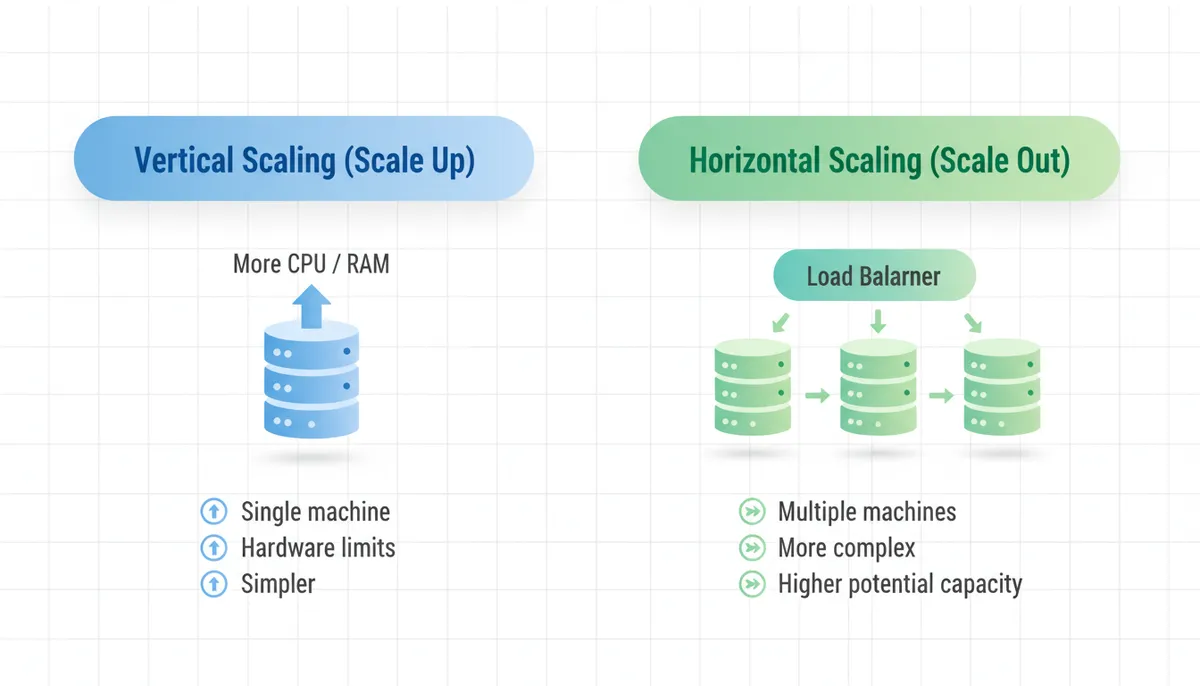
3.2 Vertical vs Horizontal Scaling
Vertical scaling (scale up):
- Add more power to a single machine: more CPU, RAM, faster disk.
- Pros: simple; no code changes; works for small to medium scale.
- Cons: hardware limits; expensive; single point of failure.
Horizontal scaling (scale out):
- Add more machines and distribute load.
- Pros: can scale much further; better fault tolerance.
- Cons: more complexity: load balancing, data partitioning, consistency.
Most modern distributed systems fundamentals are about making horizontal scaling work.
3.3 When Do You Need to Scale?
Use rough back-of-the-envelope calculations:
- If each request takes 50 ms of CPU time, one core can handle ~20 RPS.
- A 4-core machine: ~80 RPS (ignoring I/O, overhead).
- If you expect 10,000 RPS, a single machine won’t cut it.
Beginner habit: estimate orders of magnitude. You don’t need perfect math, just enough to decide whether vertical scaling is enough or you need horizontal.
4. Load Balancing and Stateless Application Servers
Once you have more than one server, you need to distribute traffic.
4.1 What Is a Load Balancer?
A load balancer sits between clients and servers:
- Receives requests from clients.
- Forwards each request to one of many backend servers.
- Can do health checks, retry, SSL termination, etc.
Common algorithms:
- Round-robin
- Least connections
- Weighted distribution
- IP hash (for “sticky sessions”)
4.2 Why Stateless Services Matter for Scaling
If each request can be handled by any server (no in-memory session state), the load balancer can freely distribute load.
If your app is stateful (session stored in memory on one server), you get:
- Sticky sessions: same user must hit the same server.
- Uneven load distribution.
- Harder failover.
Better pattern:
- Keep app servers stateless.
- Store user sessions in a shared store (Redis, database, cookie-based tokens).
5. Caching: Your First Performance Superpower
Caching is often the highest ROI system design technique.
5.1 What Is a Cache?
A cache is a faster, usually smaller storage layer that keeps copies of data from a slower, larger store.
Types:
- Client-side cache (browser, mobile).
- CDN (Content Delivery Network): caches static assets close to users.
- Application cache: e.g., Redis or Memcached in front of your database.
- Database cache: internal query caches.
5.2 Cache-Aside Pattern (Most Common)
- App receives a request for data with key
k. - Check cache:
- If hit, return value.
- If miss:
- Read from database.
- Store in cache with TTL (time-to-live).
- Return response.
This is called cache-aside or lazy loading.
Benefits:
- Reduces load on the database.
- Improves latency for frequently accessed data.
Pitfalls:
- Stale data: cache may have outdated values.
- Cache stampede: many concurrent misses for the same key.
5.3 What to Cache?
Good candidates:
- Read-heavy, infrequently changing data.
- Expensive-to-compute results (aggregations, recommendations).
- Session data (with appropriate security).
Bad candidates:
- Highly volatile data with strict consistency requirements.
- Huge objects (may evict too much other data).
6. Data Partitioning (Sharding) and Replication
As your data grows, a single database may become a bottleneck.
6.1 Replication: Copies for Read Scaling and Reliability
Replication: maintain multiple copies of the same data across different nodes.
Common patterns:
- Primary–replica (master–slave):
- Primary handles writes.
- Replicas handle reads.
- Asynchronous replication introduces replication lag (eventual consistency for reads).
Benefits:
- Better read scalability.
- Higher availability (failover to replica).
Trade-offs:
- Stale reads from replicas.
- More complex failover logic.
6.2 Partitioning (Sharding): Splitting Data Across Nodes
Partitioning: divide data into subsets and store each subset on a different node.
Simple example: user data partitioned by user_id % N:
- Users with
user_id % 4 == 0go to shard 0. user_id % 4 == 1→ shard 1, etc.
Benefits:
- Increases write and storage capacity.
- Each shard handles a fraction of the load.
Challenges:
- Cross-shard queries become harder.
- Rebalancing when you add/remove shards.
- Hot partitions if your key distribution is skewed.
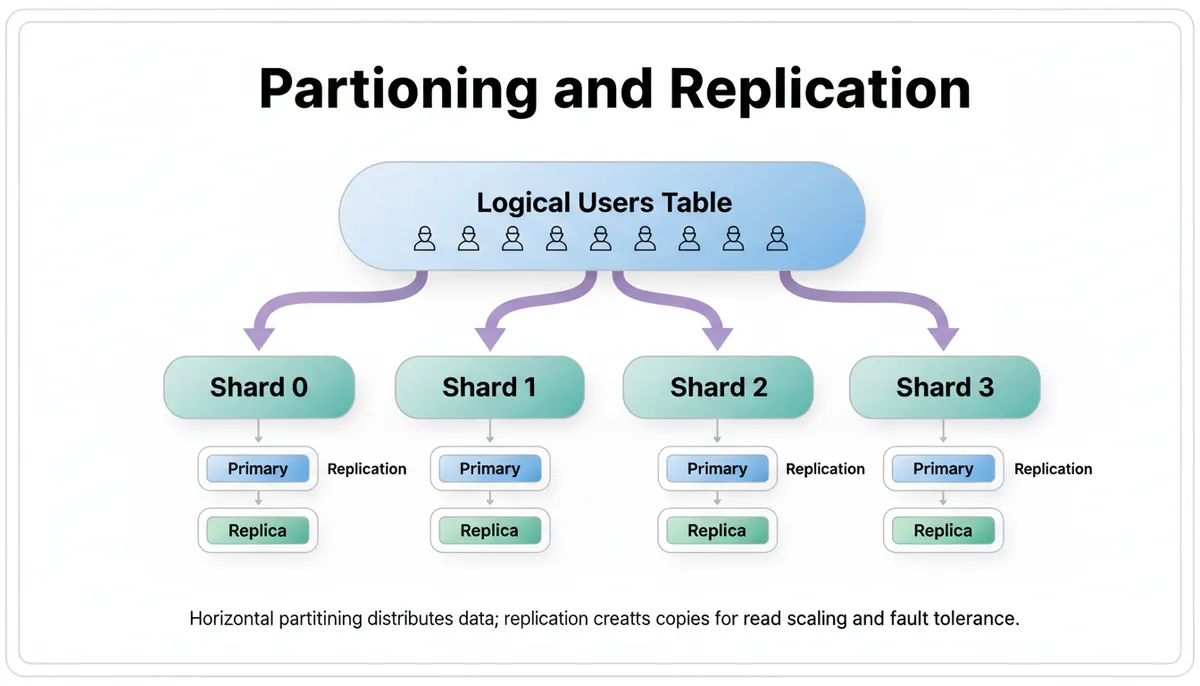
Beginner mental model: partitioning = scale out; replication = backups + read scale.
7. Consistency, Availability, and the CAP Intuition
When you distribute data, you must reason about consistency and availability.
7.1 Strong vs Eventual Consistency
-
Strong consistency:
- After a write completes, all subsequent reads see the new value.
- Easier to reason about.
- Harder in distributed systems; may reduce availability during failures.
-
Eventual consistency:
- Replicas may temporarily see different values.
- Given enough time (and no new writes), all replicas converge.
- Often acceptable for feeds, counts, analytics.
Example:
- You like a post; your like count might show 101 on your device, 100 on your friend’s for a short time.
7.2 CAP Theorem (At a High Level)
In the presence of a network partition (P), you must choose between:
- Consistency (C): all nodes see the same data.
- Availability (A): every request receives a response (even if stale).
You can’t have both C and A during a partition.
Practical takeaway for beginners:
- You’re always dealing with trade-offs between:
- Freshness of data (consistency)
- System uptime (availability)
- Latency and performance
Ask: What does this product actually need? A banking system needs stronger guarantees than a social media like counter.
8. Messaging, Queues, and Asynchronous Processing
Not all work needs to be done synchronously in the request–response cycle.
8.1 Why Use Message Queues?
A message queue (e.g., RabbitMQ, Kafka, SQS) lets you:
- Decouple producers (who send messages) and consumers (who process them).
- Smooth out traffic spikes.
- Retry failed work.
- Implement background processing.
Example use cases:
- Sending emails after user registration.
- Generating reports.
- Processing uploads (image resizing, video transcoding).
8.2 Basic Flow
- User triggers an action (e.g., upload photo).
- API server writes a message to a queue:
{ "user_id": 123, "file_path": "..." }. - Background workers consume messages from the queue and process them.
- Worker might update the database when done.
This is asynchronous: the user doesn’t wait for the full processing to complete.
8.3 Idempotency
When using queues and retries, you must design operations to be idempotent:
- Performing the same operation multiple times has the same effect as doing it once.
Example:
- Use a unique
request_idand check if it’s already processed before performing a side effect (like charging a credit card).
9. Putting It Together: A Simple Scalable Web Architecture
Let’s combine these system design basics into a concrete example.
9.1 Requirements
Design a simple social feed system:
- Users can post messages.
- Users can view their own feed.
- Up to 1M daily active users.
- Reads are 10x writes.
- Accepts some staleness in feeds (seconds).
9.2 High-Level Architecture
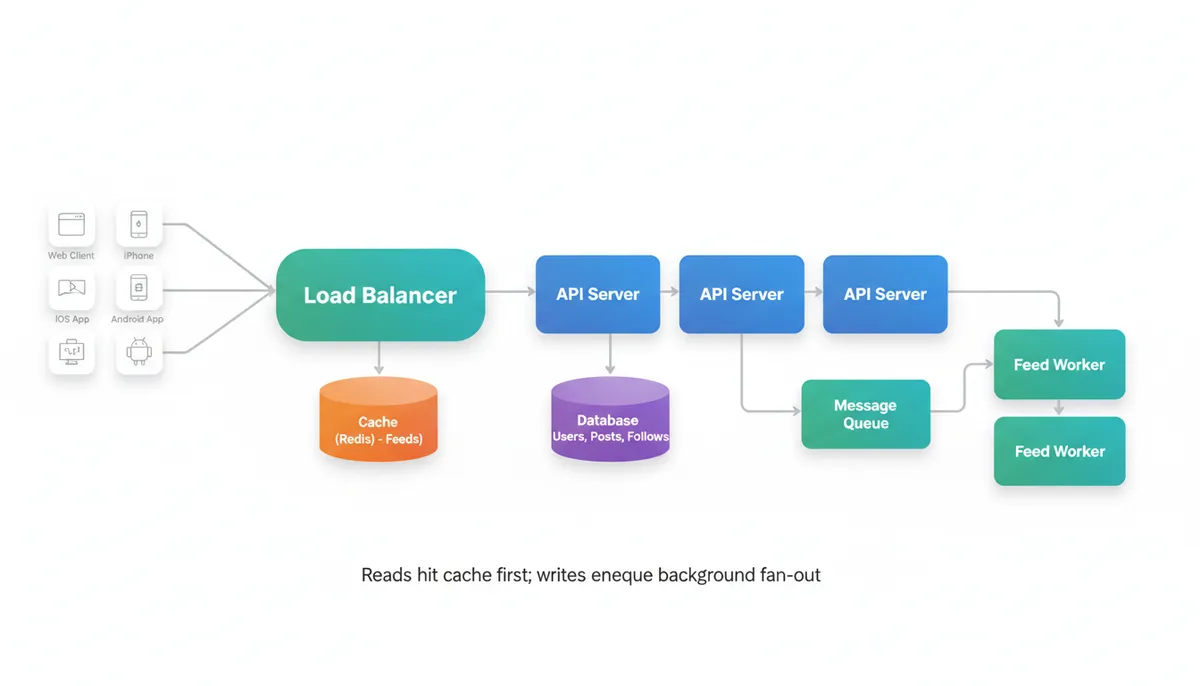
- Client: web/mobile app.
- Load balancer: distributes HTTP requests.
- Stateless API servers:
- Handle authentication.
- Expose endpoints:
POST /posts,GET /feed.
- Database (SQL or NoSQL):
- Store users, posts, follower relationships.
- Cache (Redis):
- Cache user feeds (
feed:{user_id}).
- Cache user feeds (
- Message queue + workers:
- On new post, fan-out to followers’ feeds in background.
9.3 Data Flow Examples
Write path (posting a message):
- Client →
POST /posts. - API server:
- Authenticates user.
- Writes post to database (strong consistency).
- Publishes message to queue:
{"post_id": ..., "author_id": ...}.
- Workers:
- Consume messages.
- For each follower, update their feed in cache and/or a precomputed feed table.
Read path (viewing feed):
- Client →
GET /feed. - API server:
- Checks cache (
feed:{user_id}). - On cache miss, reads from feed table in DB, populates cache.
- Checks cache (
This design uses:
- Stateless servers + load balancer for horizontal scalability.
- Cache for read-heavy access pattern.
- Asynchronous processing for fan-out.
- Database as source of truth.
10. Common Mistakes Beginners Make in System Design
10.1 Jumping to Technologies Too Early
Starting with “We’ll use Kafka and Cassandra” before understanding:
- What are the core operations?
- What are the read/write ratios?
- What are the latency and consistency requirements?
Better: describe the behavior and constraints in plain language first.
10.2 Ignoring Bottlenecks and Back-of-the-Envelope Math
Designs that “scale to millions” without:
- Estimating QPS (queries per second).
- Estimating data growth.
- Identifying single points of failure.
Practice:
- Approximate: “1M DAU, each does 20 feed views/day → ~230 QPS on average.”
- Then ask: “Can a single database handle this? Probably yes, but what about spikes?”
10.3 Over-Engineering for Tiny Loads
Adding sharding, complex queues, and microservices for a system with:
- 1k users
- Single-digit QPS
You pay complexity costs without real benefit. Start simple; design with a path to evolve.
10.4 Underestimating Operational Complexity
Every component you add (Kafka, Redis, Elasticsearch, etc.) adds:
- Deployment and monitoring overhead.
- Failure modes.
- Upgrade paths.
Beginners often design beautiful diagrams that are operationally fragile.
11. Best Practices and Actionable Tips for System Design Beginners
11.1 Start With Requirements and Constraints
Before drawing boxes:
- Clarify functional requirements:
- Core operations (CRUD, search, analytics).
- Clarify non-functional requirements:
- Scale (users, QPS, data size).
- Latency targets.
- Availability (SLA).
- Consistency needs.
- Identify bottlenecks:
- Hot paths (most frequently used).
- Heavy operations (most expensive).
11.2 Design for Simplicity First, Then Evolution
- Start with a monolith and a single database if it meets your needs.
- Keep boundaries clear so you can extract services later.
- Use feature flags and versioned APIs to evolve without breaking clients.
11.3 Think in Terms of Patterns
Just as DSA has patterns (two pointers, sliding window, etc.), system design has recurring patterns:
- Cache-aside
- Primary–replica
- Write-through / write-back caching
- Event sourcing
- CQRS (Command Query Responsibility Segregation)
- Pub/sub messaging
Learning these patterns gives you a reusable toolbox. Platforms that organize knowledge into patterns (for example, Thita’s /dsa-patterns-sheet on the algorithms side) can help you build similar mental models for system design.
11.4 Always Consider Failure Modes
For each component, ask:
- What happens if this fails?
- Does the system degrade gracefully?
- Can we retry safely (idempotency)?
- Do we lose data or just availability?
Examples:
- If cache goes down: fall back to DB, maybe with throttling.
- If DB primary fails: failover to replica; some writes may be lost or need reconciliation.
11.5 Measure, Don’t Guess
In real systems:
- Add metrics: latency, error rates, QPS per endpoint.
- Add logging and tracing.
- Use dashboards and alerts.
In interviews, you can still talk about what you would measure and how you’d iterate based on real data.
12. How to Practice System Design (Especially for Beginners)
System design is a skill; you get better by doing.
- Pick simple products you use daily:
- URL shortener
- Rate limiter
- Notification service
- Chat app
- For each, practice:
- Writing down requirements.
- Estimating scale.
- Sketching a high-level architecture.
- Identifying bottlenecks and evolution paths.
Pairing this with realistic feedback (for example, through AI-driven mock interviews like AI Interview Practice: Free Mock Interview Simulator with Real-Time Feedback for Technical Interviews) can help you quickly see where your mental models are weak and which system design basics you need to reinforce.
13. Key Takeaways
- System design basics are about trade-offs:
- Simplicity vs scalability
- Consistency vs availability
- Latency vs cost
- Distributed systems fundamentals you should know early:
- Stateless vs stateful services
- Vertical vs horizontal scaling
- Load balancing and caching
- Replication and partitioning
- Strong vs eventual consistency
- Queues and asynchronous processing
- Scalability concepts are not magic:
- Estimate load.
- Identify bottlenecks.
- Use simple patterns (cache-aside, primary–replica) before complex architectures.
- System design for beginners is approachable if you:
- Start from requirements.
- Use back-of-the-envelope math.
- Learn common patterns.
- Practice on small, concrete problems.
Once these foundations are solid, more advanced topics—like microservices, event-driven architectures, and global-scale systems—become much easier to understand and reason about.