
AI
Common Mistakes When Using AI for Interview Preparation
Most candidates now use ChatGPT and similar tools for interview prep—but the results are wildly different. Some engineers get dramatically better in weeks. O...
Most candidates now use ChatGPT and similar tools for interview prep—but the results are wildly different. Some engineers get dramatically better in weeks. Others spend hours “studying” with AI and still fail basic screens. The difference usually isn’t intelligence or effort; it’s how they use AI.
This post walks through the most common AI interview prep mistakes and how to avoid them. We’ll focus on technical interviews (DSA, systems, coding), but most ideas apply to behavioral prep too. If you’re using ChatGPT for interview prep—or planning to—this is the guide you wish you had before you started.
Why AI Interview Prep Fails for Many Candidates
Using AI for studying can be incredibly efficient: instant feedback, infinite practice questions, personalized explanations. But AI also makes it easy to feel productive while making almost no real progress.
Most ai learning pitfalls fall into three categories:
- Misaligned goals: optimizing for “feeling smart” instead of “performing under pressure”
- Misusing the tool: asking AI to do the hard parts you actually need to learn
- Broken feedback loops: not validating or iterating based on real performance
We’ll go through specific mistakes in each category, with concrete examples and better patterns you can adopt.
Mistake #1: Treating AI as an Answer Machine Instead of a Coach
What this looks like
- You paste a LeetCode problem into ChatGPT and ask: “Solve this.”
- You read the solution, think “Makes sense,” and move on.
- You feel like you “covered” 5–10 problems in an evening.
This is the classic chatgpt interview prep anti-pattern: using AI as a solution dump.
Why this is a problem
Technical interviews don’t test whether you can understand a solution after seeing it. They test whether you can:
- Parse an ambiguous problem statement
- Explore constraints and edge cases
- Design and justify an approach
- Implement correctly under time pressure
- Debug and refine
If AI is always doing the design and implementation, you’re optimizing the wrong skill.
A better pattern: “You are the candidate, AI is the interviewer”
Turn the interaction around:
- You try the problem first—on paper or in your editor—without AI.
- When stuck, ask AI questions, not for answers:
- “Can you help me reason about the constraints?”
- “What are common patterns that apply to this problem type?”
- “Here’s my current approach; what edge cases am I missing?”
- Only after you’ve attempted a full solution:
- Compare your approach to AI’s
- Ask it to critique your code line-by-line
- Ask it to generate follow-up questions an interviewer might ask
This mirrors how pattern-based learning works in structured resources like Thita’s Master the Sliding Window Pattern: Complete Guide with Examples: you’re learning how to think, not just copying finished answers.
Mistake #2: Not Verifying AI’s Technical Accuracy
What this looks like
- You accept every AI explanation as correct because it’s confident and well-written.
- You copy AI-generated code into an online judge and tweak until it passes.
- You let AI “simplify” complex topics (e.g., distributed consensus) without cross-checking.
Why this is a problem
LLMs are probabilistic text generators, not compilers or formal verifiers. They:
- Can produce subtly wrong algorithms that pass simple examples but fail edge cases
- Might misstate time/space complexity
- Can hallucinate APIs or language features
- Sometimes give outdated or non-idiomatic patterns
Relying on unverified AI output builds false confidence—you think you’ve mastered a topic, but your mental model is built on sand.
A better pattern: Always run, test, and cross-reference
When using AI for coding interview prep:
-
Run the code
- Paste AI’s solution into an online judge (LeetCode, HackerRank, etc.).
- Add your own edge cases: empty inputs, large inputs, duplicates, negative values, etc.
-
Ask AI to critique itself
- “Find bugs or edge cases that break this solution.”
- “Is there any input where this approach is O(n²) instead of O(n)?”
-
Cross-reference with trusted sources
- Official editorial solutions
- Well-known textbooks or blogs
- Pattern-based resources (e.g., sliding window, two pointers, BFS/DFS) like those in Best Ways to Use AI for DSA and Coding Interview Preparation
-
Force explicit complexity analysis
- “Explain the time and space complexity of this solution step-by-step.”
- “Can you derive the complexity from the loops and data structures used?”
Mistake #3: Overfitting to AI’s Style of Interview
What this looks like
- You only practice by chatting with AI (no whiteboard, no IDE, no timer).
- AI always gives you perfectly structured follow-up questions and hints.
- You never practice saying your thoughts out loud.
In real interviews:
- Questions are sometimes ambiguous or underspecified.
- Interviewers vary widely in style and helpfulness.
- You need to communicate clearly under time and social pressure.
Why this is a problem
AI mock interviews are useful, but they’re also too consistent and too polite. If you only practice in that environment, you’re overfitting to a narrow “AI interviewer distribution” that doesn’t match reality.
A better pattern: Simulate real constraints and variability
When using AI mock interviews (whether through ChatGPT, Thita’s AI Mock Interviews vs Real Interviews: Do They Actually Help?, or another tool):
- Use a timer: Ask AI to enforce 30–45 minute sessions and cut you off.
- Practice voice: Speak your reasoning out loud, even if AI is text-only.
- Vary the difficulty and style:
- “Act as a rushed interviewer who gives minimal hints.”
- “Act as a skeptical interviewer who challenges every assumption.”
- “Ask me behavioral questions and push for concrete examples.”
You’re not just learning algorithms; you’re training the interaction pattern.
Mistake #4: Skipping Fundamentals and Patterns
What this looks like
- You ask AI for “Top 100 LeetCode questions” and grind them in random order.
- You treat each problem as unique instead of part of a pattern.
- You rely on AI to “recognize” the pattern for you every time.
Why this is a problem
DSA interviews are pattern-heavy. Companies don’t expect you to memorize 500 problems; they expect you to:
- Recognize common patterns (sliding window, binary search, graph traversal, DP, etc.)
- Map new problems onto known patterns
- Adapt patterns to new constraints
If you let AI recognize the pattern for you every time, you never build the mental index you need in a real interview.
A better pattern: Use AI to reinforce pattern-based learning
For each problem you solve (with or without AI):
-
Label the pattern yourself first
- “This feels like sliding window because we’re maintaining a window over a string.”
- “This is a classic BFS shortest path on an unweighted graph.”
-
Ask AI to confirm or refine your pattern
- “Which DSA pattern does this problem belong to, and why?”
- “Are there alternative patterns that also work here?”
-
Create pattern summaries with AI
- “Summarize the sliding window pattern with 3 canonical examples and their complexities.”
- “Compare two pointers vs sliding window: when is each appropriate?”
-
Build your own pattern checklist
- With AI’s help, create a cheat sheet: for each pattern, list:
- When to recognize it
- Typical complexity
- Common pitfalls
- 2–3 representative problems
- With AI’s help, create a cheat sheet: for each pattern, list:
This is where structured resources like a curated What Are DSA Patterns? A Complete Guide for Beginners plus AI explanations work well together.
Mistake #5: Letting AI Write All the Code
What this looks like
- You prompt: “Write a clean, optimal solution in Python for this problem.”
- You read the code and say “I understand this,” but never type it yourself.
- You rely on AI to fix syntax and off-by-one errors.
Why this is a problem
Typing code is not the main skill, but implementing correctly under pressure is. Real interviews test:
- How you structure your solution
- How you name variables and functions
- How you handle edge cases in code
- How you debug when something goes wrong
If AI always writes the code, you’re skipping the part that most candidates actually fail.
A better pattern: AI as a code reviewer, not a code generator
Use this workflow:
-
You write the code from scratch
- In your own editor
- Without copying from AI
-
Then ask AI to review
- “Here is my solution. Act as a senior engineer reviewing this code.”
- Ask for:
- Logic bugs
- Edge cases
- Readability issues
- Complexity analysis
-
Iterate and re-implement
- After each review, re-implement the solution from memory.
- Ask AI to generate variations:
- “Now modify the problem: what if the input is a stream instead of an array?”
- “What changes if the array is sorted?”
By the third or fourth iteration, you should be able to implement the pattern without AI.
Mistake #6: Using AI for Passive Consumption Instead of Active Practice
What this looks like
- You ask AI to “Explain dynamic programming” and read a long answer.
- You “study” by reading AI-generated notes and summaries.
- You rarely write code or solve problems end-to-end.
Why this is a problem
Reading explanations feels productive. But interview performance correlates with deliberate practice, not passive exposure.
Active practice means:
- Generating solutions yourself
- Making mistakes and correcting them
- Retrieving knowledge from memory (not from the chat window)
A better pattern: Turn explanations into exercises
Whenever AI explains a concept:
-
Ask for a simple exercise
- “Give me a very easy DP problem to practice the idea you just explained.”
- “Don’t give me the solution; just the problem and constraints.”
-
Solve it without looking back
- Hide the chat temporarily.
- Try to re-derive the idea from scratch.
-
Then ask for a solution and comparison
- “Show me an optimal solution; highlight differences from mine.”
- “What did I do that is correct but suboptimal?”
-
Use spaced repetition
- “Quiz me tomorrow on 3 DP problems that reinforce today’s concepts.”
- Save the prompt history or notes and revisit.
AI can be an excellent generator of targeted practice—but only if you push yourself to do something with the explanations.
Mistake #7: Ignoring Prompt Engineering for Learning
What this looks like
-
You ask very generic prompts:
- “Explain this problem.”
- “Solve this.”
- “Teach me system design.”
-
You get generic answers that are:
- Too high-level
- Too long
- Not tailored to your level
Why this is a problem
LLMs are extremely sensitive to prompt quality. Poor prompts lead to:
- Overly verbose, unfocused explanations
- Misaligned difficulty (too easy or too hard)
- Missing the specific skill you want to practice
A better pattern: Structured, role-based prompts
Use prompts that specify:
- Your role and level
- The task format
- Constraints and style of response
Example: Good vs bad prompt for a DSA explanation
Bad:
Explain sliding window.
Better:
I’m preparing for mid-level software engineer interviews.
Explain the sliding window pattern with:
- A high-level intuition (2–3 sentences)
- One simple example problem
- A step-by-step walkthrough of how the window moves
- Time and space complexity Keep the explanation under 500 words.
Example: Prompt for code review
Act as a senior backend engineer reviewing my code for a coding interview.
- Identify any logical bugs or missing edge cases
- Comment on readability and variable naming
- Analyze time and space complexity
- Suggest one more optimal approach if mine is not optimal
Here is the problem: [problem statement]
Here is my solution in Java:JAVA
Well-structured prompts convert AI from a generic assistant into a specialized tutor.
Mistake #8: Not Tracking Progress or Weak Areas
What this looks like
- You chat with AI for hours across many topics.
- You don’t have a clear view of:
- Which patterns you’ve mastered
- Which question types you consistently miss
- How your mock interview scores are trending
- Every session feels like “more practice,” but not part of a plan.
Why this is a problem
Without feedback loops and tracking, you:
- Over-practice comfortable topics
- Under-practice weak areas
- Don’t know when you’re “ready enough” to start interviewing
A better pattern: Use AI to build and maintain a learning plan
You can ask AI to help you manage the meta-layer of your prep:
-
Initial assessment
- “Help me design a 4-week interview prep plan for mid-level backend roles.”
- “Here’s my current background and recent performance on LeetCode.”
-
Daily/weekly retros
- “Summarize what I practiced this week and identify patterns in my mistakes.”
- “Classify my last 20 problems by pattern and difficulty; highlight weak areas.”
-
Adaptive planning
- “Given that I’m still weak on graph algorithms and DP, adjust my next 7 days of practice.”
- “Limit daily workload to 90 minutes.”
Platforms like Thita’s AI interview practice platform automate some of this, but you can approximate it with careful prompting in any LLM.
Mistake #9: Misusing AI for System Design Interviews
What this looks like
- You ask AI: “Design Twitter.”
- It gives you a polished, end-to-end system design: components, databases, queues, etc.
- You read it and think, “I could talk through this in an interview.”
Why this is a problem
System design interviews test:
- Your ability to clarify requirements
- Your decision-making process and tradeoffs
- Your ability to reason about scaling, consistency, and failure modes
- How you communicate architecture incrementally
Reading a perfect design is not the same as constructing one under constraints.
A better pattern: Use AI as a design partner, not a blueprint generator
Try this interactive flow:
-
You start the design
- “I’ll design a URL shortener. First, I’ll clarify requirements: …”
- Write your own high-level API and core components.
-
Ask AI to challenge you
- “Act as an interviewer. Critique my initial design and ask probing questions.”
- “What scaling or consistency issues am I missing?”
-
Iterate on tradeoffs
- “Given 1B URLs and 10k QPS, is my choice of database reasonable? Suggest alternatives and tradeoffs.”
-
Practice structuring your explanation
- “Given the design we converged on, help me create a 10-minute explanation outline I can use in interviews.”
You’re using AI to simulate an interactive whiteboard discussion, not to memorize a static architecture.
Mistake #10: Neglecting Behavioral and Communication Practice
What this looks like
- You use AI almost exclusively for coding and system design.
- You assume behavioral interviews are “just talking about my experience.”
- You don’t practice STAR stories or handling tricky questions.
Why this is a problem
Many candidates fail at “soft” parts:
- Telling concise, impactful stories
- Handling conflict or failure questions
- Demonstrating leadership and ownership
- Asking good questions at the end
AI is actually very good at helping here—if you use it intentionally.
A better pattern: AI as behavioral role-play partner
Use AI to:
-
Generate targeted behavioral questions
- “Act as a hiring manager for a senior backend role. Ask me 10 behavioral questions focused on ownership and ambiguity.”
-
Refine your stories
- Paste your draft STAR answer and ask:
- “Make this more concise.”
- “Highlight impact with specific metrics.”
- “Remove buzzwords and make it sound natural.”
- Paste your draft STAR answer and ask:
-
Simulate tough conversations
- “Role-play a scenario where I have to push back on an unrealistic deadline.”
- “Give me feedback on my tone and clarity.”
Communication is a skill; AI can be a low-stakes environment to practice it.
Putting It Together: A Sample “AI-First” Prep Session
To make this concrete, here’s how a 90-minute chatgpt interview prep session can avoid common ai interview prep mistakes:
-
10 minutes – Warm-up & planning
- Ask AI: “Given I’m weak on graph algorithms and behavioral questions about conflict, design a 90-minute session for me.”
- Get a plan: 1 graph problem, 1 short system design drill, 3 behavioral questions.
-
35 minutes – Graph problem
- You solve a medium graph problem from scratch.
- After coding:
- Ask AI to review your solution.
- Ask it to suggest 2 edge-case inputs.
- Ask it to compare your approach to an optimal one.
-
25 minutes – System design micro-drill
- You outline a design for a rate limiter.
- Ask AI to:
- Act as interviewer, challenge your assumptions.
- Suggest operational concerns you missed (monitoring, failure modes).
- Help you refine a 5-minute explanation.
-
20 minutes – Behavioral practice
- AI asks you 3 conflict-related behavioral questions.
- You answer out loud, then paste summaries.
- Ask AI to:
- Improve clarity and impact.
- Suggest missing metrics or concrete details.
-
10 minutes – Retrospective
- Ask AI: “Summarize my weaknesses from this session and propose 3 focus areas for tomorrow.”
This structure uses AI as:
- Planner
- Reviewer
- Interviewer
- Feedback engine
—but keeps you doing the cognitive heavy lifting.
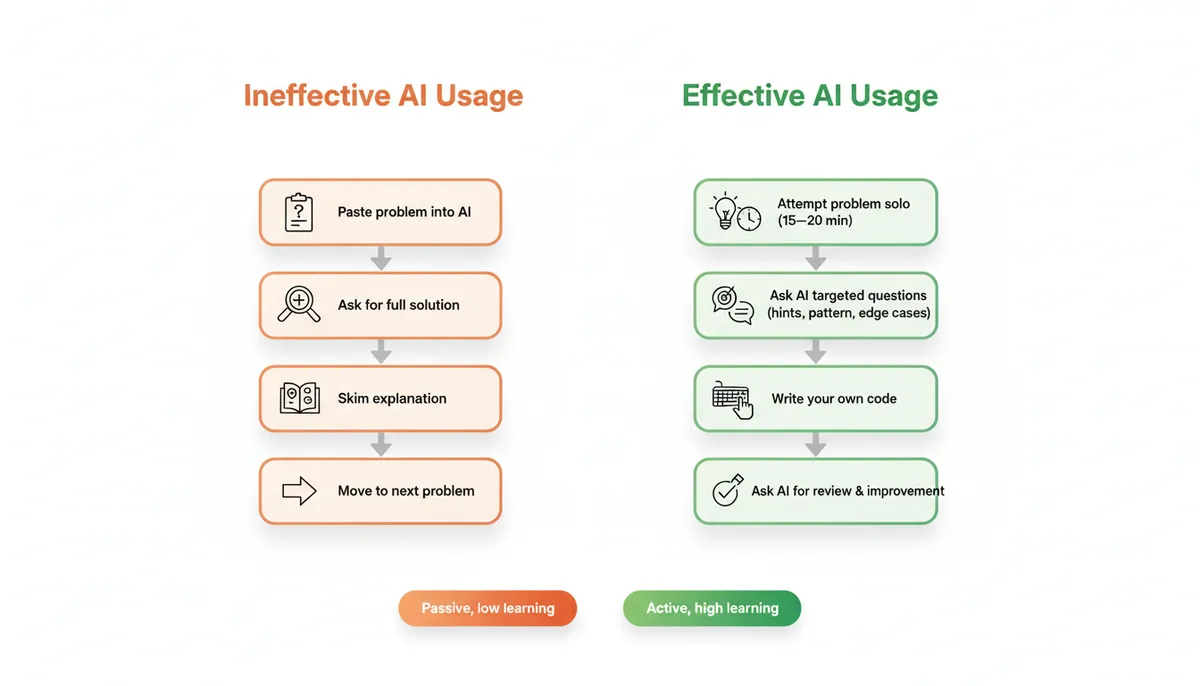
Visual Guide: Good vs Bad AI Usage for Interview Prep
Key Takeaways: Avoiding AI Learning Pitfalls
To make AI a force multiplier instead of a crutch in your interview prep:
-
Use AI as a coach, not an answer oracle
Do the hard parts yourself: problem solving, coding, communication. -
Always verify and test AI-generated solutions
Run code, add edge cases, and cross-reference with trusted materials. -
Practice under realistic constraints
Timed sessions, spoken reasoning, varied interviewer styles. -
Anchor your learning in patterns, not individual problems
Use AI to reinforce pattern recognition, not to bypass it. -
Optimize your prompts for learning, not convenience
Be explicit about your level, goals, and desired format. -
Track progress and iterate on a plan
Let AI help you analyze your performance and adjust focus.
Used thoughtfully, AI can compress months of unfocused grinding into weeks of targeted, high-leverage practice. The difference is not which tool you use—it’s how you use it.