
AI
Best Ways to Use AI for DSA and Coding Interview Preparation
The last few years have made one thing very clear: if you’re preparing for coding interviews and not using AI, you’re leaving leverage on the table.
The last few years have made one thing very clear: if you’re preparing for coding interviews and not using AI, you’re leaving leverage on the table.
Used well, AI for DSA preparation can accelerate your learning, expose you to more patterns, and give you feedback at a pace humans simply can’t match. Used poorly, it can quietly turn into a crutch that harms your problem-solving ability.
This post is a practical guide to using AI coding interview tools, ChatGPT for LeetCode, and AI learning assistants effectively—without losing the core skills interviewers actually test.
We’ll focus on how to integrate AI into a serious preparation workflow, not on generic “AI is cool” narratives.
Why Use AI for DSA and Coding Interview Preparation?
Before diving into tactics, it’s worth being explicit about what AI is good at—and what it isn’t—in the context of DSA and interviews.
What AI Is Good At
AI tools are very strong at:
- Generating variations of problems on the same pattern (e.g., different flavors of sliding window).
- Explaining concepts in multiple ways until one clicks for you.
- Providing instant feedback on your code: correctness, complexity, edge cases.
- Simulating interviewer behavior: asking follow-up questions, requesting optimizations.
- Acting as a rubber duck: letting you verbalize your approach and catching logical gaps.
These strengths map well to DSA preparation, which is fundamentally about:
- Recognizing patterns
- Practicing them across many problems
- Getting feedback quickly
- Iterating on your solutions
What AI Is Not Good At (Yet)
AI tools are weaker at:
- Assessing your actual independence: they can’t tell if you relied on them too early.
- Understanding your mental state: boredom, overconfidence, anxiety.
- Guaranteeing correctness: LLMs can hallucinate or miss edge cases.
- Knowing your long-term progress unless the platform tracks it explicitly.
Your job is to design a workflow where AI amplifies your thinking instead of replacing it.
A Structured Workflow: Where AI Fits in DSA Practice
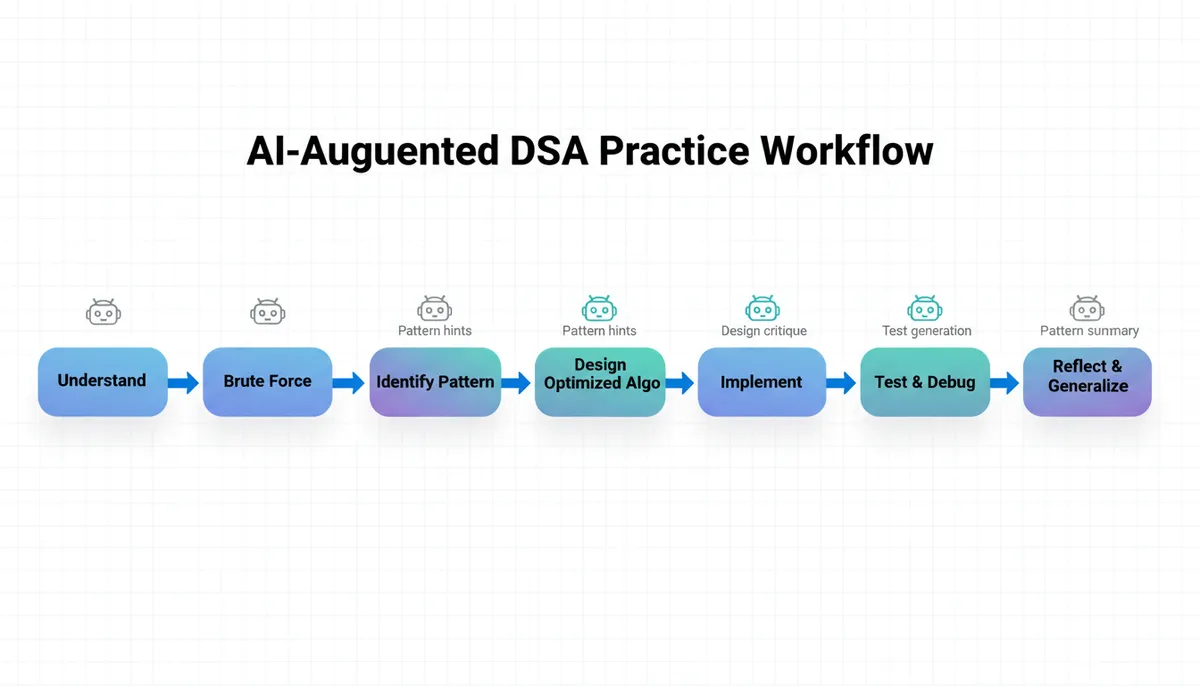
A good DSA prep workflow has roughly these stages for each problem:
- Understand the problem
- Explore brute force
- Identify the pattern
- Design the optimized solution
- Implement
- Test and debug
- Reflect and generalize
AI can help at each stage—but with different levels of involvement.
1. Understanding the Problem (Use AI Sparingly)
When you first read a problem:
- Paraphrase the problem in your own words.
- Identify inputs, outputs, and constraints.
- Draw small examples by hand.
How AI can help:
- Clarifying ambiguous wording:
- “Explain this problem in simpler terms with a few examples.”
- Generating more sample inputs/outputs to test your understanding.
Avoid: Asking AI for the solution at this stage. That short-circuits your ability to reason about requirements.
2. Exploring Brute Force (Do This Yourself First)
Brute force is where you demonstrate you can reason from first principles.
Try to:
- Come up with a naive approach.
- Analyze its time and space complexity.
- Identify the bottleneck.
How AI can help (after you’ve tried):
- Ask: “Here’s my brute-force solution and complexity. Is this analysis correct? What’s the bottleneck?”
- If you’re stuck: “What would a straightforward brute-force solution look like, ignoring efficiency?”
This keeps you in control of the reasoning, while AI validates and nudges.
3. Identifying the DSA Pattern (Where AI Shines)
Most interview problems map to a small set of patterns (two pointers, sliding window, binary search on answer, etc.). Platforms like Thita.ai explicitly organize practice around these 94+ DSA patterns.
How AI can help:
-
After you’ve tried for ~10–20 minutes:
- “Here’s the problem and my brute-force idea. Which DSA pattern(s) does this most likely belong to?”
- “This feels like a sliding window or two-pointer problem. Can you help me compare these two approaches for this specific problem?”
-
When reviewing:
- “Given this problem and solution, what other problems use the same underlying pattern?”
This is one of the highest-leverage uses of AI: mapping problems to patterns and building your internal pattern library faster.
If you’re using a pattern-based platform (e.g., Thita’s The 90 DSA Patterns That Cover 99% of Coding Interviews), you can cross-reference the pattern AI suggests with structured notes and curated problems.
4. Designing the Optimized Solution (Guided, Not Generated)
Once you suspect a pattern, you need to design an efficient algorithm.
Try to:
- Sketch the high-level idea in plain language.
- Work through examples step-by-step.
- Identify invariants, state variables, and edge cases.
How AI can help:
Use AI as a design partner, not an answer generator.
Example prompt:
“I’m solving this array problem. I think a sliding window approach works.
Here’s my current idea in words:
- Initialize
left = 0,right = 0, and a running sum.- Expand
rightwhile sum < target, shrink fromleftotherwise.
Can you help me reason about whether this maintains the correct invariant, and what edge cases I might miss?”
AI can:
- Point out missing invariants.
- Suggest alternative state representations.
- Help you reason about corner cases (empty input, negative values, duplicates, etc.).
You still own the algorithm design; AI is there to challenge and refine it.
5. Implementation (AI as Reviewer, Not Typist)
You should write the code yourself. Interviewers evaluate:
- How you translate ideas into code
- Your naming, structure, and clarity
- Your ability to debug syntax and logic issues
How AI can help:
-
After you’ve written code:
- “Here is my solution in Java. Please review for bugs, edge cases, and complexity.”
- “Can you suggest minor improvements in readability without changing the algorithm?”
-
If stuck on syntax:
- “I’m trying to write a recursive DFS in C++. Here’s my function signature and what I want it to do. Can you show a minimal example with correct syntax?”
Avoid copy-pasting entire AI-generated solutions into your editor and “learning” from them. That tends to bypass the part of your brain that actually develops coding fluency.
6. Testing and Debugging (AI as Debugging Assistant)
Testing is where AI coding interview tools can save you a lot of time.
How AI can help:
-
Generating test cases:
- “Given this problem statement, generate 10 diverse test cases, including edge cases, in JSON format.”
-
Debugging:
- “Here’s my code and a test case where it fails. Help me trace through and find the bug. Don’t rewrite the solution; just show the logic error.”
-
Time/space analysis:
- “What is the time and space complexity of this code? Explain in detail.”
This keeps you in the debugging loop while leveraging AI’s speed for test generation and complexity analysis.
7. Reflection and Generalization (Where AI Multiplies Learning)
Most candidates skip reflection. This is where AI can be disproportionately useful.
After solving a problem, ask:
- “What pattern does this problem use?”
- “How would I recognize this pattern next time?”
- “What variants of this problem exist?”
How AI can help:
-
Summarizing the pattern:
- “Summarize this solution in terms of a general pattern: what are the key steps and invariants?”
-
Generating related problems:
- “Given this problem and solution, suggest 3–5 related problems (with brief descriptions) that use similar ideas but with twists.”
-
Prompting deeper understanding:
- “Explain this solution in three levels:
- High-level intuition for a beginner
- Step-by-step with an example
- Formal algorithm with invariants and complexity analysis”
- “Explain this solution in three levels:
This is particularly effective when combined with pattern-based learning in tools like Thita’s Beginner to Advanced DSA Roadmap for Software Engineers in 2026, where each problem you solve reinforces a pattern you can revisit later.
Using AI Mock Interviews Effectively
AI mock interviews are one of the most promising use cases of AI for DSA preparation—but only if you treat them like real interviews.
What a Good AI Mock Interview Should Simulate
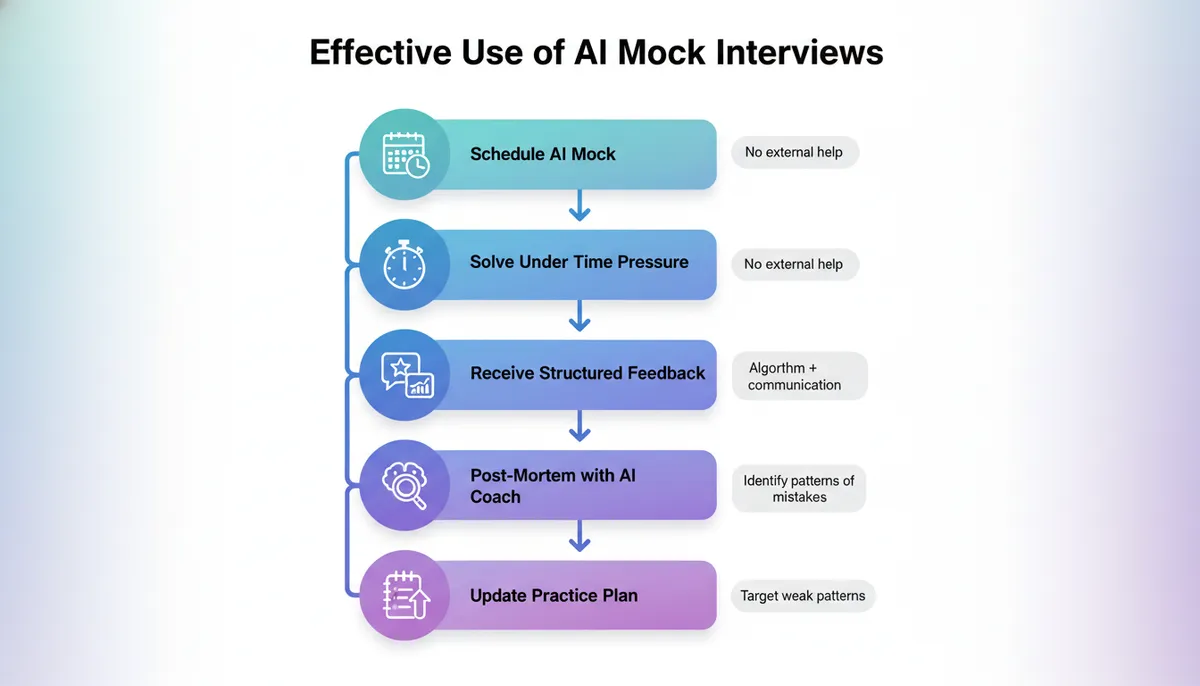
A solid AI mock interview experience should include:
- Problem selection matching your target company/level.
- Interactive questioning: “Why did you choose this approach?”, “Can we do better?”
- Time pressure: 30–45 minutes per problem.
- Verbal explanation: you talk through your thought process.
- Feedback on:
- Problem understanding
- Communication
- Algorithmic choices
- Code quality
- Complexity analysis
Platforms like Thita’s AI Mock Interviews vs Real Interviews: Do They Actually Help? feature are designed specifically to simulate this environment.
How to Approach an AI Mock Interview
Treat it like a real one:
- No external help: Don’t ask another AI tab for hints.
- Think out loud: Explain constraints, brute force, then optimization.
- Ask clarifying questions: Don’t assume hidden constraints.
- Handle feedback: If the AI asks for a more optimal solution, explore trade-offs explicitly.
- Do a post-mortem:
- Where did you lose time?
- Did you jump to coding too early?
- Did you miss an obvious pattern?
Use AI again for the post-mortem:
“Here’s the transcript of my mock interview. Identify:
- 3 things I did well
- 3 areas for improvement
- Specific habits I should practice to improve in those areas.”
How to Use ChatGPT for LeetCode (Without Ruining Your Prep)
Many candidates already use ChatGPT for LeetCode daily. The difference between those who benefit and those who don’t is how they use it.
A Healthy Pattern: “Coach Mode” vs “Answer Mode”
Use ChatGPT (or any AI learning assistant) primarily in coach mode:
- Ask it to question you, not solve for you.
- Ask it to critique, not generate.
Example “coach mode” prompts:
- “I’m going to explain my approach to LeetCode 3 (Longest Substring Without Repeating Characters). Please interrupt me with questions if my reasoning is unclear or if you see a logical gap.”
- “I’ll write a brute-force solution first. Don’t give me the optimal one yet. Just tell me if my brute force is correct and what its complexity is.”
Reserve answer mode for:
- When you’re truly stuck after 30–45 minutes.
- When you’re in review mode, not active solving mode.
Even in answer mode, don’t just read the final code. Ask:
- “Explain the key idea behind this solution in 3–4 sentences.”
- “Walk through this example step-by-step using the final algorithm.”
- “Compare this approach with my brute-force idea. What changed?”
Example: Using AI on a Classic Two-Pointer Problem
Let’s walk through a concrete example to make this less abstract.
Problem (simplified):
Given a sorted array of integers and a target sum, find two numbers such that they add up to the target. Return their indices (1-based).
Step 1: Your Work (No AI)
You:
- Recognize that brute force is O(n²) with two nested loops.
- Suspect there’s a better approach because the array is sorted.
- Think of two pointers:
leftat start,rightat end.
You design:
PYTHON
Time: O(n), Space: O(1).
Step 2: AI as Reviewer
You paste your solution into an AI assistant and ask:
“Here’s my solution.
- Is it correct?
- What are all the edge cases?
- Explain the invariant maintained by the two pointers.”
The AI might respond:
- Correctness: Yes, because for each pair of pointers, if sum < target, increasing
leftis the only way to increase sum (array sorted), etc. - Edge cases: empty array, single element, multiple valid pairs (first found is returned).
- Invariant: At each step, all pairs
(i, j)withi < leftorj > righthave already been ruled out as candidates.
This explanation reinforces your understanding of the two-pointer pattern, not just this specific problem.
Step 3: Generalization with AI
You then ask:
“Suggest 3 more problems that use the two-pointer pattern in different ways (e.g., partitioning, deduplication, etc.), and briefly describe the twist in each.”
Now AI is helping you build a pattern cluster around two pointers, which is exactly the kind of learning that compounds.
Using AI Learning Assistants for Concept Mastery
DSA prep isn’t only about solving problems; it’s about mastering underlying concepts: trees, graphs, DP, complexity, etc. AI learning assistants can act as an always-available tutor.
Turning AI into a Personalized DSA Tutor
For each topic (say, binary trees), you can:
-
Start with a diagnostic:
“Test my understanding of binary tree traversals. Ask me 5 increasingly difficult questions (conceptual and code-level). Wait for my answer each time and then give feedback.”
-
Drill weak points:
If you struggle with recursion, ask:
“Give me 3 binary tree problems that specifically stress recursive thinking but are still medium difficulty. For each, only reveal the next hint when I ask.”
-
Request multiple explanations:
“Explain inorder traversal in three ways:
- For someone who knows arrays but not trees
- Using recursion
- Using an explicit stack (iterative)
Include small diagrams in text form.”
This is exactly the kind of adaptive, multi-angle teaching that’s hard to get from static resources.
If you’re using a platform like Thita’s How to Use AI Tools Like ChatGPT for Interview Preparation (Without Becoming Dependent), you’ll often get this kind of interaction wrapped with progress tracking and pattern coverage metrics.
Common Mistakes When Using AI for DSA Preparation
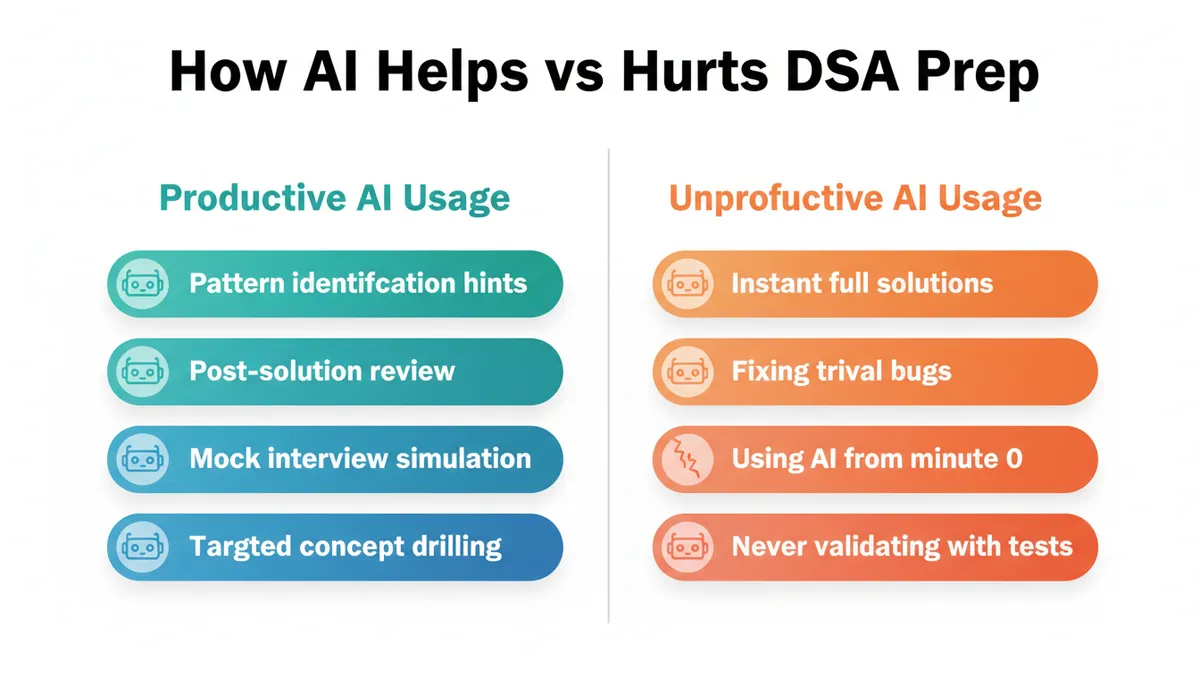
AI can help you learn faster—or it can give you the illusion of progress. The difference often comes down to avoiding these pitfalls.
1. Copy-Pasting Solutions Without Struggle
If your first move on a new problem is to paste it into ChatGPT, you’re not doing interview prep; you’re doing answer collection.
Fix: Commit to a minimum solo thinking time per problem (e.g., 20–30 minutes) before asking AI for help. Use a timer if needed.
2. Using AI as a Crutch for Simple Bugs
Relying on AI to fix every syntax or off-by-one error prevents you from developing debugging skills.
Fix: Only ask AI for debugging help after:
- You’ve printed intermediate states.
- You’ve walked through the code on paper with a sample input.
- You can describe what you expected vs what happened.
3. Overfitting to AI’s Style
If you always see one style of explanation or code (e.g., recursive with memoization), you might miss other idioms interviewers expect you to know.
Fix:
- Occasionally ask: “Show me an alternative approach with the same complexity but different style (e.g., iterative vs recursive).”
- Practice implementing both styles yourself.
4. Ignoring Communication Practice
Many candidates focus on getting the right answer with AI’s help but never practice explaining their thinking.
Fix:
- Use AI to simulate an interviewer: “Ask me to explain my approach step-by-step and challenge unclear parts.”
- Record yourself explaining solutions and have AI critique clarity and structure.
5. Trusting AI’s Correctness Blindly
LLMs can and do make mistakes—especially on edge cases or tricky corner conditions.
Fix:
- Always validate AI-generated code with your own test cases.
- Ask AI to explicitly enumerate edge cases and walk through at least one of them manually.
Best Practices and Actionable Tips
To make AI a force multiplier rather than a distraction, you can adopt a few concrete habits.
1. Time-Box Your AI Help
For each problem:
- 0–20 minutes: No AI, pure thinking, brute force, and pattern guessing.
- 20–35 minutes: AI as coach (hints, pattern confirmation, complexity checks).
- 35+ minutes: AI as teacher (see full solution, deep explanation, related problems).
This structure preserves your problem-solving muscles while still letting AI accelerate learning.
2. Use a “Three-Phase” Approach for Each Problem
For every problem you solve with AI’s help:
- Attempt: Solve as much as you can alone.
- Absorb: Use AI to fill gaps, explain, and generalize.
- Rebuild: A day or two later, solve the same or a variant problem without AI.
If you can’t rebuild the solution cold, you haven’t learned it yet.
3. Maintain a Pattern Journal
Create a simple document or spreadsheet with:
- Pattern name (e.g., “Two Pointers on Sorted Array”)
- Core idea (1–2 sentences)
- Typical problems
- Common pitfalls
- AI-generated “pattern summary” you’ve validated
Whenever AI helps you identify a pattern, log it. Over time, this becomes your personal DSA pattern map.
4. Ask AI for “Concept Checks”
Periodically, ask:
“I’m preparing for coding interviews. Give me a short quiz (5–7 questions) on [topic: e.g., time complexity of common operations, hash tables, binary search variants]. Wait for my answers and then grade me with explanations.”
This keeps your fundamentals sharp, not just your problem-specific skills.
5. Combine Human and AI Feedback
If you have access to human mock interviews, use AI to:
- Prepare beforehand (quick refreshers on patterns).
- Decompress afterward:
- “Here’s what happened in my mock interview. I struggled with X. Suggest a focused practice plan for the next week.”
AI is great at turning qualitative feedback into concrete practice plans.
Key Takeaways
- AI for DSA preparation is most powerful when used as a coach and tutor, not as a solution vending machine.
- Integrate AI into each stage of your workflow:
- Clarify problems and generate examples.
- Validate brute force and identify patterns.
- Critique algorithm design and code.
- Generate tests and debug.
- Summarize patterns and suggest related problems.
- Use AI mock interviews to practice under realistic constraints and get structured feedback on both thinking and communication.
- Avoid common pitfalls: over-reliance, skipping struggle, ignoring debugging, and trusting AI’s correctness blindly.
- Build durable skills by following a cycle of attempt → get AI help → rebuild without AI, anchored around a growing pattern library.
If you treat AI coding interview tools and AI learning assistants as multipliers of your own effort—not replacements—you can compress months of unfocused practice into a much more efficient, pattern-driven learning loop.