
Interview
Adobe Interview Questions and Process: The Complete Guide (2026)
Understand Adobe's reported SDE interview process: online test, project screen, technical rounds, difficulty, timing and a practical 30-day plan.
Adobe interview questions commonly span a HackerRank online assessment, a hiring-manager conversation about your past work, and technical discussions covering coding, object-oriented design, system design and role-specific fundamentals. Reported accounts describe a broad loop rather than a single narrowly focused test: you need reliable DSA fundamentals, clear project ownership stories and the ability to explain technical trade-offs. For focused coding practice, Adobe's interview kit holds 63 mapped DSA questions and one low-level design problem evidenced at Adobe.
The exact sequence varies by team, location and seniority, so treat this guide as the reported shape of the loop rather than a fixed company policy. Confirm the format, expected language and role-specific focus with your recruiter.
Adobe interview process at a glance
| Stage | Format | What it screens for |
|---|---|---|
| Recruiter screen | Initial conversation | Role fit, experience and logistics |
| Online assessment | HackerRank coding and multiple-choice questions | DSA speed and CS fundamentals |
| Hiring-manager screen | Project deep-dive | Ownership, judgement and business impact |
| Technical rounds | Coding and design discussion | Problem solving, engineering depth and communication |
| Role-specific discussion | Varies by team | Relevant domain knowledge such as graphics, ML or cloud |
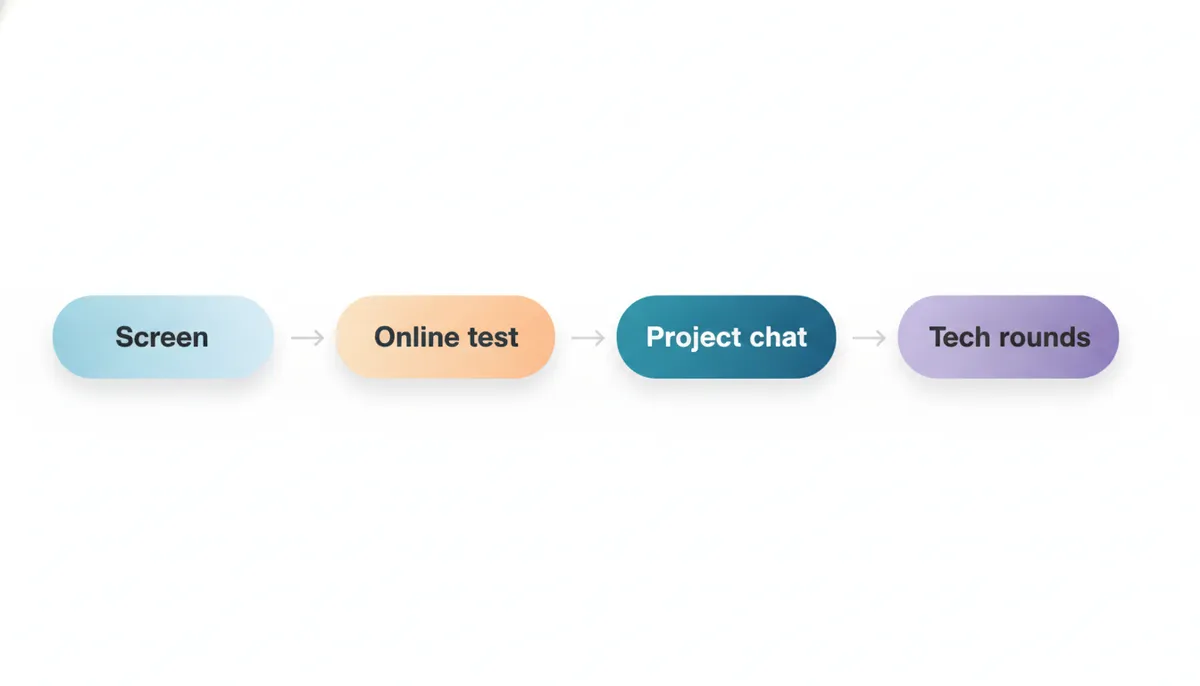
Reported accounts describe three to five rounds overall. The technical content is broad: coding matters, but so do the foundations behind the code and your ability to explain decisions you have made in real systems.
Round 1 — recruiter screen
The recruiter screen is usually the first opportunity to establish whether the role, level and team direction fit your background. It is not normally a technical test, but it should still influence how you prepare.
Expect questions about your current work, preferred technical areas, notice period and motivation for considering Adobe. Use this conversation to learn what the team builds and whether the later interviews are likely to lean towards frontend work, cloud services, data, creative tooling, graphics or machine learning.
The strongest answer to “Tell me about yourself” is not a career chronology. It is a short narrative that connects your recent work to the role: the problem you worked on, the technical responsibility you held, the result and why that experience makes this Adobe opportunity relevant.
Prepare a concise version, then save the detail for later project discussions. You should also ask whether the online assessment includes computer-science multiple-choice questions, as candidate reports commonly describe that format.
Round 2 — online assessment
Reported Adobe online assessments use HackerRank and combine coding with multiple-choice questions. Candidate accounts commonly describe two medium DSA problems alongside questions on operating systems, DBMS and networking.
This combination matters because it changes the preparation strategy. A candidate who practises coding alone may be surprised by questions on process scheduling, database transactions, indexing, normalisation, HTTP, TCP/IP or concurrency basics. You do not need to memorise every textbook definition, but you do need enough understanding to reason through a short applied question.
For coding, prioritise the patterns that let you recognise a route to a solution quickly: arrays and strings, hash maps, two pointers, sliding windows, recursion, trees, graphs and binary search. The DSA Patterns Sheet is free to browse and helps organise that preparation by problem shape rather than by a long, unstructured list.
For the multiple-choice component, use short revision cycles. The Operating Systems Sheet, DBMS Sheet and Computer Networks Sheet are free to browse and are useful for rebuilding the fundamentals likely to appear around the coding work.
💡 Pro Tip: Do not leave review until the end. Reserve time to test boundary cases, confirm time complexity and revisit any multiple-choice question where you are guessing between two plausible answers.
Round 3 — hiring-manager project deep-dive
The hiring-manager screen is Adobe’s most distinctive reported interview ritual. Candidate accounts describe a conversation that probes ownership and business impact of past technical decisions, not merely what you built.
That distinction is important. A project answer that only lists tools — “we used React, Java and Kubernetes” — tells the interviewer very little about your engineering judgement. A stronger answer makes your role legible:
- What problem was the team trying to solve?
- What constraint made it difficult?
- What decision did you personally influence?
- Which alternatives did you reject, and why?
- How did you measure whether the result helped users or the business?
- What would you change now?
This is not a round to improvise. Select two projects with enough substance to support follow-up questions. One can be a technical success; the other should include a complication, disagreement, production issue or changed requirement. Be precise about “I” versus “we”. Good collaboration is valuable, but unclear ownership creates doubt about your actual contribution.
Practising aloud is worthwhile because the quality of a project story depends on structure as much as substance. An AI interview can help you rehearse concise explanations, follow-up questions and behavioural discussion without memorising a script.
Round 4 — coding interviews
The technical rounds reportedly include coding discussions, commonly alongside system-design conversation. This is where the online assessment’s pattern recognition becomes a live communication test.
The interviewer is not only evaluating whether your final code works. They are also assessing whether you can turn an ambiguous prompt into a clear plan, compare options, state complexity and test your solution. Narrate the important transitions:
- Clarify inputs, outputs and constraints.
- Explain a simple baseline approach.
- Identify the bottleneck.
- Propose the improved approach and its complexity.
- Code in readable pieces.
- Walk through examples and edge cases.
Candidates often lose marks by silently writing code before explaining what they are doing. Your interviewer cannot assess reasoning they never hear. For a fuller breakdown of this format, read what interviewers actually look for in live coding rounds.
Use Adobe's interview kit for company-mapped DSA practice, but do not merely chase completion. After every problem, explain the solution aloud as though an interviewer has asked why your chosen data structure is appropriate. That short habit builds the communication layer that ordinary solo practice misses.
Round 5 — design and role-specific depth
Reported Adobe loops include a system-design discussion, while the expected depth varies by level and team. For experienced candidates, prepare to discuss components, data flow, interfaces, scale, reliability and trade-offs rather than presenting a diagram with no reasoning behind it.
At a lower level, the emphasis may be more on object-oriented design and sound engineering choices: clear responsibilities, sensible data models, testability and how a small design could change when requirements change. Low-level design versus high-level design explains the distinction and helps you avoid answering an architecture question with only class diagrams.
A June 2025 candidate report from Noida describes two DSA and two low-level design rounds. That is a single report, not a general rule, but it is a useful signal to take class design seriously when your role involves application engineering. The Low Level Design Sheet is free to browse and gives you a structured way to practise entities, interactions and extensibility.
Some Adobe teams reportedly add domain depth around graphics, machine learning or cloud systems. Do not try to guess the exact prompt. Instead, revisit the concepts closest to the job description and be ready to explain design choices from relevant work you have already done.
What makes Adobe’s interview process different?
Adobe’s reported hiring-manager screen places unusual emphasis on the business impact behind technical decisions. Many engineering loops ask candidates to describe a project. Adobe’s reported format goes further: it probes whether you understood the customer, product or operational consequence of the decision.
That makes preparation more concrete than generic behavioural rehearsal. For each project story, prepare a technical layer and an impact layer.
The technical layer includes architecture, constraints, alternatives, failures and metrics. The impact layer answers who benefited, what changed, what risk was reduced, what latency or cost improved, or how the team moved faster. If you cannot quantify an outcome, describe the observable result honestly: fewer support issues, a simpler workflow, faster releases or a capability that enabled another team.
This is also why polished but shallow answers struggle. The interviewer can keep asking “why that choice?” until they reach the limit of your actual involvement. Prepare the decision trail, not a rehearsed achievement statement.
Is the Adobe interview hard?
Adobe’s interview process is moderately difficult because it tests breadth. Reported accounts describe coding, CS fundamentals, project depth, design and, for some roles, domain knowledge. You can be strong in one area and still be exposed by another.
How many rounds are there? Candidate reports commonly describe three to five rounds overall, beginning with a recruiter conversation and online assessment before later project and technical discussions. The exact count varies by team and level.
How long does it take? Reported timelines run from one month to around two and a half months. Scheduling, team needs and the pace of feedback can change that substantially.
The coding bar is best approached as a consistency test rather than a contest for cleverness. Can you solve familiar problem shapes accurately, explain complexity and write code that survives edge cases? The project and design rounds then test whether you can operate as an engineer in a real product environment.
A 30-day Adobe preparation plan
Days 1–7 — rebuild coding patterns
Start with arrays, strings, hash maps, linked lists, trees, graphs and binary search. Work in timed sessions, but spend as much time reviewing as solving. For each error, identify whether it came from pattern recognition, implementation, complexity analysis or test coverage.
Read how to identify the right DSA pattern in a coding interview to make your practice more deliberate.
Days 8–14 — add core CS revision
Split each study day between coding and fundamentals. Review operating-system concepts, databases and networking in short blocks. Focus on explaining relationships: why an index helps a query, how a process differs from a thread, when TCP’s guarantees matter, or how transaction isolation changes application behaviour.
Finish the week with a mixed mock assessment: coding first, then short CS questions under a timer.
Days 15–21 — prepare project and design answers
Choose two project stories and map each one to problem, action, trade-off and outcome. Practise answering follow-ups about failures and alternatives, not only the final result.
Then complete the kind of design problem evidenced at Adobe. Start with a simple working model, identify responsibilities and discuss the next requirement that would force a change. Avoid adding patterns without a reason. The goal is clear judgement, not maximum abstraction.
Days 22–30 — simulate the loop
Run separate rehearsals for coding, project depth and design. In coding practice, speak continuously enough for someone else to follow your plan. In project practice, focus on ownership and impact. In design practice, state assumptions before committing to an approach.
Use the final days to revisit weak areas rather than learning entirely new material. A calm explanation of a familiar concept is more valuable than a rushed attempt to absorb a specialised topic at the last minute.
Frequently asked questions
What does Adobe ask in a software engineering interview?
Reported accounts describe DSA coding, operating systems, DBMS, networking, project discussion, object-oriented design and system-design topics. Some teams also add relevant domain depth.
Does Adobe have an online assessment?
Candidate reports commonly describe a HackerRank assessment with coding questions and multiple-choice CS fundamentals questions.
How many coding questions does Adobe ask?
Reported assessment formats commonly include two medium DSA questions. Later technical-round formats vary by team and level.
Does Adobe ask system design questions?
Reported accounts describe a system-design discussion in the technical stages, especially where the role or level calls for broader engineering design.
Is low-level design important for Adobe interviews?
It can be. A single June 2025 Noida candidate report described multiple low-level design rounds, so it is sensible to prepare class design alongside coding fundamentals.
What should I expect in the hiring-manager round?
Prepare for a deep discussion of past technical decisions, your personal ownership, trade-offs and business impact.
How long is Adobe’s interview process?
Reported timelines range from one month to around two and a half months. Team and scheduling differences can make the process shorter or longer.
Are OS, DBMS and networking important for Adobe?
Yes. Candidate reports commonly mention multiple-choice questions on those subjects in the online assessment.
How should I prepare for Adobe coding rounds?
Practise common DSA patterns under time pressure, explain your reasoning aloud and review every missed edge case. Pattern recognition and communication both matter.
Start your Adobe interview preparation
Adobe’s loop rewards balanced preparation: dependable coding, refreshed CS fundamentals, thoughtful design and project stories that show real ownership. Begin with the material most likely to recur, then use mock practice to turn isolated knowledge into a clear interview performance.
Open Adobe's interview kit to practise the 63 mapped DSA questions and one low-level design problem evidenced at Adobe. Pair that work with the free sheets for CS fundamentals and an AI interview when you are ready to rehearse coding, design and behavioural discussion under pressure.
Topics
Related on Thita
Your next step
Practise with AI mock interviews
A spoken interview that asks follow-up questions, runs your code and ends with a written report.