
Interview
Microsoft System Design Interview: The Complete Guide (2026)
Prepare for the Microsoft system design interview with round expectations, design domains, a focused preparation plan and practical answers that stand out.
The Microsoft system design interview is not an optional senior-level extra bolted onto an otherwise coding-heavy process. Reported accounts describe a genuinely mixed engineering loop: coding remains important, but design carries real weight across a low-level design discussion and a dedicated system design round for experienced roles.
That distinction matters for preparation. A candidate who practises only data structures may still reach the loop with no repeatable way to turn an ambiguous feature request into a clear architecture, sensible trade-offs and a credible implementation plan. Microsoft's interview kit brings together 181 mapped DSA questions, nine low-level design problems and six system design problems associated with Microsoft, so you can prepare the technical skills as a connected programme rather than isolated topics.
This guide explains where system design appears in the reported process, what Microsoft-flavoured design discussions tend to reward, how strong candidates structure their answers, and how to prepare when time is limited.
Where system design fits in the Microsoft interview
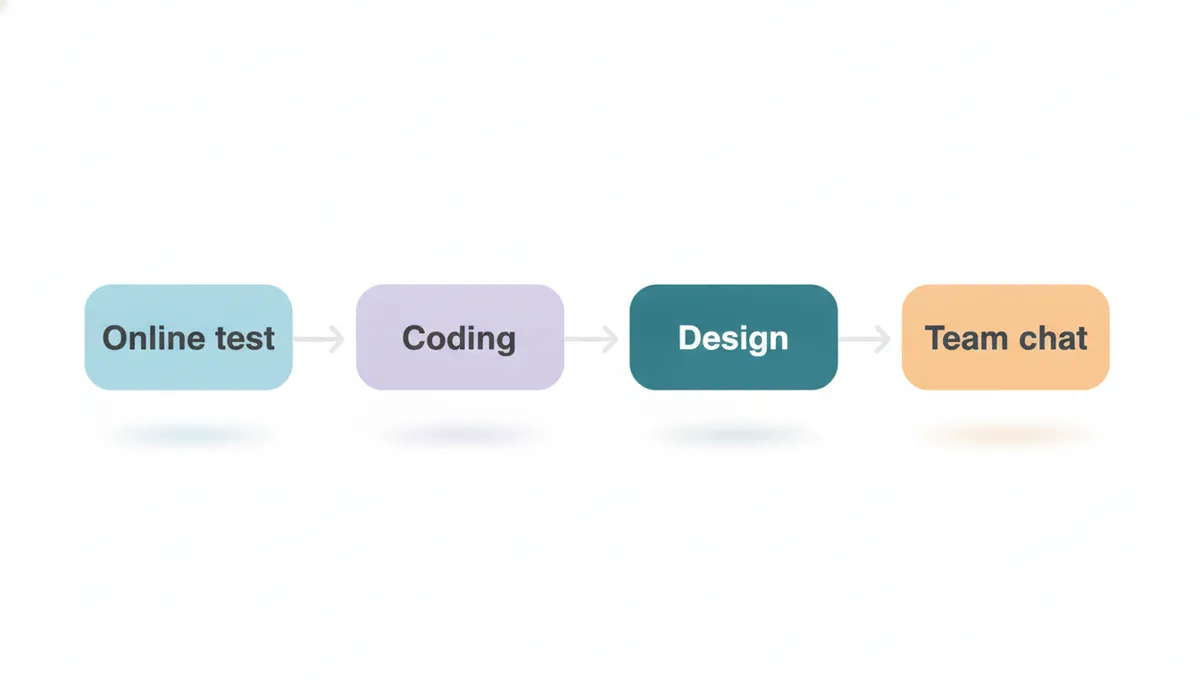
Reported accounts commonly describe a recruiter conversation followed by an online assessment, then a loop of technical and hiring-manager conversations. The exact sequence varies by role, location and level, so treat this as a working model rather than a fixed script.
The technical portion is commonly reported to include coding rounds, a low-level design round and, for experienced candidates, a system design discussion. The design components therefore are not simply a final add-on after the “real” interview. They are separate opportunities to assess a different kind of engineering judgement.
A useful way to think about the split is this:
- Coding rounds test whether you can solve a defined problem clearly, correctly and efficiently.
- Low-level design tests whether you can organise classes, responsibilities, interfaces and behaviours into maintainable code.
- System design tests whether you can make an evolving service reliable, scalable and understandable under real constraints.
- Hiring-manager discussion tests whether you can explain the technical decisions you have made in your own work, including their consequences.
For experienced roles, reported accounts describe a system design round at SDE-2 and above. The hiring-manager or “as appropriate” conversation may also ask you to design a feature based on a past project. That creates an important preparation implication: do not prepare architecture as a memorised whiteboard performance only. Be ready to apply the same reasoning to something you have actually built.
The reported loop is largely similar across India and other regions, although available accounts skew towards India-sourced experiences and role-level variation is real. Confirm the format with your recruiter when your process starts.
The Microsoft product territory to know
Good system design interviews are never really about reciting components. They are about choosing components because the product and its constraints make them appropriate. Microsoft’s product surface makes several domains especially natural practice territory.
Collaboration and shared state
Think about systems in which many people create, edit, view and receive changes: documents, meetings, chat, notifications, calendars and workspaces. These problems reward clear reasoning about fan-out, delivery guarantees, ordering, presence, permissions and conflict handling.
You do not need to claim that a particular prompt will appear. Instead, practise the kind of design problem evidenced at Microsoft: a service with users, state changes, background work and a need to remain useful when parts of the system fail or slow down.
For example, if asked to design a collaborative feature, a strong answer distinguishes between:
- the source of truth for durable state;
- the fast path for an interactive update;
- the path that notifies other users;
- what can be eventually consistent;
- what must be correct immediately, such as access control.
Cloud platforms and multi-tenant services
Azure makes multi-tenancy a valuable lens. A good design should ask early: who are the tenants, what isolation do they require, and what happens when one customer becomes unusually noisy?
This leads naturally to trade-offs around rate limits, quotas, partitioning, billing events, audit records and regional deployment. Candidates often jump straight to a generic queue and cache diagram. Stronger candidates first establish whether the problem is serving a consumer feature, an internal enterprise product or a shared cloud platform. The answer changes with that choice.
A rate limiter is particularly useful practice because it forces you to discuss policy, identity, storage, distributed coordination and graceful failure. Read how to design a rate limiter for a system design interview before attempting one from scratch.
Search, content and knowledge systems
Microsoft products frequently involve large stores of documents, messages, code, files and organisational knowledge. Search-style discussions let you demonstrate more than a standard “index and query” answer. They introduce ingestion pipelines, permissions-aware retrieval, ranking, freshness, deletion, versioning and observability.
When you practise this domain, make authorisation part of the main design rather than an afterthought. “We will filter inaccessible results later” is often a warning sign. If search results can expose sensitive enterprise information, access control affects the data model, index structure, caching choices and audit strategy from the beginning.
Developer tools and telemetry
Developer-facing systems create another natural design territory: build events, logs, metrics, deployment activity and issue notifications. These problems reward practical judgement about high write volume, delayed processing, retention, sampling and alert fatigue.
The best answers identify the primary user. An engineer debugging a live issue needs recent, searchable data quickly. A finance or compliance user may need durable records and predictable retention. A platform team may care most about low-cost ingestion and resilient backpressure. Naming the user changes the architecture for a reason.
What a strong answer does differently
Most candidates can name a load balancer, cache, queue and database. That is not yet a system design answer. Interviewers are listening for whether you can make a sequence of decisions that fits the problem.
Start by narrowing the problem
Before drawing boxes, ask questions that make the design tractable:
- Who uses the system and what is the main workflow?
- What is the most important user action?
- Which requirements are essential now, and which can wait?
- What kind of consistency does that action need?
- Is the workload read-heavy, write-heavy or bursty?
- What failure would be unacceptable?
Do not turn clarification into a long interrogation. State reasonable assumptions when information is unavailable, then move forward. The point is to show judgement and keep the discussion collaborative.
Build the smallest credible version first
A reliable structure is: requirements, rough scale, core data model, main request flow, then deeper trade-offs. Start with a simple system that can serve the central use case. Only add complexity when you can say what risk it resolves.
For instance, do not begin with multi-region replication, event sourcing and several specialised stores. Begin with the core service and durable data path. Then introduce a queue if work can happen asynchronously, a cache if repeated reads dominate, or partitions if one store cannot plausibly handle the workload.
This is the difference between architecture theatre and engineering reasoning.
Make trade-offs explicit
A strong candidate does not present every decision as universally correct. Say what you are optimising for and what you are accepting in return.
Examples:
- “I would use asynchronous delivery for notifications because immediate delivery is less important than keeping writes responsive.”
- “I would keep permission checks on the read path because stale authorisation creates a security risk.”
- “I would begin with a relational store for transactional integrity, then separate high-volume event data if scale requires it.”
The sentence after the choice often matters more than the choice itself. It shows you understand why a design has limits.
Discuss failure before being prompted
Mature answers include failure handling without becoming pessimistic. What happens if a downstream service times out? If a queue grows? If a cache is unavailable? If a consumer receives an event twice?
You do not need an elaborate disaster-recovery lecture for every prompt. Name the likely failure modes of your own design, explain the fallback and identify the monitoring signal that would reveal trouble. This is especially useful in Microsoft-style enterprise and cloud contexts, where reliability, permissions and operational visibility are often part of the product value.
Keep the explanation navigable
System design interviews are communication tests as much as technical tests. Signpost your answer:
“I will start with the user flow, then define the data model, then explain how the system scales.”
At each transition, pause. Ask whether the interviewer wants more depth on a component. A clear candidate can adapt the depth of discussion; a rehearsed candidate keeps talking through a memorised diagram.
If this is a weak point, how to explain your thought process clearly in coding interviews is useful preparation for both coding and design conversations.
Low-level design and high-level design: prepare both
The Microsoft loop commonly reported for experienced candidates separates low-level and high-level concerns. Treating them as the same skill is a common mistake.
In low-level design, expect to reason about entities, responsibilities, APIs, state transitions and how the code can absorb the next requirement. Your design should be readable enough that another engineer could implement it without guessing your intent. Avoid applying patterns merely because you know their names. An interface earns its place when behaviour may vary; a factory earns its place when object creation genuinely needs to vary.
In high-level design, zoom out. Explain service boundaries, storage, asynchronous processing, capacity pressure, resilience and observability. You are not expected to provide production-ready infrastructure detail for every component. You are expected to know where the difficult decisions live.
The distinction is worth making explicit during preparation. Low-level design vs high-level design: what interviews actually expect explains where class design ends and system architecture begins.
Use Microsoft's interview kit to alternate between the two modes. Complete an LLD problem as working code, then practise explaining an HLD problem aloud on a blank page. The change in format is deliberate: one builds implementation discipline, the other builds architectural judgement.
A focused preparation plan
First phase: restore coding fluency
Coding is still a meaningful part of the process, so do not abandon it while preparing design. Work by pattern rather than by random problem selection: arrays and strings, hashing, trees, graphs, recursion, dynamic programming and binary search.
The DSA Patterns Sheet is free to browse and helps organise practice around recognition rather than topic labels. Pair it with timed sessions in Code Practice, where you can rehearse explaining complexity, edge cases and alternatives while you code.
Your goal is not only to arrive at a correct answer. It is to make your reasoning visible from the first clarification to the final test case.
Second phase: build design vocabulary
Choose a small set of recurring systems: notification delivery, document sharing, search, rate limiting, task scheduling and event ingestion. For each, write a short answer covering requirements, data, APIs, core flow, scaling risks and failures.
Use the Low Level Design Sheet and System Design Sheet; both are free to browse. Compare your approach against the editorial after you have committed to a design. The learning comes from identifying where your assumptions differed, not from reading an ideal answer first.
Third phase: practise timed design discussions
Move from notes to simulation. Give yourself a short preparation window, then explain a design aloud as though an interviewer were present. Record yourself if possible. You will quickly notice whether you jump into details, lose the thread, fail to discuss trade-offs or leave no time for failure handling.
An AI mock interview can help rehearse system design, coding and behavioural discussions when you need live pressure and follow-up questions. Practise past-project conversations too: prepare stories in which you owned a difficult decision, changed direction after evidence, handled a production issue or improved a system for users.
Final phase: integrate the loop
In the final stretch, rotate through coding, LLD, HLD and project depth. Do not schedule every session as a new topic. Revisit previous designs and improve them after a new constraint is introduced: regional expansion, tenant isolation, higher traffic, stricter permissions or a degraded dependency.
That is close to what good interview follow-ups test. The first version of your solution is rarely the point; how you adapt it is.
Frequently asked questions
Does Microsoft have a system design interview?
Reported accounts commonly describe a dedicated system design discussion for experienced roles, including SDE-2 and above. The exact format varies by team and level.
Is system design important at Microsoft?
Yes. Candidate reports describe meaningful design content across both low-level design and system design conversations, alongside coding rounds.
What level should I start preparing system design?
Start building basic design fluency before you need it. Architecture-level design is commonly reported for experienced roles, while class design and project-depth discussions can appear earlier.
What should I practise for the Microsoft system design interview?
Practise collaboration systems, enterprise permissions, cloud multi-tenancy, search, notification delivery, telemetry and reliable background processing. Focus on the reasoning behind your choices.
Does Microsoft ask low-level design questions?
Reported accounts describe a low-level design round, often combined with background, computer-science fundamentals or project discussion. Prepare classes, interfaces, responsibilities and extensibility.
How should I structure a system design answer?
Clarify requirements, state assumptions, outline the core flow, define data and APIs, then discuss scaling, failures and trade-offs. Start simple and deepen only where needed.
Should I memorise common system design diagrams?
No. Familiar diagrams can help you communicate, but memorised components without workload assumptions or trade-offs usually sound generic.
How do I prepare for the hiring-manager discussion?
Know your own projects in detail: your role, the alternatives considered, what failed, the decision you made and what you would improve now. Rehearse these answers aloud.
Are coding rounds still important for Microsoft?
Yes. Reported loops remain meaningfully coding-focused, so maintain DSA practice while building design skill rather than treating the two as separate preparation tracks.
Where to start
The best preparation is balanced: solve coding problems clearly, build small designs that work, and practise explaining larger systems under ambiguity. Do not wait until the final week to speak through a design aloud. Communication, prioritisation and trade-off judgement improve through repetition.
Open Microsoft's interview kit to practise the 181 mapped DSA questions, nine low-level design problems and six system design problems associated with Microsoft. Then use the free sheets and an AI mock interview to turn private study into interview-ready explanations.
Interview formats change by role and team. Use reported accounts as preparation guidance, then confirm your own loop with your recruiter.
Topics
Related on Thita
Your next step
Practise with AI mock interviews
A spoken interview that asks follow-up questions, runs your code and ends with a written report.