
Interview
OS Interview Questions: 70+ Operating System Questions With Answers (2026)
OS interview questions with answers: 70+ operating system questions on processes, scheduling, deadlocks, paging and more, with worked examples and viva answers.

Learn operating systems the way interviews ask them
OS interview questions (also called operating system interview questions) test whether you can explain how one computer shares a CPU, memory and disk between many programs. The topics asked most are processes, threads, scheduling, synchronization, deadlocks, paging, virtual memory, file systems, disk I/O and system calls. This page answers 70+ questions and answers, with four worked examples you can redo on paper.
Checked November 2026. Answers follow Silberschatz, Galvin and Gagne, Operating System Concepts (10th edition), plus the Linux man pages and kernel documentation linked where a Linux claim is made.
What OS interview questions actually test
Most OS rounds are not trivia. For a fresher, the interviewer wants to hear that you can define the term, give the difference from its neighbour (process vs thread, mutex vs semaphore, paging vs segmentation), and give a small example. For an experienced engineer, the same topics come back as "what happens when" questions: what happens on a page fault, what happens when two threads increment one counter, what happens on fork().
Three habits separate good answers from memorised ones:
- Say the mechanism, not just the name. "A page fault is when the page is not in memory" is a definition. "The MMU traps to the kernel, the kernel finds a free frame, reads the page from disk, updates the page table and restarts the instruction" is an answer.
- Work one number. Scheduling, page replacement, Banker's algorithm and disk scheduling are asked with small inputs. This page works one of each, and every number was recomputed.
- Know the trade-off. Nearly every OS design choice (time slice length, page size, spinlock vs mutex) trades one cost for another. Name both.
The question lists on sites like InterviewBit, Sanfoundry and Naukri converge on the same core: OS basics, process vs thread, scheduling, deadlocks, paging and virtual memory, plus a few experienced-level topics such as copy-on-write, mmap and the Linux scheduler. This page covers all of that, then adds what those lists tend to skip: worked examples, disk scheduling, file system internals and the experienced-engineer questions with sources.
OS important questions: the 15 to learn if you only have one evening
If you are short on time, learn these 15 first. They cover most of what fresher-level OS rounds ask, and each one links to its answer below.
- What is the difference between a process and a thread?
- What are the states of a process?
- What is a context switch?
- How do FCFS, SJF and Round Robin compare?
- What is a race condition?
- What is the difference between a mutex and a semaphore?
- How do you solve the producer-consumer problem?
- What is a deadlock and what are the four necessary conditions?
- How does the Banker's algorithm work?
- What is paging?
- What is a TLB?
- What is demand paging and what happens on a page fault?
- How do the FIFO, LRU and Optimal page replacement algorithms compare?
- What is thrashing?
- What is the difference between user mode and kernel mode?
Operating system interview questions: basics, kernel and system calls
This section covers what an OS is, how it protects itself, and how programs ask it for help. The matching lessons are in the OS basics lesson.
What is an operating system?
An operating system is the software that manages the hardware and gives programs a common set of services. It sits between applications and hardware, allocates CPU time, memory, storage and devices, and keeps programs from interfering with each other. Silberschatz describes it as a resource allocator and a control program.
Follow-up interviewers ask: is the browser or the shell part of the OS? (Usually no. They are applications that call the OS.)
What are the main functions of an operating system?
The core functions are process management, memory management, file system management, I/O device management, and protection and security. A short list also includes user interface and accounting. If you can attach one concrete mechanism to each (scheduler, page tables, inodes, drivers, permission bits), the answer sounds like experience instead of a memorised list.
What is the difference between the kernel and the operating system?
The kernel is the core of the OS: the part that always runs in kernel mode and directly controls hardware, memory and processes. "Operating system" is the broader term and usually includes system programs around the kernel, such as the shell, libraries, daemons and utilities. Linux, strictly, is a kernel; a Linux distribution is an operating system built around it.
What is the difference between user mode and kernel mode?
The CPU has at least two privilege levels, controlled by a mode bit. In user mode, code cannot execute privileged instructions such as I/O instructions or changes to the page table. In kernel mode, it can. User programs run in user mode, so a buggy program cannot overwrite another program or talk to the disk directly. To get a privileged service, it makes a system call, which switches to kernel mode, runs kernel code and switches back.
Follow-up interviewers ask: what happens if a user program tries a privileged instruction? (The CPU raises an exception and the kernel typically terminates the process.)
What is a system call?
A system call is the interface a program uses to request a service from the kernel, such as read, write, open, fork or mmap. The call executes a special instruction (a trap) that switches to kernel mode and jumps to a kernel routine selected by a system call number. When the routine finishes, control returns to the program in user mode. Programs rarely invoke system calls directly; the C library wraps them, so printf ends up calling write.
Follow-up interviewers ask: how is a system call different from a library function? (A library function runs entirely in user mode, and only some of them make a system call internally.)
What is the difference between an interrupt, a trap and an exception?
An interrupt is an asynchronous signal from hardware, such as a disk finishing a transfer or a timer firing. A trap is a synchronous, deliberate transfer into the kernel, such as a system call. An exception is a synchronous event caused by the running instruction itself, such as divide by zero or a page fault. In all three cases the CPU saves state, jumps to a handler found through the interrupt vector table, and resumes afterwards. Some textbooks use "trap" for both software-generated cases, so state which meaning you are using.
What is the difference between a monolithic kernel and a microkernel?
A monolithic kernel runs all OS services (scheduling, file systems, drivers, networking) in one address space in kernel mode. Calls between them are plain function calls, which makes it fast. A bug in a driver can crash the whole system. A microkernel keeps only the minimum in kernel mode (address spaces, scheduling, message passing) and runs file systems and drivers as user-space servers. That isolates failures but adds message-passing overhead. Linux is monolithic and supports loadable modules; QNX and the L4 family are microkernels; macOS and Windows are hybrids.
What is the difference between multiprogramming, multitasking and multiprocessing?
Multiprogramming keeps several programs in memory so the CPU always has something to run when one waits for I/O. Multitasking (time sharing) extends this by switching between programs so quickly that each user sees interactive response. Multiprocessing means more than one CPU or core executing at the same time. A single-core laptop is multitasking without being multiprocessing.
What happens when a computer boots?
Firmware (BIOS or UEFI) runs a power-on self test and finds a boot device. It loads a bootloader, which loads the kernel into memory and passes control to it. The kernel initialises memory management, devices and drivers, mounts the root file system and starts the first user process (init or systemd, PID 1), which starts everything else.
What is a real-time operating system?
A real-time OS guarantees that tasks finish within a deadline. In a hard real-time system (airbag controller, pacemaker) missing a deadline is a failure. In a soft real-time system (video playback) missing it degrades quality. What matters is predictable latency, not speed, so real-time schedulers use fixed-priority or deadline-based policies.
Process interview questions
A process is a program in execution, and most OS questions start from it. See the process lessons.
What is the difference between a program and a process?
A program is a passive file on disk: instructions and data. A process is that program in execution: the loaded code plus a program counter, registers, a stack, a heap, open files and an address space. Running the same program twice creates two processes.
What are the states of a process?
The standard model has five states: new, ready, running, waiting (blocked) and terminated. A process enters the ready state when admitted. The scheduler dispatches it to running. It returns to ready when its time slice ends or a higher-priority process arrives, and goes to waiting when it requests I/O or waits for an event. When that event completes it goes back to ready, not straight to running. On exit it becomes terminated.
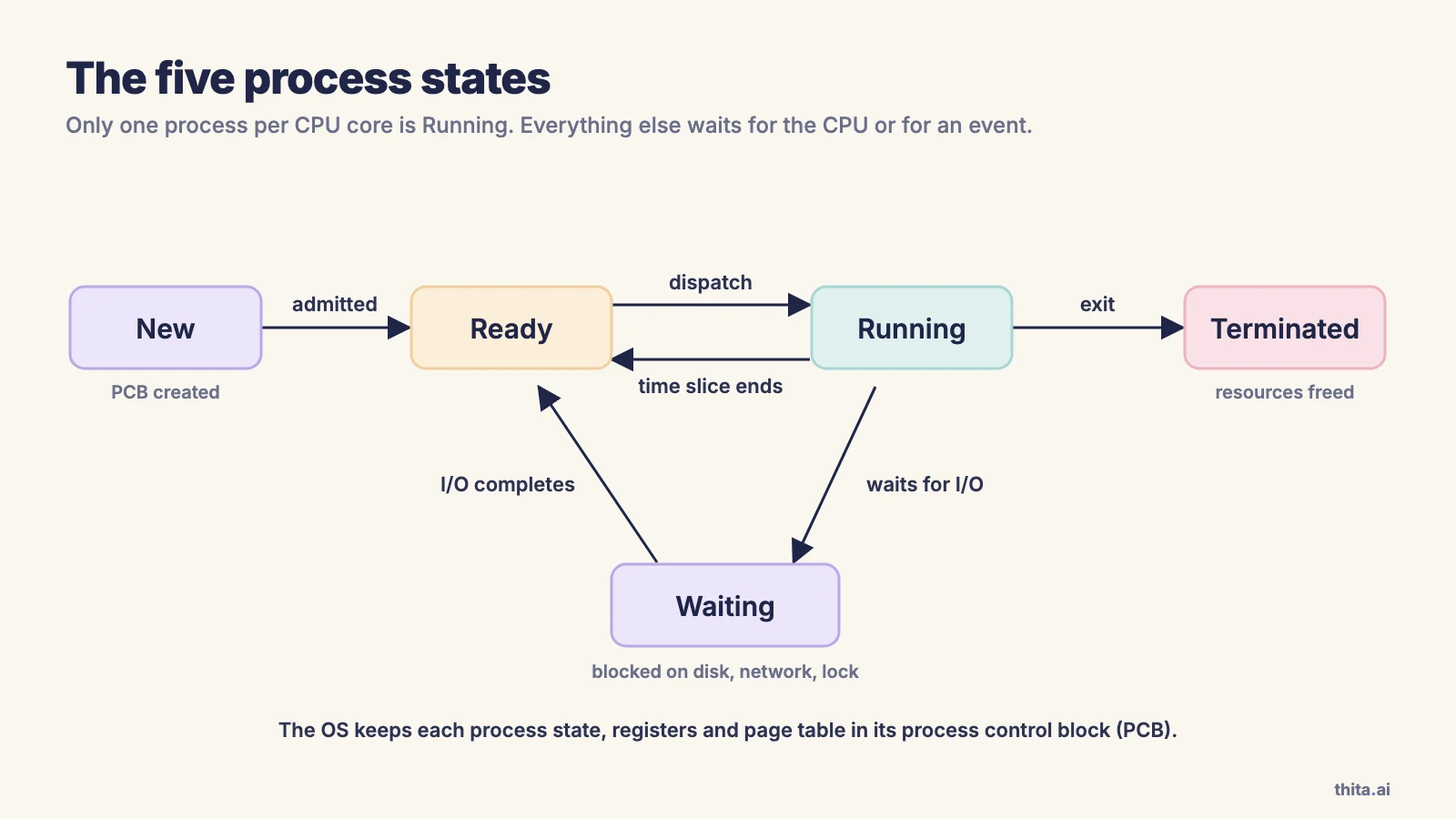
Follow-up interviewers ask: can a process go from waiting straight to running? (No. It becomes ready and waits for the scheduler.)
What is a process control block?
The process control block (PCB) is the kernel's record of one process. It holds the process ID, state, program counter and saved registers, scheduling information (priority, queue pointers), memory-management information (page table pointer), accounting data and the list of open files. A context switch saves the running process's state into its PCB and loads the next process's state from its PCB.
What is a context switch?
A context switch is the kernel switching the CPU from one process to another: it saves the running process's registers and program counter into its PCB, picks the next process, and restores that process's saved state. It is pure overhead, because no useful user work happens during it, and it is triggered by a timer interrupt, a blocking system call or a higher-priority process becoming ready.
Follow-up interviewers ask: is a switch between threads cheaper than between processes? (Usually yes, see the experienced section.)
What do fork() and exec() do?
On Unix, fork() creates a new process by duplicating the calling process. It returns the child's PID in the parent and 0 in the child, or -1 on failure (fork(2)). The exec family replaces the current process's code and data with a new program and does not return on success. Shells launch programs by calling fork() and then exec() in the child, and the parent calls wait(). Keeping the two separate lets the child set up file descriptors and redirection between them.
Follow-up interviewers ask: how many processes does fork(); fork(); create? (Four in total, so three new ones.)
What is a zombie process and what is an orphan process?
A zombie is a process that has terminated but whose parent has not yet called wait() to read its exit status, so its process table entry remains (wait(2)). An orphan is a running process whose parent has terminated. The kernel re-parents orphans to init (or a designated subreaper), which calls wait() on them, so orphans are cleaned up and a zombie that is adopted by init is reaped too. You cannot kill a zombie, because it is already dead; you make its parent reap it or end the parent.
What are the ways processes communicate?
The two models are shared memory and message passing. Mechanisms include pipes and named pipes (FIFOs), message queues, sockets, shared memory segments and signals. Shared memory is the fastest because the kernel is involved only in setup, but the processes must synchronise access themselves. Message passing is easier to reason about and works across machines (sockets) but costs a system call and a copy per message.
What does a process look like in memory?
The address space is conventionally divided into the text segment (code, read-only), the data segment (initialised and uninitialised globals), the heap (dynamic allocation, grows upward) and the stack (function frames, local variables, grows downward). Between the heap and the stack is unmapped space. Memory-mapped files and shared libraries live in regions between them.
Thread and concurrency interview questions
Threads are the unit the scheduler actually runs on modern systems, and they are where concurrency bugs come from. The matching lessons are in the threads and concurrency lesson.
What is the difference between a process and a thread?
A process owns an address space, open files and other resources. A thread is a unit of execution inside a process; all threads in a process share its code, heap and open files, and each has its own program counter, registers and stack. Because they share memory, creating and switching threads is cheaper, and communication is just reading shared variables. The cost is that one thread can corrupt another's data, and a crash in one thread usually kills the whole process.
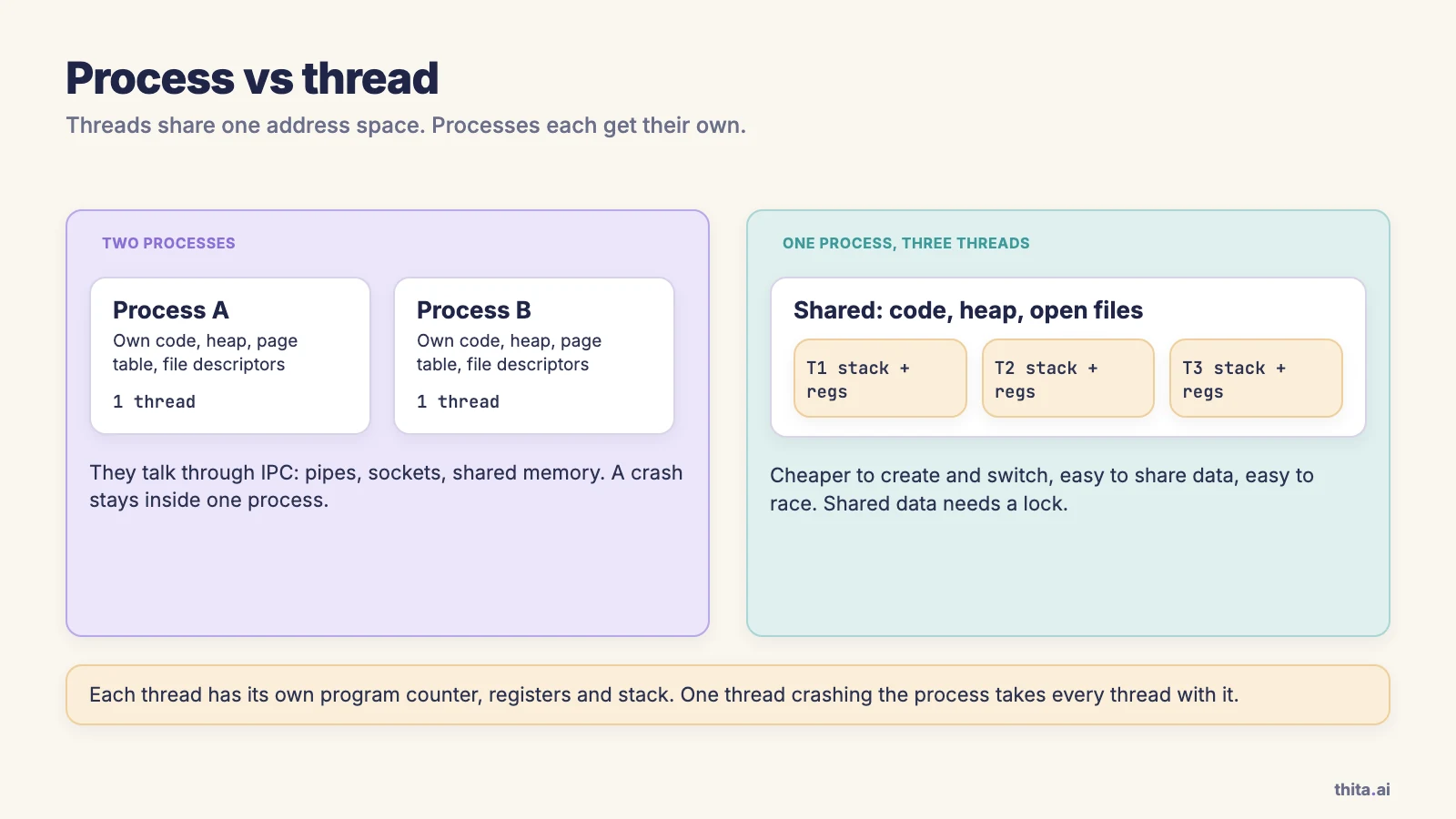
Follow-up interviewers ask: if you have two CPU-bound tasks that must not corrupt each other, would you use threads or processes? (Processes, for isolation. Threads if they must share data cheaply.)
Why use threads?
Threads give responsiveness (a UI thread keeps working while another loads data), resource sharing (no IPC needed), economy (thread creation is cheaper than process creation) and scalability (threads of one process can run on different cores in parallel). A web server that spawns a thread per request is the standard example.
What is the difference between concurrency and parallelism?
Concurrency means multiple tasks make progress during overlapping time periods, which can happen on a single core by interleaving. Parallelism means multiple tasks execute at the same instant on different cores. A concurrent program may or may not be parallel; a parallel program is always concurrent.
What is a thread pool and why use one?
A thread pool creates a fixed number of worker threads at start-up and hands them tasks from a queue. It avoids the cost of creating a thread per task and puts a ceiling on the number of threads, so a burst of requests cannot exhaust memory or drown the scheduler in context switches. Size matters: roughly the core count for CPU-bound work, larger for I/O-bound work.
What does each thread have of its own?
Its own thread ID, program counter, register set and stack. It also usually has thread-local storage and its own signal mask. Everything else, including code, global data, the heap and open file descriptors, is shared with the other threads of the process.
CPU scheduling interview questions
The scheduler decides which ready process runs next. The matching lessons are in the CPU scheduling lesson, including round robin and time slices. Scheduling also matters outside exams: a game that must hold a frame rate depends on how the OS shares cores between threads, which is part of the story in why GTA 6 runs at 30 fps.
What is the difference between preemptive and non-preemptive scheduling?
In non-preemptive scheduling, a process keeps the CPU until it finishes or blocks. In preemptive scheduling, the OS can take the CPU away, for example when a time slice expires or a higher-priority process arrives. Preemptive scheduling gives better responsiveness but needs care with shared data, because a process can be interrupted in the middle of updating it.
What criteria are used to compare CPU scheduling algorithms?
Five are standard: CPU utilization (keep the CPU busy), throughput (processes completed per unit time), turnaround time (submission to completion), waiting time (total time spent in the ready queue) and response time (submission to first response). Maximise the first two and minimise the last three. They conflict, which is why there is no single best algorithm.
How do FCFS, SJF and Round Robin compare?
First-come first-served (FCFS) runs processes in arrival order and is non-preemptive. Shortest-job-first (SJF) runs the process with the shortest next CPU burst first and is provably optimal for average waiting time, but the burst length has to be predicted. Round Robin (RR) gives each process a fixed time quantum in turn and is preemptive. Here is one set worked all three ways.
Four processes arrive at time 0 with CPU bursts: P1 = 6, P2 = 8, P3 = 7, P4 = 3 (milliseconds). Waiting time is completion time minus burst time, since all arrived at 0.
| Algorithm | Run order | Waiting times (P1, P2, P3, P4) | Average wait | Average turnaround | Average response |
|---|---|---|---|---|---|
| FCFS | P1, P2, P3, P4 | 0, 6, 14, 21 | 10.25 | 16.25 | 10.25 |
| SJF | P4, P1, P3, P2 | 3, 16, 9, 0 | 7.00 | 13.00 | 7.00 |
| RR, quantum 4 | see below | 11, 13, 17, 12 | 13.25 | 19.25 | 6.00 |
The round robin timeline with quantum 4 is: P1 0-4, P2 4-8, P3 8-12, P4 12-15, P1 15-17, P2 17-21, P3 21-24. Completion times are P4 = 15, P1 = 17, P2 = 21, P3 = 24, so waiting times are 17-6 = 11 for P1, 21-8 = 13 for P2, 24-7 = 17 for P3 and 15-3 = 12 for P4, which sum to 53 and average 13.25. Response time is the first time each process runs: 0, 4, 8, 12, which averages 6.
Read the table with care. SJF wins on average waiting time (7.00 against 10.25). Round Robin has the worst average waiting time (13.25) but the best average response time (6.00), because everyone gets the CPU within a few quanta. That is the trade-off interviewers want to hear: RR is built for interactive systems, not for minimum waiting time.
Follow-up interviewers ask: how can an OS know the next burst length for SJF? (It cannot. It estimates by exponential averaging of previous bursts.)
What is the convoy effect?
In FCFS, one long CPU-bound process holds the CPU while many short I/O-bound processes queue behind it. The I/O devices sit idle and the short processes wait far longer than necessary, which lowers utilisation. In the example above, FCFS gives P4 (burst 3) a wait of 21, while SJF gives it 0.
What is starvation and how does aging fix it?
Starvation (indefinite blocking) happens when a ready process never gets the CPU, for example a low-priority process in a system where high-priority processes keep arriving. Aging fixes it by gradually raising the priority of a process the longer it waits, so eventually it outranks the newcomers.
What is multilevel feedback queue scheduling?
A multilevel feedback queue has several ready queues of different priority and quantum. A new process enters the top queue with a short quantum. A process that uses its whole quantum is demoted to a lower queue with a longer quantum; I/O-bound and interactive processes stay near the top. Processes that wait too long in a low queue are promoted, which implements aging. It approximates SJF without knowing burst lengths.
Synchronization interview questions
Anything that shares data between threads needs synchronization, which is why this section produces the most follow-up questions. The matching lessons are in the process synchronization lesson, including the classic synchronization problems.
What is a race condition?
A race condition occurs when the result depends on the order in which concurrent threads access shared data. The standard example is counter++, which compiles to three steps: load the value, add one, store it back. If two threads both load 5 before either stores, both store 6 and one increment is lost. The fix is to make the read-modify-write atomic using a lock or an atomic instruction.
What are the three requirements for a critical-section solution?
Mutual exclusion (only one process in its critical section at a time), progress (if no process is in the critical section, the choice of who enters next cannot be postponed forever and depends only on those wanting to enter) and bounded waiting (there is a limit on how many times others can enter before a waiting process gets in). A solution missing the third can starve a process.
What is the difference between a mutex and a semaphore?
A mutex is a lock with ownership: the thread that locked it must be the one to release it, and it protects a critical section. A semaphore is an integer with two atomic operations, wait (decrement, block if the result would be negative) and signal (increment, wake a waiter), and it has no owner. A counting semaphore tracks a pool of N identical resources; a binary semaphore takes values 0 and 1 and is often used for signalling between threads, since one thread can signal what another waits on. Use a mutex for mutual exclusion, and a semaphore for counting resources or signalling.
Follow-up interviewers ask: can a binary semaphore replace a mutex? (It provides mutual exclusion, but without ownership, so any thread can release it by mistake and priority inheritance does not apply.)
What is the difference between a spinlock and a mutex?
A spinlock busy-waits: the thread loops, repeatedly testing the lock, and stays on the CPU. A mutex puts a waiting thread to sleep and wakes it when the lock is released. A spinlock wins when the critical section is shorter than a context switch and the lock holder is running on another core. A mutex wins when the wait may be long, since spinning wastes CPU. On a single-core machine, spinning on a lock held by a descheduled thread is pure waste.
What are atomic instructions such as test-and-set and compare-and-swap?
They are hardware instructions that read and modify a memory word in one uninterruptible step. Test-and-set writes 1 and returns the old value; a lock is acquired when the returned old value is 0. Compare-and-swap writes a new value only if the current value equals an expected one, and reports whether it did. Locks, semaphores and lock-free data structures are built on them, because software-only solutions such as Peterson's algorithm are not reliable on modern CPUs that reorder memory operations.
How do you solve the producer-consumer problem?
A producer adds items to a bounded buffer and a consumer removes them. The buffer must never overflow, underflow or be modified by both at once. The textbook solution uses three semaphores: empty initialised to N (free slots), full initialised to 0 (filled slots) and mutex initialised to 1.
producer:                  consumer:
  wait(empty)                wait(full)
  wait(mutex)                wait(mutex)
  add item to buffer         remove item from buffer
  signal(mutex)              signal(mutex)
  signal(full)               signal(empty)
The order of the two wait calls matters. If a producer takes mutex first and then blocks on empty because the buffer is full, no consumer can get mutex to free a slot, and the system deadlocks.
What is the dining philosophers problem?
Five philosophers sit at a round table with one chopstick between each pair. To eat, a philosopher needs both adjacent chopsticks. If every philosopher picks up the left chopstick at once, each waits forever for the right one, which is a deadlock. Standard fixes are to allow at most four philosophers at the table, to pick up both chopsticks only if both are available (inside a critical section), to use an asymmetric rule (odd philosophers pick left first, even pick right first), or to number the chopsticks and always take the lower number first, which breaks circular wait. It is a model for processes competing for several shared resources.
What is the readers-writers problem?
Many readers may read shared data at the same time, but a writer needs exclusive access. A basic solution lets readers in while no writer holds the data, which can starve writers when readers keep arriving. A writer-preference variant blocks new readers once a writer is waiting, which can starve readers. Real implementations (read-write locks) choose a policy and sometimes add fairness.
What is a monitor and what is a condition variable?
A monitor is a language-level construct that bundles shared data with the procedures that access it, and guarantees only one thread is active inside it at a time. A condition variable lets a thread inside the monitor wait for a condition (wait, which releases the lock while sleeping) and lets another thread wake it (signal). Java's synchronized with wait/notify and Python's threading.Condition are examples. Always check the condition in a while loop, not an if, because a woken thread must recheck that the condition still holds.
What is priority inversion?
Priority inversion happens when a high-priority task waits for a lock held by a low-priority task, and a medium-priority task preempts the low-priority one, so the high-priority task effectively waits behind the medium one. Priority inheritance fixes it: while the low-priority task holds the lock, it temporarily runs at the priority of the highest task waiting for it.
Deadlock interview questions
Deadlocks are one of the most predictable topics, and the four-conditions answer has to be exact. The matching lessons are in the deadlocks lesson.
What is a deadlock and what are the four necessary conditions?
A deadlock is a state where every process in a set is waiting for a resource held by another process in the set, so none can proceed. It can occur only if all four Coffman conditions hold at once: mutual exclusion (a resource is held by one process at a time), hold and wait (a process holds one resource while waiting for another), no preemption (resources are released only voluntarily) and circular wait (a cycle of processes each waiting for a resource held by the next).
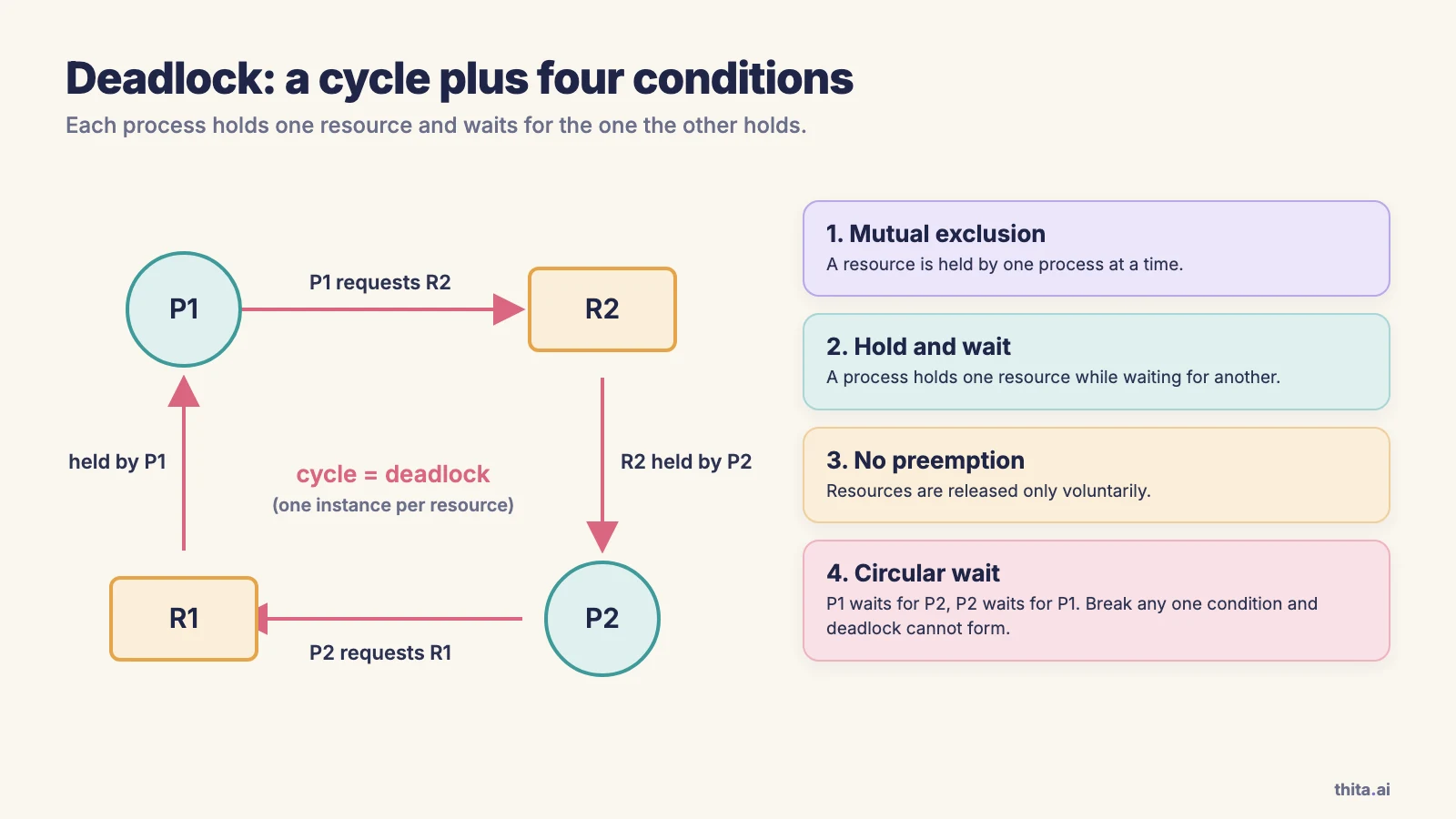
Follow-up interviewers ask: if you break one condition, is deadlock impossible? (Yes, which is why prevention works by negating one of them.)
How does an operating system handle deadlocks?
There are four approaches. Prevention ensures at least one condition can never hold. Avoidance uses advance information about maximum resource needs to grant only requests that keep the system in a safe state. Detection and recovery lets deadlocks happen, finds them with a graph or matrix check, and breaks them. Ignoring the problem is the fourth, and it is what Linux and Windows do for application-level resource deadlocks, on the grounds that deadlocks are rare and prevention is costly. Silberschatz notes this. Applications then bear the responsibility, typically with lock ordering and timeouts.
What is the difference between deadlock prevention and deadlock avoidance?
Prevention is structural: it negates one of the four conditions in advance, for example by requiring a process to request all its resources at once (breaks hold and wait), allowing resource preemption (breaks no preemption) or imposing a global ordering on resource types (breaks circular wait). It is simple but can lower utilisation. Avoidance is dynamic: the OS checks each request against what it knows of every process's maximum need and refuses requests that could lead to an unsafe state. It wastes less but needs maximum claims declared up front.
How does the Banker's algorithm work?
The Banker's algorithm avoids deadlock for resources with multiple instances. It keeps Available (free units of each type), Max (each process's maximum demand), Allocation (current holdings) and Need = Max - Allocation. A state is safe if there is an order in which every process can finish: repeatedly find a process whose Need is at most the current Work (starting at Available), assume it finishes, and add its Allocation back to Work. A request is granted only if it is within the process's Need, within Available, and the state after pretending to grant it is still safe. This example is the standard one from Silberschatz: five processes, resource types A (10 instances), B (5) and C (7).
| Process | Allocation (A B C) | Max (A B C) | Need (A B C) |
|---|---|---|---|
| P0 | 0 1 0 | 7 5 3 | 7 4 3 |
| P1 | 2 0 0 | 3 2 2 | 1 2 2 |
| P2 | 3 0 2 | 9 0 2 | 6 0 0 |
| P3 | 2 1 1 | 2 2 2 | 0 1 1 |
| P4 | 0 0 2 | 4 3 3 | 4 3 1 |
Allocated totals are A = 7, B = 2, C = 5, so Available = (10-7, 5-2, 7-5) = (3, 3, 2).
Safety check. Work = (3, 3, 2). P1's Need (1, 2, 2) fits, so P1 can finish and Work becomes (3, 3, 2) + (2, 0, 0) = (5, 3, 2). P3's Need (0, 1, 1) fits, and Work becomes (7, 4, 3). P0's Need (7, 4, 3) fits exactly, and Work becomes (7, 5, 3). P2's Need (6, 0, 0) fits, and Work becomes (10, 5, 5). P4's Need (4, 3, 1) fits, and Work becomes (10, 5, 7), the full system total. The sequence P1, P3, P0, P2, P4 is safe. Others exist: Silberschatz lists P1, P3, P4, P0, P2, and P1, P3, P4, P2, P0 also works.
Request 1: P1 asks for (1, 0, 2). It is within P1's Need (1, 2, 2) and within Available (3, 3, 2). Pretend to grant it: Available = (2, 3, 0), P1 holds (3, 0, 2) with Need (0, 2, 0). Running the safety check again, P1 can finish (Work becomes (5, 3, 2)) and the rest follow as before. The state is safe, so the request is granted.
Request 2: P4 asks for (3, 3, 0) from the original state. It is within P4's Need (4, 3, 1) and within Available (3, 3, 2). Pretend to grant it: Available = (0, 0, 2) and P4's Need becomes (1, 0, 1). With Work = (0, 0, 2), no process's Need fits (P3 needs a unit of B, P4 needs a unit of A, and the others need more), so the state is unsafe and the request is refused, even though the resources are free right now. That is the point of avoidance. See deadlock avoidance and the Banker's algorithm.
Follow-up interviewers ask: is an unsafe state a deadlock? (No. It means deadlock is possible, not that it has happened.)
What is a resource-allocation graph?
A directed graph with process nodes and resource nodes. A request edge points from a process to a resource, and an assignment edge points from a resource to a process. If every resource has a single instance, a cycle means deadlock. If resources have multiple instances, a cycle is necessary but not sufficient, so you need the matrix-based detection algorithm. The diagram above shows a two-process cycle with single-instance resources.
How is deadlock detected and recovered from?
With single-instance resources, the OS keeps a wait-for graph (the allocation graph with resource nodes removed) and searches it periodically for a cycle. With multiple instances it uses an algorithm similar to Banker's safety check on current allocations and requests. Recovery is by process termination (abort all deadlocked processes, or abort one at a time until the cycle breaks) or by resource preemption (take a resource from a victim, roll that process back, and guard against starving the same victim).
What is the difference between deadlock and starvation?
In a deadlock, a set of processes wait on each other and none can ever proceed. In starvation, one process waits indefinitely while others continue to make progress, usually because of an unfair scheduling or locking policy. Deadlock needs a cycle; starvation does not, and aging fixes it. Every deadlocked process is starved, but not every starved process is deadlocked.
Memory management interview questions
Main memory questions cover how a program's addresses become physical addresses. The matching lessons are in the main memory lesson, including page tables and the TLB.
What is the difference between a logical address and a physical address?
A logical (virtual) address is generated by the CPU and is what the program sees. A physical address is the actual location in main memory. The memory-management unit (MMU) translates one to the other at run time, using relocation registers or page tables.
What is paging?
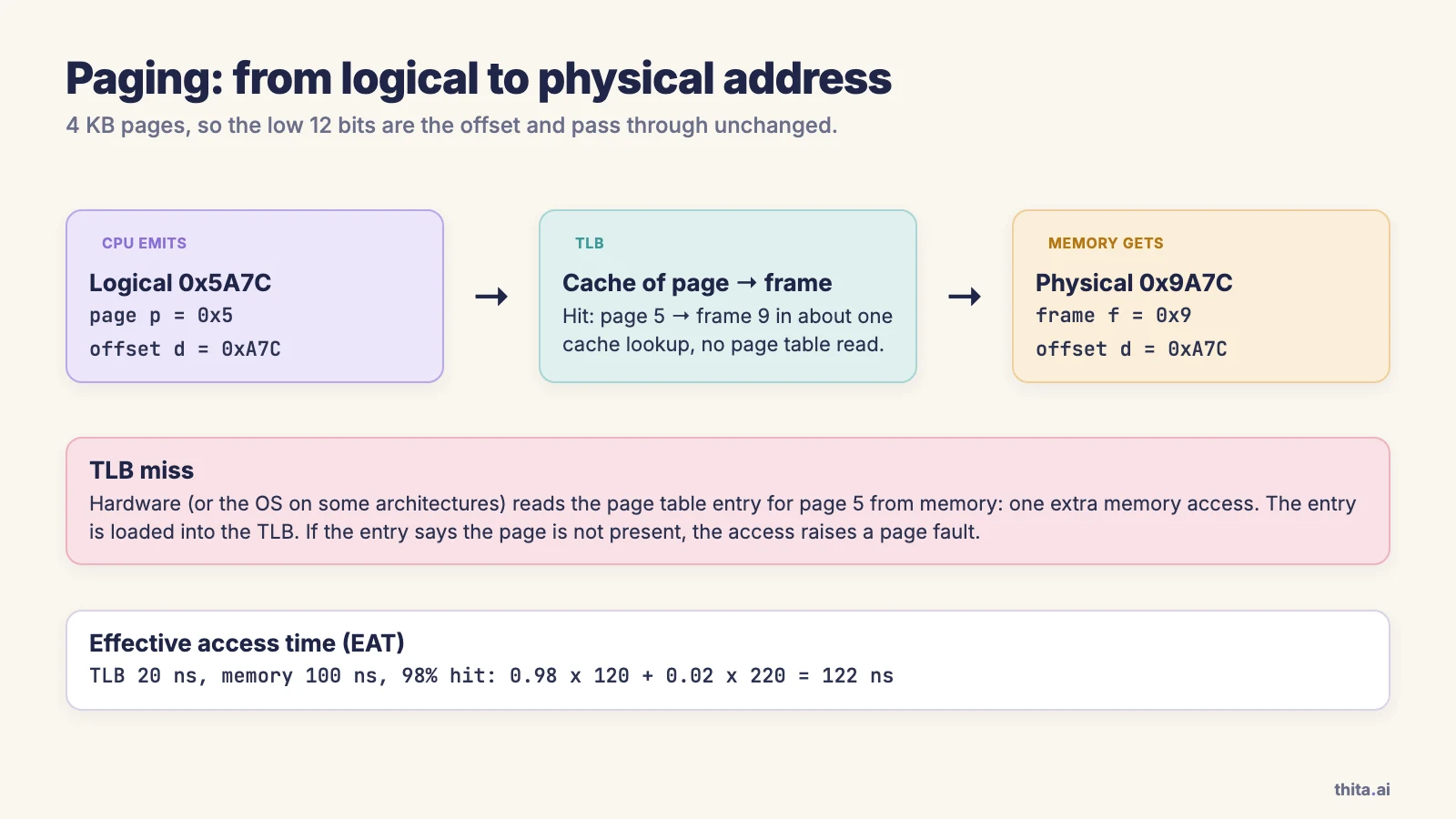
Paging divides logical memory into fixed-size blocks called pages and physical memory into blocks of the same size called frames. A logical address splits into a page number and an offset. The page table maps page number to frame number, and the physical address is the frame's base address plus the offset. Because any page can go in any frame, paging has no external fragmentation, and the program's memory need not be contiguous.
Worked example: with 4 KB pages, the offset is 12 bits. Logical address 0x5A7C has page number 0x5 and offset 0xA7C. If the page table maps page 5 to frame 9, the physical address is frame 9 followed by the same offset: 0x9A7C.
What is the difference between paging and segmentation?
Paging divides memory into fixed-size, invisible pages chosen for the hardware's convenience. Segmentation divides it into variable-size segments that match the program's logical units (code, stack, heap, a module). Paging avoids external fragmentation but has internal fragmentation in the last page. Segmentation maps better to how programmers think and eases protection and sharing, but suffers external fragmentation. Many systems combine the two, and x86-64 Linux in practice uses paging with a flat segment model.
What is the difference between internal and external fragmentation?
Internal fragmentation is wasted space inside an allocated block, for example the unused tail of the last page of a process (on average half a page per process). External fragmentation is free memory that is split into pieces too small to satisfy a request, even though the total free space is enough. Paging suffers the first, contiguous allocation and segmentation suffer the second. Compaction (moving allocations together) can cure external fragmentation.
What is a TLB?
The translation lookaside buffer is a small, fast hardware cache of recent page-to-frame mappings. Without it, every memory access under paging needs two accesses (one for the page table entry, one for the data). The MMU looks up the page number in the TLB first; on a hit it gets the frame at once, and on a miss it reads the page table and loads the entry into the TLB. Many TLBs store an address-space identifier so entries from different processes do not need to be flushed on a context switch.
Effective access time (EAT) with a TLB: let the TLB lookup take 20 ns, a memory access 100 ns and the hit ratio 98 percent. A hit costs 20 + 100 = 120 ns and a miss costs 20 + 100 + 100 = 220 ns, so EAT = 0.98 x 120 + 0.02 x 220 = 117.6 + 4.4 = 122 ns. With an 80 percent hit ratio it is 0.8 x 120 + 0.2 x 220 = 140 ns.
Follow-up interviewers ask: what happens to the TLB on a context switch? (Either it is flushed, or entries are tagged with an address-space ID.)
Why do page tables need multiple levels?
A flat page table is large. With a 32-bit address space and 4 KB pages there are 2^20 pages, so at 4 bytes per entry the table is 4 MB for every process, even if the process uses a tiny part of the space. A two-level (hierarchical) page table pages the page table itself, so inner tables exist only for regions in use. On 64-bit systems, x86-64 uses four levels for 48-bit virtual addresses. An inverted page table instead has one entry per physical frame, which saves space but makes lookup need a hash.
What is swapping?
Swapping moves a whole process (or, in modern systems, individual pages) out of main memory to backing store to free memory, and brings it back later. Modern systems swap pages rather than whole processes, which is what paging to a swap partition or file does.
What is a segmentation fault?
A segmentation fault is the error raised when a process accesses memory it is not allowed to: an unmapped address, a null pointer, or a write to read-only memory. The MMU detects the illegal access and traps to the kernel, which sends the process a SIGSEGV signal that terminates it by default.
Virtual memory interview questions
Virtual memory lets a program use more memory than is physically installed by keeping only the needed pages in RAM. See the virtual memory lesson and page replacement algorithms. The same idea explains how a game can stream a huge world through limited memory, as in how GTA 6 streams its world.
What is virtual memory?
Virtual memory separates the logical address space a program sees from physical memory. Only the pages a program is actively using need to be in RAM; the rest stay on disk. This lets programs be larger than RAM, lets more programs run at once, gives each process a private address space, and makes sharing and protection easy. It works because programs exhibit locality of reference: over a short time they use a small part of their address space.
What is demand paging and what happens on a page fault?
Demand paging loads a page into memory only when it is first referenced. Each page table entry has a valid bit saying whether the page is in memory. When a process touches a page marked invalid, the hardware raises a page fault, and the kernel handles it in six steps:
- The MMU traps to the kernel.
- The kernel checks whether the reference is legal (otherwise it terminates the process).
- It finds a free frame (running a page replacement algorithm if none is free).
- It schedules a disk read of the page into that frame, and the process blocks.
- When the read completes, it updates the page table and sets the valid bit.
- It restarts the instruction that faulted.
Page faults are expensive. Silberschatz's example uses a 200 ns memory access and an 8 ms fault service time. If one access in 1,000 faults, EAT = 0.999 x 200 + 0.001 x 8,000,000 = 199.8 + 8,000 = 8,199.8 ns, about 41 times slower than a no-fault access. To keep slowdown under 10 percent, the fault rate must stay below about one in 400,000.
Follow-up interviewers ask: is every page fault an error? (No. Most are normal demand-paging events, called minor if the page is already in memory and major if it needs a disk read.)
How do the FIFO, LRU and Optimal page replacement algorithms compare?
When memory is full and a page fault occurs, the OS picks a victim. FIFO evicts the page that has been in memory longest. LRU evicts the page unused for the longest time, assuming the past predicts the future. Optimal evicts the page that will not be used for the longest time ahead; it needs future knowledge, so it exists as a benchmark. Here is the standard textbook string with three frames.
Reference string: 7, 0, 1, 2, 0, 3, 0, 4, 2, 3, 0, 3, 2, 1, 2, 0, 1, 7, 0, 1 (20 references, 3 frames).
| Algorithm | Page faults |
|---|---|
| FIFO | 15 |
| LRU | 12 |
| Optimal | 9 |
To see the mechanism, here is a shorter string, 2, 3, 2, 1, 5, 2, 4, 5, 3, 2, 5, 2 with three frames. FIFO faults on 2, 3, 1, 5, 2, 4, 3, 5 and 2: nine faults. It evicts page 2 when 5 arrives, even though 2 was just used, and so faults on it again straight away. LRU faults on 2, 3, 1, 5, 4, 3 and 2: seven faults, because it keeps the recently used pages 2 and 5.
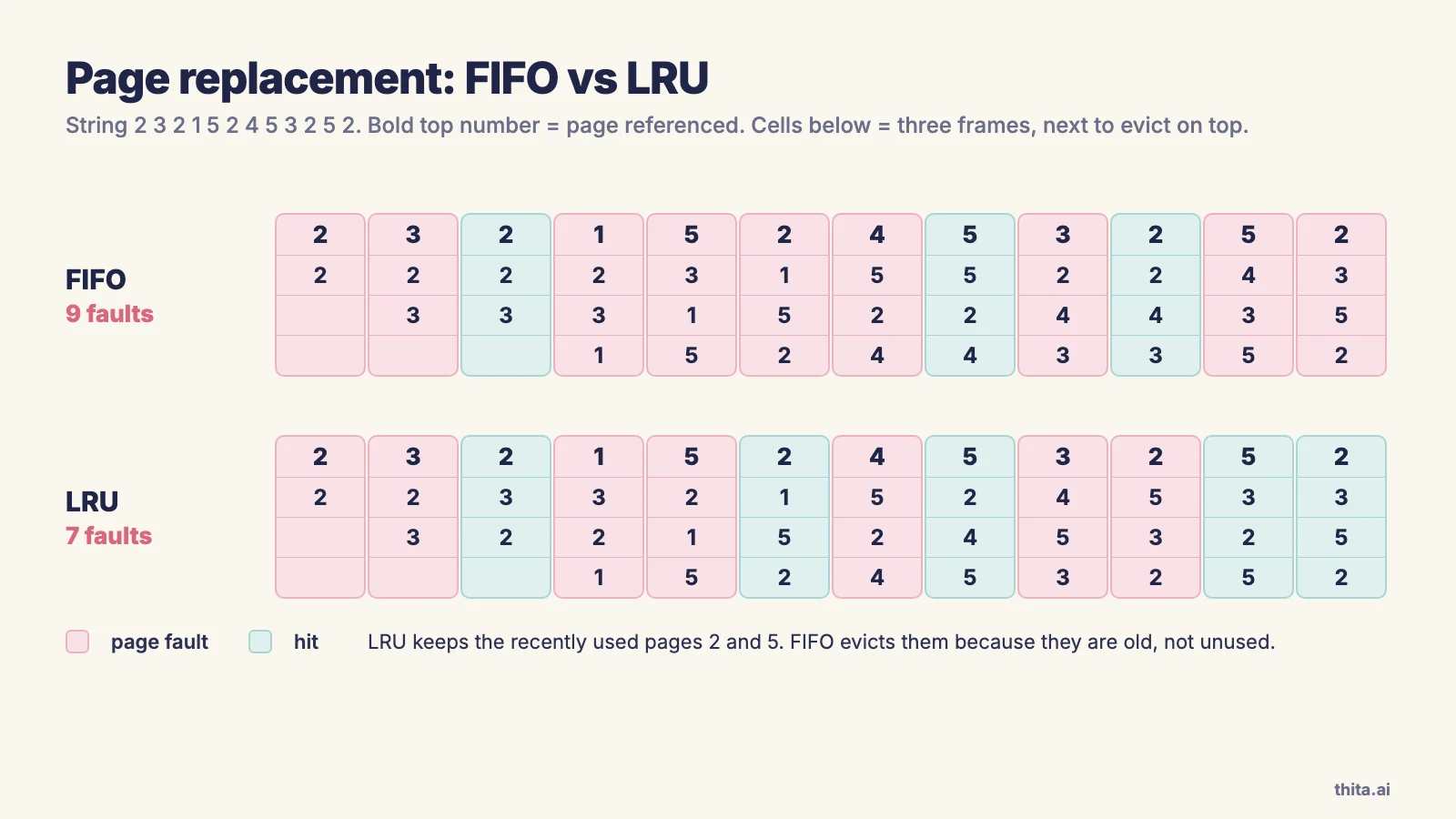
Real systems cannot afford exact LRU, so they approximate it with a reference bit and the clock (second-chance) algorithm.
What is Belady's anomaly?
Belady's anomaly is when giving a process more frames increases the number of page faults. It happens with FIFO. On the reference string 1, 2, 3, 4, 1, 2, 5, 1, 2, 3, 4, 5, FIFO causes 9 faults with 3 frames and 10 faults with 4 frames. LRU and Optimal never show it, because they are stack algorithms: the set of pages kept with n frames is always a subset of the set kept with n+1 frames.
What is thrashing?
Thrashing is when a process (or the whole system) spends more time paging than executing. It starts when a process has too few frames for its working set, so it faults constantly, evicting pages it will need again. CPU utilisation drops, the OS sees the idle CPU and admits more processes, and the faults get worse. The fixes are to give each process enough frames for its working set, to use the working-set model or page-fault-frequency control to decide how many frames it needs, and to suspend some processes (lower the degree of multiprogramming).
What is locality of reference?
Locality is the tendency of programs to reuse recently used data (temporal locality) and to access data near recently accessed addresses (spatial locality). Caches, the TLB and demand paging all work because of it. A loop walking an array has good locality, and one jumping randomly through a huge table does not.
File system interview questions
File system questions cover how files are named, stored and kept consistent. The matching lessons are in the file systems lesson, including file allocation methods.
What is an inode?
An inode is the on-disk structure that stores a file's metadata: owner, permissions, timestamps, size, link count and pointers to its data blocks. It does not store the file name; names live in directory entries that map a name to an inode number. In the classic ext2/ext3 layout, the inode holds 12 direct block pointers plus single, double and triple indirect pointers, so small files need no extra reads while large files can still be addressed. Newer file systems such as ext4 use extents instead.
What are the file allocation methods?
Contiguous allocation stores a file in consecutive blocks: fast sequential and random access, but external fragmentation and difficulty growing files. Linked allocation chains blocks with pointers: no external fragmentation, but poor random access and a lost pointer loses the rest of the file (FAT keeps the links in a table to improve this). Indexed allocation keeps all block pointers in an index block (the inode approach): good random access, at the cost of the index overhead.
What is the difference between a hard link and a symbolic link?
A hard link is another directory entry pointing to the same inode, so both names are equally real and the data survives until the link count reaches zero. It cannot cross file systems and normally cannot point to a directory. A symbolic link is a small file containing a path. It can cross file systems and point to directories, but it breaks (dangles) if the target is removed or renamed.
What is journaling in a file system?
Journaling records the intent of a multi-step update in a log (the journal) before applying it to the main structures. After a crash, the system replays or discards the journal instead of scanning the entire disk, so the file system returns to a consistent state quickly. ext3 and ext4, NTFS and XFS use journals; many journal metadata only, which keeps consistency cheaply but does not protect file contents unless a full-data mode is chosen.
How is free disk space tracked?
The common methods are a bitmap (one bit per block, simple and good for finding contiguous runs), a linked list of free blocks (no extra space, slow to find runs), grouping (the first free block stores addresses of the next n free blocks) and counting (store a start block and a run length). Bitmaps are the usual choice when the bitmap fits in memory.
I/O and disk scheduling interview questions
This section covers how the OS talks to devices and orders disk requests. See the storage and I/O systems lesson, including disk scheduling algorithms.
How do SSTF and SCAN disk scheduling work?
On a hard disk the slow part is moving the head (seek time), so the OS reorders pending requests. FCFS serves them in arrival order. SSTF (shortest seek time first) serves the closest cylinder next, like SJF, and can starve far-away requests. SCAN (the elevator algorithm) sweeps the head to one end, serving requests on the way, then reverses. LOOK is SCAN that reverses at the last request instead of the disk edge. C-SCAN sweeps one way only and jumps back, which gives more uniform waiting.
Worked example: cylinders 0 to 199, head at 53, queue 98, 183, 37, 122, 14, 124, 65, 67.
| Algorithm | Order served | Total head movement |
|---|---|---|
| FCFS | 98, 183, 37, 122, 14, 124, 65, 67 | 45+85+146+85+108+110+59+2 = 640 |
| SSTF | 65, 67, 37, 14, 98, 122, 124, 183 | 12+2+30+23+84+24+2+59 = 236 |
| SCAN (toward 0 first) | 37, 14, (to 0), 65, 67, 98, 122, 124, 183 | 53 + 183 = 236 |
| LOOK (toward 0 first) | 37, 14, 65, 67, 98, 122, 124, 183 | 39 + 169 = 208 |
SSTF and SCAN tie at 236 on this input, which is a coincidence; LOOK saves the trip to cylinder 0. These algorithms matter for spinning disks. SSDs have no head, so seek-minimising order matters little for them. Linux offers the multi-queue schedulers none, mq-deadline, bfq and kyber, and the simple none option is a common choice for fast SSDs; check your own system's default.
What is the difference between polling, interrupts and DMA?
With polling, the CPU repeatedly checks a device's status register, which wastes CPU if the device is slow. With interrupts, the device signals the CPU when it needs attention, so the CPU does other work meanwhile. With direct memory access (DMA), a controller moves a whole block between the device and memory without the CPU copying each byte, and interrupts the CPU once at the end. Polling can beat interrupts for very fast devices, where interrupt overhead exceeds the wait.
What is the difference between buffering, caching and spooling?
Buffering holds data temporarily while it moves between two things of different speeds, such as a disk and a network. Caching keeps a copy of frequently used data in faster storage so later reads are fast. Spooling queues output for a device that cannot interleave jobs, such as a printer, so many programs can submit jobs without waiting. A buffer may hold the only copy of the data; a cache holds a copy of something stored elsewhere.
What are the common RAID levels?
RAID 0 stripes data across disks for speed, with no redundancy. RAID 1 mirrors data across disks, which survives a disk failure at half the capacity. RAID 5 stripes data with parity distributed across all disks and survives one disk failure. RAID 6 uses two parity blocks and survives two failures. RAID 10 stripes across mirrored pairs. RAID improves reliability or speed but is not a backup, since it does not protect against deletion or corruption.
Operating system interview questions for experienced engineers
For engineers with a few years of experience, interviewers ask about mechanisms in real systems, usually Linux. Several answers below cite the Linux man pages and kernel documentation.
How does copy-on-write work?
Copy-on-write (COW) defers copying until someone writes. After fork(), the parent and child share the same physical pages, marked read-only in both page tables. When either writes, the CPU raises a page fault, the kernel copies just that page, gives the writer a private writable copy and resumes. The Linux man page says fork() "is implemented using copy-on-write pages", so its only cost is duplicating the parent's page tables and creating a task structure for the child (fork(2)). This is why fork() followed by exec() is cheap even for a large process. See copy-on-write and memory-mapped files.
Follow-up interviewers ask: why can fork() still cause a latency spike in a large process? (Copying the page tables is proportional to the size of the address space, and afterwards each first write to a shared page triggers a copy.)
What does mmap do and when would you use it?
mmap maps a file (or anonymous memory) into the process's address space, so reading and writing memory reads and writes the file. Pages are loaded lazily through page faults. With MAP_SHARED, updates are visible to other processes mapping the same region and, for files, are carried through to the file. With MAP_PRIVATE, the mapping is copy-on-write, so changes stay private and never reach the file. MAP_ANONYMOUS creates memory with no file behind it, zero-initialised (mmap(2)). It is used for loading executables and shared libraries, for shared memory between processes, for large file access without read copies, and by allocators for big blocks. The costs are page-fault overhead on first touch and less predictable I/O errors, which arrive as signals.
What does a context switch really cost?
There are two costs. The direct cost is saving and restoring registers, running the scheduler and switching the page table (for a process switch). The indirect cost is usually larger: the new thread's data is absent from the CPU caches, and unless the TLB tags entries with address-space IDs its entries are flushed, so the first stretch after the switch runs slowly through cache and TLB misses. A thread switch within the same process avoids the address space change, so it is cheaper. The practical lesson is to measure on your hardware, and to avoid designs that switch thousands of times per second without need.
What is the difference between user-level and kernel-level threads?
User-level threads are managed by a library in user space; the kernel sees one schedulable entity. Switching is fast, but one blocking system call can block all the threads, and they cannot run on several cores. Kernel-level threads are known to the kernel, which schedules each one, so they can run in parallel and block independently, at the cost of a system call for management operations. The mapping models are many-to-one, one-to-one and many-to-many. Linux uses one-to-one: threads are tasks created with clone() with CLONE_VM, which shares the address space and is, in the man page's words, used "to implement threads" (clone(2)). Runtimes such as Go multiplex many user-level goroutines over a few kernel threads, a many-to-many design.
How does the Linux scheduler decide what runs next?
For normal tasks, Linux used the Completely Fair Scheduler (CFS) for many years. CFS tracks each task's virtual runtime (vruntime), its actual runtime normalised by the number of runnable tasks and its weight, keeps runnable tasks in a red-black tree ordered by vruntime, and always runs the leftmost one, the task that has had the least CPU so far (CFS design). Lower nice values mean a higher weight and a slower-growing vruntime, so those tasks get more CPU.
Since Linux 6.6 the kernel uses EEVDF instead of CFS for normal tasks (Earliest Eligible Virtual Deadline First). EEVDF gives each task a "lag", whether it is owed CPU time or has overused its share, considers only tasks with non-negative lag, and runs the one with the earliest virtual deadline, which lets latency-sensitive tasks request shorter time slices (EEVDF scheduler). If an interviewer says "CFS", you can answer with the red-black tree and vruntime, then add that kernels since 6.6 use EEVDF. Real-time tasks (SCHED_FIFO, SCHED_RR) are scheduled strictly by priority ahead of normal tasks.
What is false sharing?
False sharing is when two threads write to different variables that sit on the same cache line (commonly 64 bytes). Each write invalidates the other core's copy of the line, so the line bounces between cores even though the threads never touch the same variable. It shows up as a multi-threaded program that scales badly. The fix is to pad or align hot per-thread variables onto separate cache lines.
What is the buddy system?
The buddy system is a kernel allocator that splits memory into power-of-two blocks. A request is rounded up to the next power of two; if no block of that size is free, a larger one is split into two "buddies". On free, a block merges with its buddy if the buddy is also free, so large blocks are rebuilt quickly. It is fast and limits external fragmentation. Rounding up wastes space (internal fragmentation). Linux uses it for physical pages, with the slab allocator on top for small kernel objects.
OS viva questions: quick answers
These are the short-answer questions that come up in university vivas and written practicals. Each has a one-line answer; the long answers are above.
| Question | Quick answer |
|---|---|
| What is an OS? | Software that manages hardware and provides services to programs. |
| What is a kernel? | The core part of the OS that runs in privileged mode. |
| What is a process? | A program in execution. |
| What is a thread? | A unit of execution inside a process, sharing its memory. |
| What is a PCB? | The kernel's record of one process: state, registers, PID, page table pointer. |
| What is a context switch? | Saving one process's state and loading another's so the CPU can switch. |
| What is a deadlock? | A set of processes each waiting for a resource another holds. |
| What are the deadlock conditions? | Mutual exclusion, hold and wait, no preemption, circular wait. |
| What is starvation? | A process waiting indefinitely while others progress. |
| What is a semaphore? | An integer variable changed only by atomic wait and signal operations. |
| What is a critical section? | Code that accesses shared data and must run by one process at a time. |
| What is paging? | Dividing memory into fixed-size pages and frames to avoid external fragmentation. |
| What is segmentation? | Dividing memory into variable-size logical units such as code and stack. |
| What is virtual memory? | A scheme that lets a program use more memory than physical RAM by paging to disk. |
| What is a page fault? | A trap when a program references a page that is not in memory. |
| What is thrashing? | Excessive paging that leaves the CPU mostly idle. |
| What is fragmentation? | Wasted memory: internal (inside blocks) or external (between blocks). |
| What is spooling? | Queuing output so slow devices such as printers serve many jobs. |
| What is a system call? | A program's request to the kernel for a service. |
| What is a shell? | A program that takes commands and passes them to the OS. |
How to prepare for OS interview questions
Start from your interview type. For OS interview questions for freshers and campus rounds, depth in the first nine topics of this page is enough, and the viva table above is your last-day revision. For an experienced backend or systems role, add the experienced section and prepare to explain one mechanism you have debugged in production, such as a lock contention problem or a memory leak.
A one-week plan.
| Day | Study | Practise out loud |
|---|---|---|
| 1 | Basics, processes, system calls | Draw the process state diagram and explain fork() |
| 2 | Threads, scheduling | Redo the FCFS, SJF and RR example from memory |
| 3 | Synchronization | Write the producer-consumer solution; explain mutex vs semaphore |
| 4 | Deadlocks | Redo the Banker's example, including the refused request |
| 5 | Memory management, virtual memory | Translate an address with a page table; count FIFO and LRU faults |
| 6 | File systems, I/O, disk scheduling | Redo the SSTF and SCAN example; explain the inode |
| 7 | Experienced questions and a mock | Answer 15 random questions aloud, with a timer |
A reading list is short: the Silberschatz textbook for the standard answers, the Linux man pages for Unix details, and the kernel documentation for how Linux does it. Thita's operating systems sheet is the practice list for these topics, and the OS lessons linked throughout this page are the matching lessons in Thita's AI coach.
Frequently Asked Questions
What are the most asked OS interview questions?
The most asked are the difference between a process and a thread, the states of a process, context switching, CPU scheduling algorithms, mutex vs semaphore, race conditions, the four conditions for deadlock, paging vs segmentation, virtual memory and page faults, page replacement algorithms and thrashing. These make up the 15-question list near the top of this page.
Which OS topics are most important for placements and campus interviews?
Processes and threads, CPU scheduling, synchronization, deadlocks, memory management and virtual memory carry most of the weight. File systems and disk scheduling appear less often but are common in vivas. Practise the numerical problems (scheduling, page replacement, Banker's algorithm and disk scheduling), because they are easy to ask and easy to mark.
How do I prepare for an operating system interview in a week?
Follow the one-week plan above: one topic cluster per day, redo one worked example per day without looking, and spend the last day on timed spoken answers. Learn each answer as a mechanism (what happens, step by step) plus one trade-off, not as a definition.
Are OS questions asked at FAANG and other big tech interviews?
Rarely as a standalone round. They appear inside coding and system design rounds and in systems-flavoured roles: threads and locks come up when you write concurrent code, and caching, memory and I/O come up in system design. Teams that work close to the kernel, infrastructure or SRE ask more. Check the specific job description, because the weighting differs by team.
What OS questions are asked of experienced engineers?
Mostly "what happens when" and "why" questions: how fork() and copy-on-write work, what a page fault does, how mmap differs from read, the real cost of a context switch, how the Linux scheduler picks a task, user-level vs kernel-level threads and false sharing. They want you to tie a concept to something you have debugged.
Is Linux knowledge needed for OS interviews?
For most fresher rounds, the textbook concepts are enough. For backend, SRE and infrastructure roles, interviewers often ask about Linux specifically: system calls, signals, fork/exec, mmap, the scheduler and the page cache. The man pages (section 2 for system calls) are the most reliable reference.
Topics
Related on Thita
Your next step
Learn operating systems the way interviews ask them
The OS sheet covers processes, threads, scheduling, synchronization, deadlocks, memory and file systems in order, and every lesson can be heard with an AI coach you can stop and ask. Practise the answers out loud in an AI mock interview when they hold up.