
System Design
Why Is GTA 6 30 FPS? The Frame Budget Behind the Frame Rate
Why is GTA 6 30 fps on PS5 and PS5 Pro? A 33.3 ms frame budget, a CPU-bound city and what Digital Foundry found at launch, explained like an engineer would.
Thirty frames per second feels like a verdict. It is closer to an invoice.
Updated 19 November 2026, launch day. Figures are checked against the sources linked below.
Why is GTA 6 30 fps? Each frame gets a fixed budget: 33.3 ms at 30 fps. GTA 6 spends it on a dense, simulated city of pedestrians, traffic, physics and streaming. Those costs land on the CPU, and a faster GPU or upscaler cannot shrink them. At 60 fps the CPU gets 16.7 ms, half the time.
That is the short answer. The rest of this post is the long one, written for people who want to know why the number is what it is.
This is a spoke of our series on how the game is probably built. The pillar covers what engine GTA 6 uses. Start there if you want the whole map.
What has been reported about GTA 6's frame rate?
First the facts, with dates, because this topic collects rumors.
- Rockstar's stance. Rockstar confirmed 30 fps on both consoles in August 2026. TweakTown reported on 10 November that this includes the PS5 Pro, with PSSR upscaling and ray-traced shadows. No 40 or 60 fps mode has been announced.
- The CPU argument. On 17 November, TweakTown relayed Richard Leadbetter of Digital Foundry on DF Direct Weekly. A 60 fps mode is "not viable", and a 40 fps mode would still need "a huge amount of optimization or cutbacks." His reasoning, as reported: the limit is the processor, and the PS5 Pro's CPU is only modestly faster than the base console's.
- How it runs. On 18 November, TweakTown reported John Linneman of Digital Foundry saying the base PS5 struggles to hold 30 fps "more often than expected". Normal play has small dips. Heavy action, such as a grenade launcher test, drops below 30 for the whole encounter. The same coverage describes the PS5 Pro as holding 30 with near-flawless pacing in normal play, with brief dips in the grenade-launcher stress test.
- Resolution. Digital Foundry's August analysis of Rockstar's trailer footage put the base PS5 near 1440p internal. No Pro figure has been published, and Rockstar has not confirmed either.
Two places where the reporting needs care.
The lowest frame rate on the base PS5 depends on the scene. TweakTown's write-up gives 24 fps in explosion tests and 26 fps while driving. Treat it as "low to mid 20s in the worst moments."
And on the future: an August TechRadar report floated 60 fps being added after launch. Rockstar has announced no such mode, and Digital Foundry's more recent view (17 November) is that it is not viable. The Digital Foundry quotes above are as relayed by the outlets named.
Everything below this line that is not in the list above is inference from how engines work. We will say so once per area and then stop apologizing.
Why is GTA 6 30 fps and not 60? Start with frame time
Frame rate is a reciprocal. The budget is 1000 ms divided by the frame rate.
| Target | Time per frame | Relative to 30 fps |
|---|---|---|
| 30 fps | 33.3 ms | baseline |
| 40 fps | 25.0 ms | 25% less time |
| 60 fps | 16.7 ms | half the time |
Read the right-hand column. Going from 30 to 60 asks every subsystem to finish in half the time, in the same frame, on the same chip.
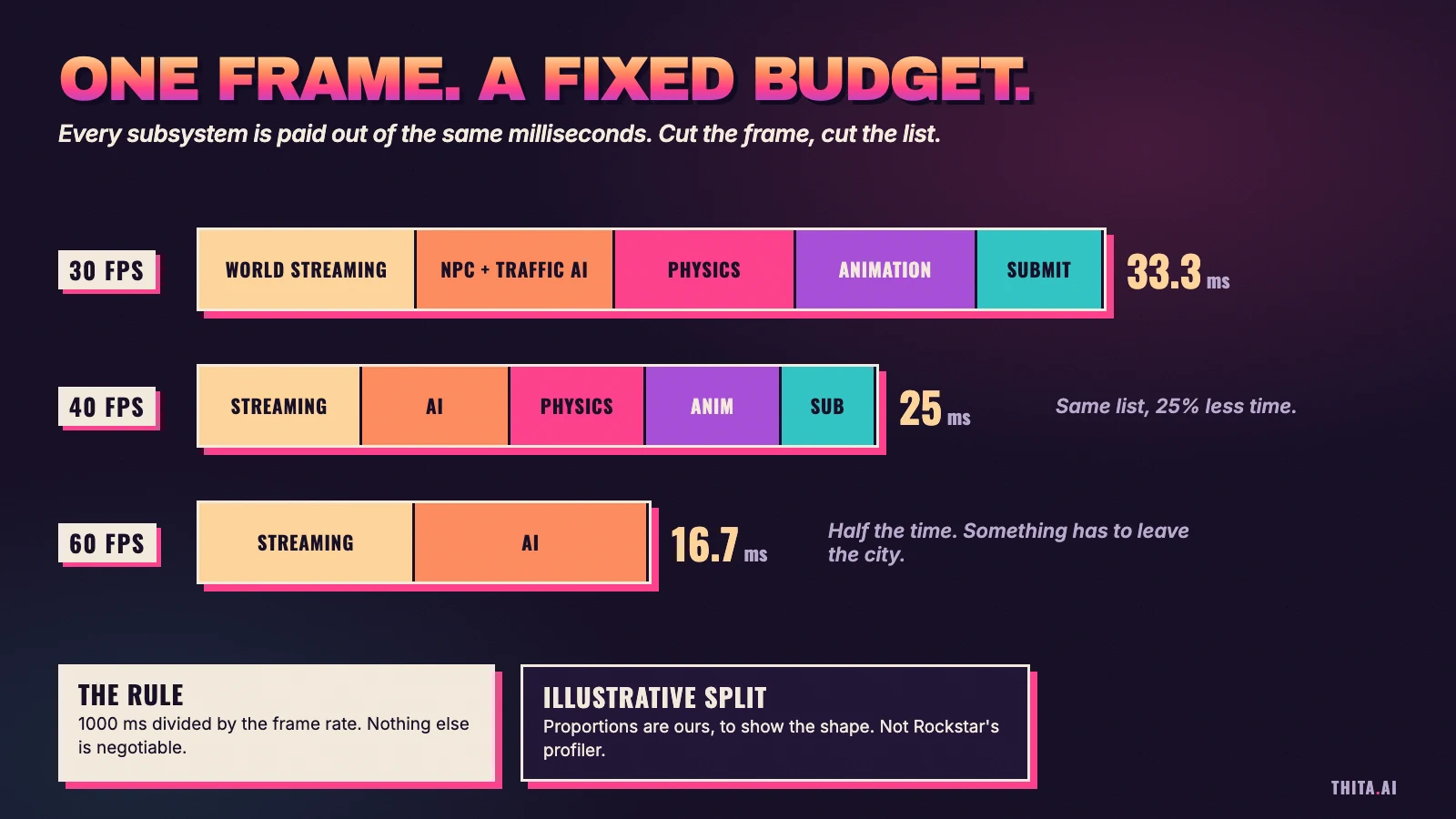
The bars in the diagram are illustrative, since profiler captures are not public. The shape is real, though. Every open-world engine runs a loop: read input, simulate the world, decide what to draw, hand it to the GPU, repeat. The loop has a deadline. The deadline is the budget.
A constraint is a collaborator. It tells the team what the game is allowed to be.
What is a frame budget?
A frame budget is the total time one frame may take, divided among the subsystems that must finish inside it. If the sum goes over, the frame arrives late and the screen shows the old one again.
A dropped frame is not a mystery. It is a sum that overflowed.
Why 33.3 ms and not "about 30"?
Because the display is a clock. A 60 Hz screen refreshes every 16.7 ms, and a 30 fps game hands over one image every second refresh. Miss that refresh by one millisecond and the frame shows at 50 ms, not 34. The penalty is quantized, so dips feel like hitches, not gentle slowdowns.
Is GTA 6 CPU-bound or GPU-bound?
On the reporting above, CPU-bound. Here is what those words mean.
A frame is built by two processors working in sequence. The CPU simulates the world and describes the frame: who moved, what collided, what is visible, which draw commands to issue. The GPU takes that description and paints pixels.
If the GPU finishes early and waits for the CPU, you are CPU-bound. If the CPU finishes early and waits for the GPU, you are GPU-bound. The slower side sets the frame time. The faster side idles.
One experiment tells you which. Lower the resolution. If the frame rate does not move, the GPU was never the problem.
Why does a better GPU not fix a CPU limit?
Because they are different workloads. The GPU's cost scales with how many pixels it shades and how expensive each pixel is. The CPU's cost scales with how much world it has to think about.
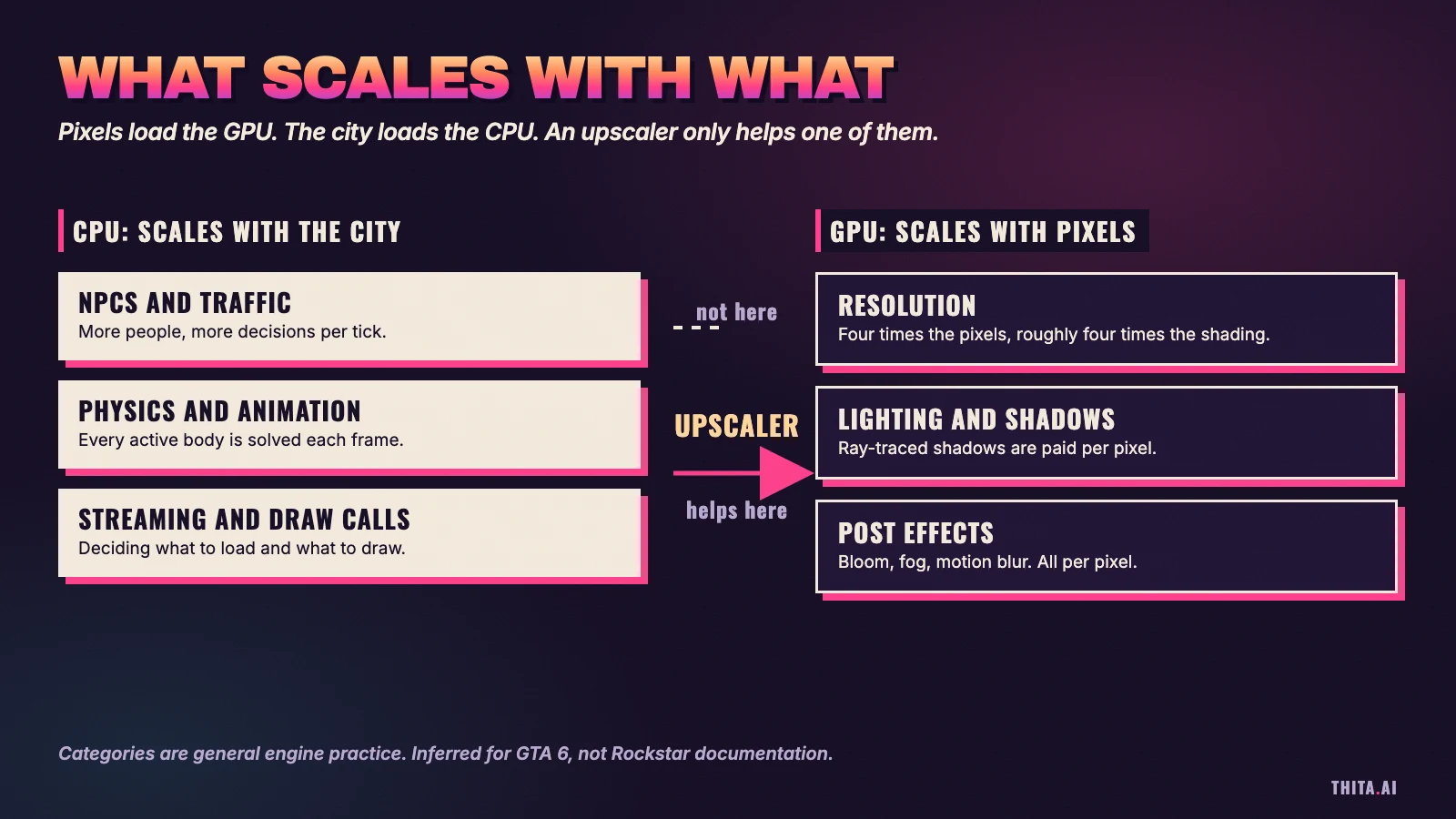
Double the resolution on each axis (1080p to 4K, four times the pixels) and the GPU does about four times the shading. The CPU does the same work, because the same pedestrians walk the same street. Double the pedestrians and the opposite happens.
This is why the PS5 Pro is not a 60 fps console for this game. As reported, its GPU is a large step up and its CPU is a small one.
Why does simulation density scale with the city and not the resolution?
Because a living city is a list of things that must update every frame, and the list is long.
From the outside, the likely shape of GTA 6's per-frame CPU work is the usual open-world list. Rockstar has not published the real one, so treat these as the categories any such engine carries.
- Pedestrians. Each active person needs a decision: where to walk, who to avoid, whether the gunshot a block away concerns them. Our sibling post on NPC AI and the wanted system goes through how that is probably layered.
- Traffic. Vehicles follow lanes, obey signals, brake for each other and react to the player. A road network is a graph, and every car is a query on it.
- Physics. Collisions, ragdolls, debris, vehicle suspension, destructible props. Cost rises with the number of interacting bodies, not the number of bodies on screen.
- Animation. Skeletons, blending, and the procedural character motion Rockstar has used for years. More characters in view means more skeletons evaluated.
- World streaming. Deciding what to load next, what to drop, and keeping the game from stalling while the player drives at speed. Our post on GTA 6 file size and world streaming covers that one in depth.
- Render preparation. Culling, sorting and building the draw lists the GPU will consume.
None of these items has a pixel in it.
Leadbetter's remark, as relayed, is that "literally anything can happen because of the systemic nature of the experience." That sentence is an engineering statement. A systemic game does not play back a scripted street. It runs one. Rules interact, and interacting rules have a worst case. The frame has to survive the worst case, not the average one.
That is why the dips in the reports cluster in heavy action. Explosions, panicking crowds and chasing police raise the number of active simulation objects at once. The budget does not grow to meet them.
Why did Rockstar choose density over frame rate?
Digital Foundry reads it as a choice to maximise visual detail at a fixed 30 fps. TechRadar quotes the team saying Rockstar focused on "maximizing the level of visual detail at a fixed 30fps frame rate on all platforms." Rockstar has not explained its reasoning in detail.
Obbe Vermeij, a former Rockstar technical lead, framed it as a trade-off in a July 2025 post on X, as reported by Insider Gaming: "At 30 fps you can render twice as many polygons compared to 60 fps." He was not speaking about work he had done on GTA 6.
The question is not "why did they not pick 60?" The question is "what would the city lose to get there?"
Why does an upscaler like PSSR help the GPU but not the CPU?
PSSR is Sony's machine-learning upscaler for the PS5 Pro. It renders the image at a lower internal resolution and reconstructs a sharper, higher-resolution one.
That saves GPU work. Fewer pixels shaded means more GPU time free. It saves almost nothing on the CPU side, because the CPU never knew how many pixels there were. It was busy counting pedestrians.
Upscaling is a GPU optimization. It can buy visual quality, or GPU headroom for the ray-traced shadows Rockstar says the Pro gets. It cannot buy back CPU milliseconds.
So when a Pro-enhanced game is still capped at 30, the cap is the CPU's signature.
Can GTA 6 just use more CPU cores?
Modern engines split the frame into jobs: small units of work that any core can pick up. A scheduler hands jobs to worker threads. Where one job needs another's result, there is a dependency, and where several must finish before the next phase starts, there is a sync point.
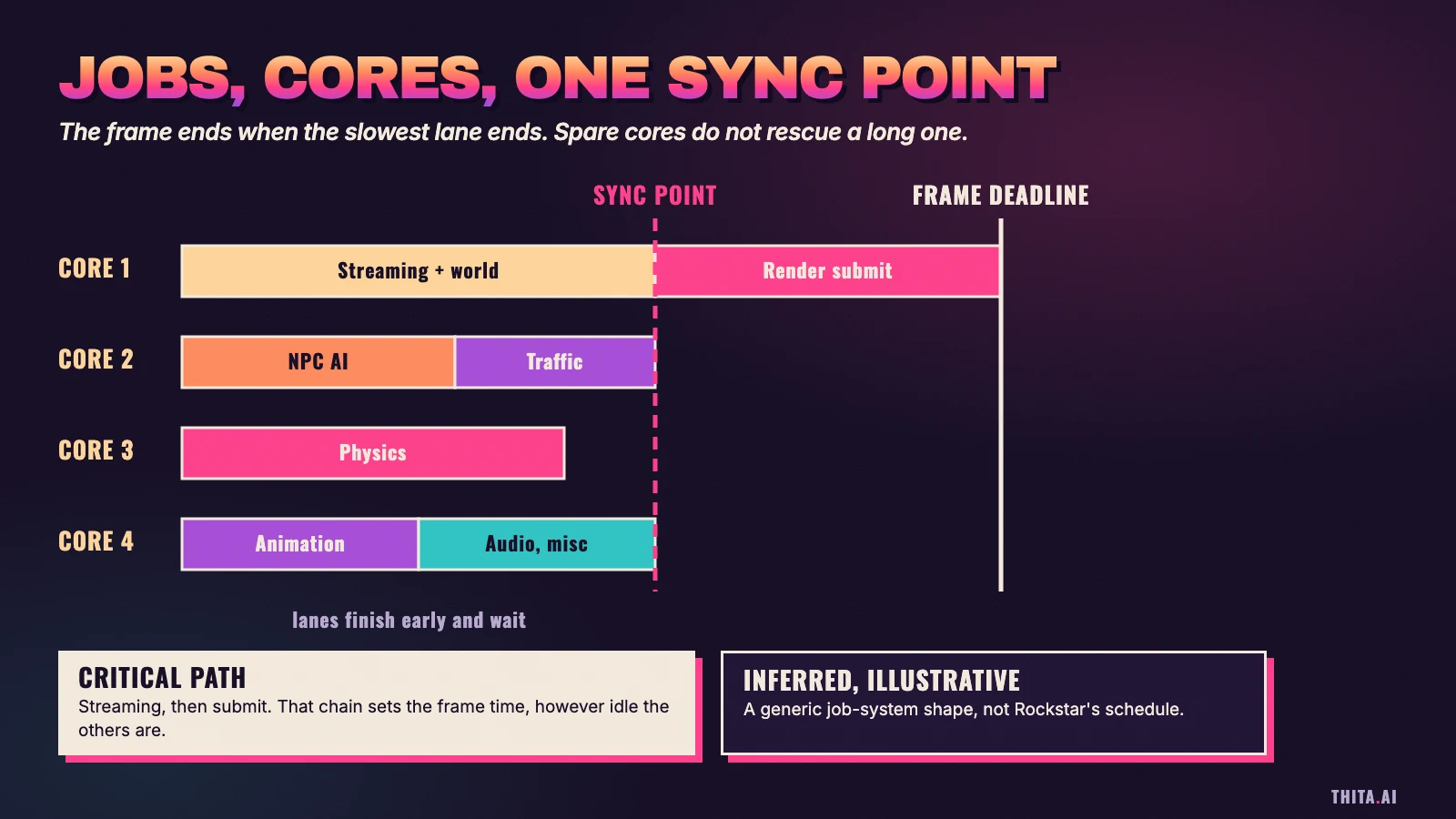
The picture is a generic job graph, not Rockstar's. It shows the two limits that matter.
First, the critical path. The longest chain of dependent jobs sets the frame time, however many cores sit idle beside it. You can add lanes. You cannot add speed to a chain.
Second, the sync point. Every lane waits for the slowest one. A single heavy physics island or a streaming hitch holds the whole phase.
Textbooks call this Amdahl's law: the serial portion caps what parallel hardware can do.
If this sounds like operating systems class, it is. The scheduler decisions behind a frame are the same ones in the OS lesson on multiprocessor scheduling, and the worker-pool shape is exactly the one in thread pools and common thread patterns. Switching a thread off a core has a cost too, which the context switching lesson walks through. A frame that pays for needless switches has spent budget on bookkeeping.
What is frame pacing, and why can a locked 30 feel better than 45?
Frame rate is an average. Frame pacing is the rhythm.
On a 60 Hz display, a new frame can only appear on a refresh tick. A locked 30 fps game delivers one frame every second tick. Every frame stays on screen for exactly 33.3 ms. The motion is even.
An unlocked game running somewhere between 40 and 50 delivers frames at irregular intervals. Some frames sit on screen for one refresh, some for two. The average is higher. The experience is a stutter, because the eye reads the pattern of the changes, not the mean.
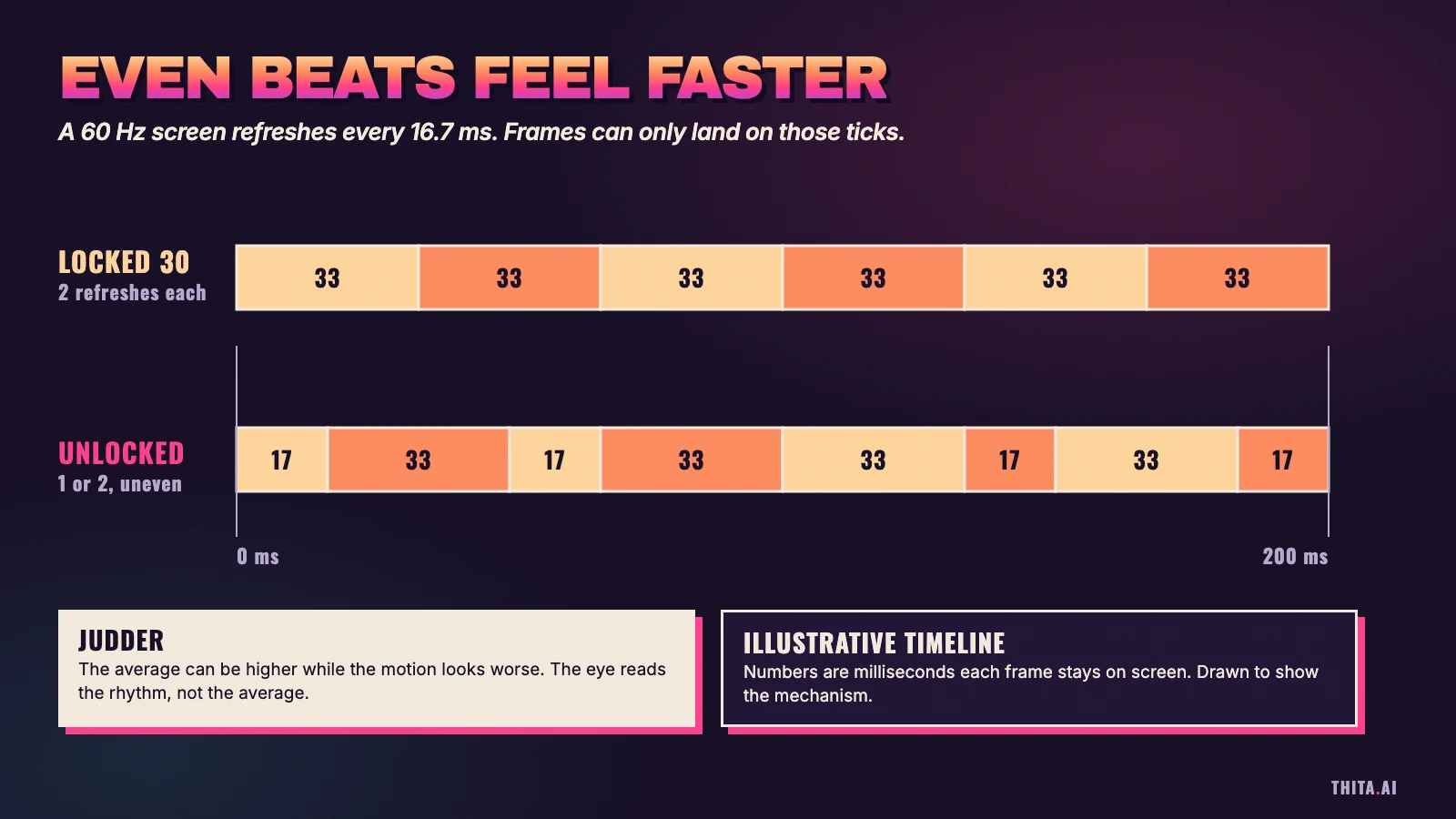
The numbers in the diagram are illustrative. The mechanism is not. A cap plus a budget the engine can keep gives a steady rhythm, and the Pro praise reported above was about exactly that.
It is also why base PS5 dips read as worse than their raw numbers. Falling from 30 to the mid 20s breaks the rhythm the player had settled into.
| Locked 30 | Unlocked 40 to 50 | |
|---|---|---|
| Frame time | 33.3 ms, steady | Varies frame to frame |
| Display behavior | Each frame held two refreshes | Mixed one and two refreshes |
| Feels like | Even motion | Judder, even at a higher average |
| Needs from the engine | A budget it can keep | Variable refresh or a matching display |
The last row is the footnote. 120 Hz and variable refresh screens change the arithmetic (25 ms is exactly three refreshes at 120 Hz), which is why 40 fps modes exist in other games. For GTA 6, Digital Foundry argues the CPU is the obstacle.
How does 30 fps affect input latency?
Frame time is also a floor on responsiveness.
Between a button press and the changed pixel sits a pipeline: input, simulation, render, GPU, display. Each stage aligns to a frame boundary. At 30 fps a frame is 33.3 ms, so the clock is coarse, and a pipeline can add more than one frame of delay. At 60 fps every stage is half as long.
That is the real cost of 30, and what people mean when a game "feels floaty." It is a coarser clock.
Games manage it by sampling input late and predicting motion forward. Whether Rockstar does either here is not public. A budget can be spent on latency as well as on pixels.
Is this the same problem as a latency budget in system design?
Yes. Almost line for line.
A backend request has a deadline too. Suppose an API promises 300 ms at the 99th percentile, split among an auth check, a cache lookup, a database read and a downstream service. If one hop overruns its share, spare capacity elsewhere does not give the time back.
| Game frame | Request path |
|---|---|
| 33.3 ms frame deadline | 300 ms p99 deadline |
| Streaming, AI, physics, animation | Auth, cache, database, downstream calls |
| Critical path of dependent jobs | Longest chain of synchronous calls |
| Sync point | Fan-out join, wait for slowest shard |
| Dropped frame | Timeout, retry, user-visible stall |
| Worst-case explosion scene | Tail latency (p99, not the average) |
Both disciplines say the same thing. Design for the worst case. Measure the slowest lane. Find the critical path before you buy hardware. The system design estimation numbers lesson builds the habit of knowing what a memory read or a network hop costs, so a budget is arithmetic and not a guess.
How would you schedule six subsystems inside 33 milliseconds?
That is the interview version of this post. The prompt: "You have 33 milliseconds per frame. Here are six subsystems: streaming, AI, physics, animation, audio and render submission. Design the scheduler."
A good answer starts with the budget and what happens on a miss: hold the previous frame, or drop work. Then split the subsystems into dependent and independent work and draw the dependency graph. Run it on a fixed pool of worker threads fed by a queue of jobs, one thread per core, not one thread per task. Name the critical path and the sync points, and say where cores will idle. Give each subsystem a time slice and a degrade path, such as fewer NPCs updated per frame or lower physics detail, for when it overruns. Close with how you would measure it: per-subsystem timing, a p99 view and a worst-case scene.
The same answer, with the box labeled "service" instead of "subsystem," is a question in the system design course. If this is the first time a budget like this has made sense to you, that is the start of system design, not the end of it. The step-by-step framework for any system design question shows how to carry the habit into any prompt.
Frequently Asked Questions
Why is GTA 6 30 fps on PS5?
Rockstar confirmed 30 fps on both consoles in August 2026. Digital Foundry's reported reasoning is that the CPU is the limit: at 30 fps the CPU has 33.3 ms per frame, and a dense, systemic city fills it. Rockstar has not explained its reasoning in detail.
Will GTA 6 get a 60 fps mode?
Not at launch, as reported. Digital Foundry's Richard Leadbetter called a 60 fps mode "not viable" on these consoles (17 November). An August TechRadar report floated 60 fps arriving after launch. Rockstar has announced no such mode.
Does the PS5 Pro run GTA 6 at 60 fps?
No. Rockstar lists PSSR upscaling and ray-traced shadows as PS5 Pro enhancements, with the same 30 fps target. Digital Foundry reports the Pro holds 30 more reliably than the base PS5. The Pro's GPU is much faster, but its CPU is only modestly faster.
What is the difference between CPU-bound and GPU-bound?
A game is CPU-bound when the processor's simulation work takes longer than the graphics card's drawing work, so the GPU waits. It is GPU-bound in the opposite case. The easy test is to lower the resolution: if the frame rate does not rise, the CPU is the limit.
Is 30 fps bad?
A steady 30 fps has even frame pacing and looks consistent, but it has coarser input latency than 60. The bigger problem is dips below 30, which break the rhythm. That is what the reports describe on the base PS5 in heavy action.
Why do console games target 30 fps so often?
Because games with large simulated worlds are usually CPU-limited, and consoles have fixed CPUs. A 30 fps target doubles the time available per frame, which lets the studio spend it on more characters, traffic, physics and detail. It is a tradeoff, chosen per game.
Topics
Related on Thita
Your next step
Learn the system design behind worlds like this
Streaming, caching, real-time networking, state machines and geospatial indexes are the same ideas system design interviews test. Thita teaches them in 12 families with 26 worked case studies, and every lesson can be heard with an AI coach you can stop and ask.