
Interview
Remote vs Onsite Interviews: How Preparation Strategies Differ
Remote interviews and onsite interviews look similar on paper: same company, same role, often the same question bank. Yet candidates who perform confidently ...
Remote interviews and onsite interviews look similar on paper: same company, same role, often the same question bank. Yet candidates who perform confidently in one format can struggle in the other. The difference is rarely about algorithms or system design knowledge—it’s about environment, constraints, and how you communicate under them.
This post breaks down how interview preparation should differ for remote interviews vs onsite interviews, specifically in tech hiring. We’ll focus on practical, engineer-level tactics you can apply immediately, not generic advice like “be yourself.”
Remote vs Onsite Interviews: What Actually Changes?
From a hiring team’s perspective, remote and onsite interviews aim to answer the same questions:
- Can you solve the kinds of problems we have?
- Can you reason clearly and communicate well?
- Will you be effective working with this team?
But the constraints differ:
-
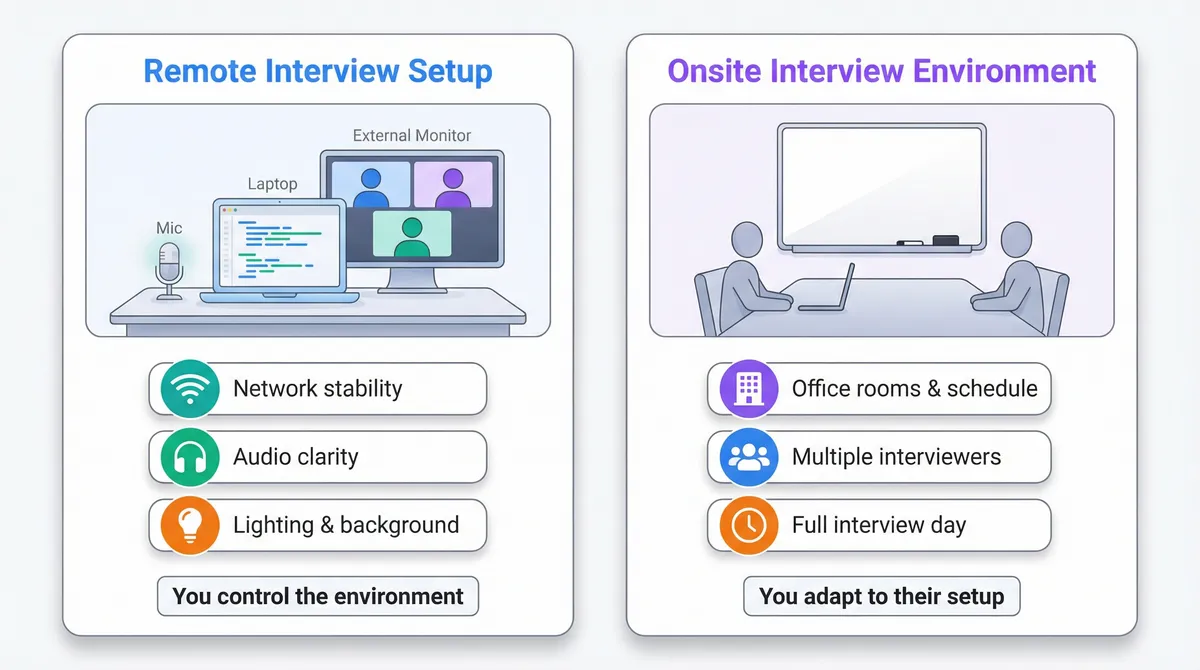
Remote interviews introduce:
- Audio/video quality issues
- Screen sharing and tooling constraints
- Harder non-verbal communication
- Environment control (or lack of it) on your side
-
Onsite interviews introduce:
- Whiteboards or low-tech environments
- Longer, more intense interview days
- In-person social dynamics (small talk, lunch, office tour)
- Less control over your environment and schedule
Your technical preparation (DSA patterns, system design fundamentals, language fluency) should be strong for both. What changes is how you execute under these different constraints.
Key Differences in Remote vs Onsite Interview Preparation
1. Environment and Setup
Remote: You Own the Environment
For remote interviews, your environment is part of your “interview stack.”
You need to prepare:
-
Network and hardware
- Stable wired or strong Wi-Fi connection
- External monitor if possible (code + notes + interviewer view)
- Tested microphone and camera (avoid laptop mic if you can)
-
Workspace
- Quiet room with a door
- Neutral background (or consistent virtual background)
- Good lighting (front-facing light, not backlit)
-
Tooling
- Browser updated, video platform tested (Zoom, Google Meet, etc.)
- Coding platform tested (CoderPad, CodeSignal, shared docs, etc.)
- Keyboard shortcuts for switching windows/screens
Preparation task: schedule at least one full-length mock remote interview using the same tools (or similar) to simulate the real constraints. Leveraging AI Mock Interviews vs Real Interviews: Do They Actually Help? can also provide valuable practice in a simulated remote environment.
Onsite: You Adapt to Their Environment
Onsite, you control very little:
- You may be coding on:
- A whiteboard
- A shared laptop
- Pen and paper
- You’ll be moving between rooms, meeting multiple people
- You’ll have to manage energy over several hours
Preparation task: practice whiteboard-style problem solving:
- Solve a problem on paper or a whiteboard without running code
- Talk through your thought process as if someone is in the room
- Practice writing legible, structured code without auto-completion
This approach aligns well with strategies discussed in How to Revise DSA Efficiently Before Interviews, which emphasizes offline coding practice and clarity.
2. Communication and Presence
Remote: Compensate for Reduced Bandwidth
In remote interviews, you lose a lot of non-verbal bandwidth:
- Harder for interviewers to see your thinking on your face
- Easier for people to talk over each other
- Silence can feel more awkward
Compensate by over-communicating structure:
-
At the start of a question:
- Restate the problem in your own words
- Clarify constraints and examples
- Explicitly state your plan: “I’ll first clarify requirements, then propose an approach, then we can discuss complexity.”
-
While coding:
- Narrate key decisions: “I’m choosing a hash map here to get O(1) lookups.”
- Periodically summarize: “So far, I’ve handled the input parsing; next I’ll implement the main loop.”
-
When stuck:
- Verbalize your confusion: “I see two options: binary search or sliding window. Binary search seems promising because the array is sorted. Let me outline that.”
This isn’t “talk more”; it’s talk more structurally. Interviewers need to infer your thought process through audio and a code window.
Onsite: Use the Full Room
Onsite, you have more channels:
- Whiteboard
- Body language
- Eye contact
- Physical pointing to parts of your diagram or code
Use them:
-
Draw diagrams for:
- Data structures (trees, graphs)
- System design components
- Edge cases and flows
-
Stand when whiteboarding; face the interviewer regularly:
- Alternate between writing and turning to explain
- Use your hand to highlight parts of the diagram while speaking
Preparation task: practice explaining a known algorithm without code, using only a whiteboard or paper diagram (e.g., explain BFS on a graph with a drawn queue and visited set).
Remote Interview Preparation: Deep Dive
Tooling and Workflow
Remote interviews are often constrained by the tools the company uses. Common setups:
- Collaborative code editors (CoderPad, HackerRank, CodeSignal)
- Shared Google Docs or similar
- Screen sharing your local IDE (less common for early rounds)
You should:
-
Practice in the same mode:
- If they mention CoderPad, use “plain text + stdout” style, no IDE features
- Get comfortable without auto-complete, linting, or local testing
-
Optimize your layout:
- One monitor for code
- One for video call + notes (if allowed)
- Keyboard shortcuts for:
- Switching windows (Alt+Tab / Cmd+Tab)
- Mute/unmute
- Start/stop screen share
-
Use a simple, readable coding style:
- Short functions
- Clear variable names
- Minimal cleverness
Example: a simple two-sum implementation in a shared editor where you can’t run code:
PYTHON
When walking through this remotely, you would:
- State the approach: “I’ll use a hash map to store values we’ve seen and their indices.”
- State complexity: “Time O(n), space O(n).”
- Dry-run with an example verbally, pointing in the editor: “For nums = [2,7,11,15], target = 9…”
Handling Technical Issues Gracefully
You should assume something will go wrong at some point in your interviewing career:
- Audio lag
- Video freeze
- Screen share glitch
Preparation strategies:
- Have a backup device ready and logged into email/calendar
- Have a phone hotspot configured
- Keep the recruiter’s email or phone number reachable
During an issue:
- Narrate what’s happening: “My screen share seems frozen on my side; I’m going to stop and restart it.”
- If it persists: “Would you mind if I email the recruiter after this call to reschedule, in case this affects our ability to continue effectively?”
Interviewers don’t penalize you for network issues; they do care about how you handle them.
Remote Behavioral and Culture Fit Rounds
Remote behavioral interviews can feel more “flat.” You don’t have the energy of a room, so you need more structure:
- Prepare STAR-format stories (Situation, Task, Action, Result)
- Have 6–8 stories that you can adapt:
- Debugging a hard production issue
- Disagreement with a teammate
- Leading a project or initiative
- Learning a new technology quickly
- Handling failure or a missed deadline
When answering:
- Keep answers tight; remote attention spans are shorter
- Explicitly connect your story to the question: “This example shows how I handle ambiguity and drive clarity in requirements.”
Onsite Interview Preparation: Deep Dive
Whiteboard and Low-Tech Coding
Many onsite interviews still rely on whiteboards or paper. The constraints:
- No compiler
- No syntax highlighting
- No execution
Your preparation should include offline coding drills:
- Pick a problem you know (e.g., “reverse a linked list”).
- Solve it on paper or a whiteboard:
- Write function signature
- Implement full solution
- Include edge case handling
- Review for:
- Legibility
- Logical structure
- Missing corner cases
For example, reversing a linked list in a whiteboard setting (in generic pseudocode):
TEXT
When presenting onsite:
- Draw a small linked list (e.g., 1 → 2 → 3 → null)
- Walk through pointers (
prev,current,nextNode) step by step - Use arrows and labels on the whiteboard to show pointer movement
Endurance and Schedule Management
Onsite days can be 4–6 hours of back-to-back interviews. Preparation isn’t just intellectual; it’s also physical and logistical.
Prepare by:
-
Doing back-to-back practice sessions:
- Two coding problems + one system design session in a row
- Minimal breaks, to simulate fatigue
-
Planning your energy management:
- Light meal before the onsite
- Hydration (but not so much that you’re uncomfortable)
- Use short breaks to reset, not to doomscroll on your phone
During the day:
-
Treat each interview as a fresh start; don’t carry over:
- A previous bad performance
- Overanalysis of earlier feedback
-
Use the lunch/chat session:
- Ask about team practices, deployment, on-call
- Show curiosity about their engineering culture
System Design Onsite
System design interviews are often onsite (or in longer remote sessions). Onsite, you can leverage the whiteboard more naturally.
Preparation tasks:
-
Practice designing:
- URL shortener
- News feed
- Rate limiter
- Real-time chat
-
For each, practice:
- Drawing high-level architecture: clients, API gateway, services, databases, caches, queues
- Detailing specific components when asked:
- Data model
- Consistency model
- Scaling strategy
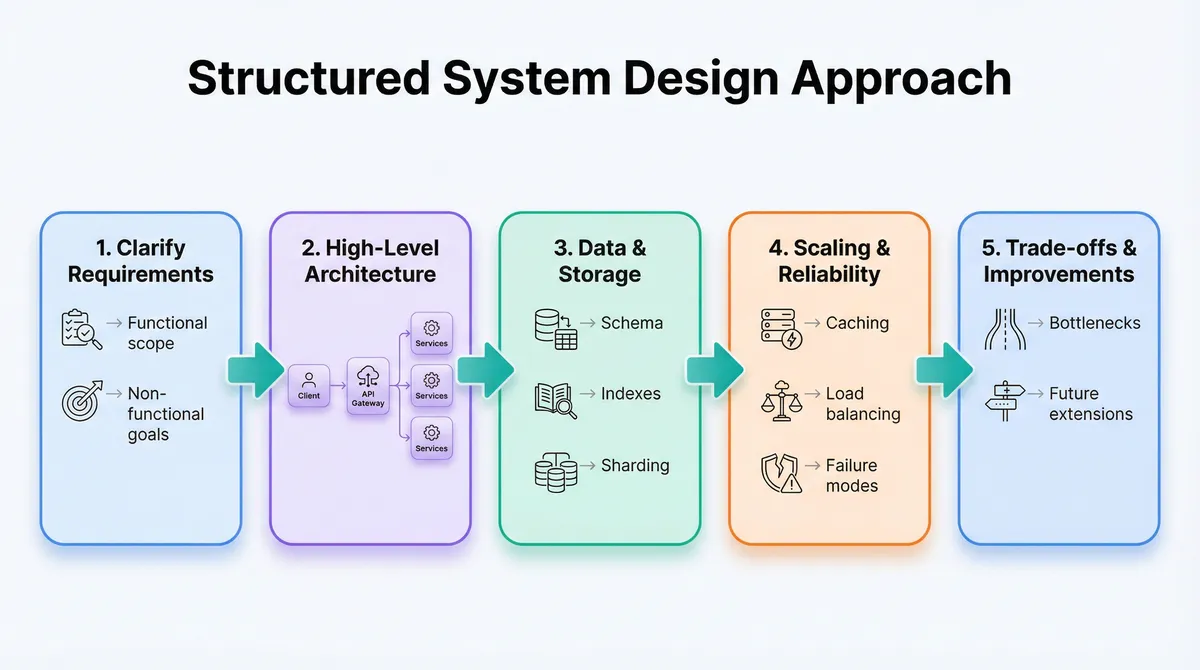
Use a repeatable structure:
- Clarify requirements
- Propose high-level design
- Drill into a component (e.g., database schema, cache strategy)
- Discuss trade-offs and bottlenecks
Onsite, physically pointing to parts of your diagram while explaining helps the interviewer follow your reasoning. For a comprehensive guide on system design preparation, see The Ultimate System Design Roadmap: 120 Topics to Master Every Interview.
Differences in Coding Practice: Remote vs Onsite
Your core algorithmic knowledge is shared across both formats, but how you practice should diverge slightly.
Remote: Practice in “Online Judge” Mode
-
Use platforms that simulate:
- No access to your local IDE
- Time pressure per problem
- Typing speed and accuracy
-
Focus on:
- Reading and understanding problem statements quickly
- Typing bug-free code without heavy IDE support
- Writing minimal test cases in your head or in comments
For example, when using a pattern-based sheet (like a 94-pattern DSA catalog), you might:
- For remote: solve problems directly in an online editor, narrating as you type
- For onsite: solve the same patterns on paper, focusing on clarity of explanation
If you use something like Thita’s /dsa-patterns-sheet, you can deliberately alternate: one day solve a pattern remotely in an online editor, another day solve it on a whiteboard or notebook.
Onsite: Practice “Whiteboard-First” Thinking
-
Emphasize:
- Coming up with a correct approach before writing any code
- Talking through complexity and trade-offs early
- Writing code in a single pass that’s mostly correct
-
Techniques:
- Plan before writing: outline your function signature, main steps, and key data structures on the board before filling in details.
- Chunk your logic: write helper functions with clear names instead of large monolithic code blocks.
For mastering these coding patterns, resources like Master Array/Matrix Manipulation Patterns: 7 templates for Coding Interviews can be very helpful.
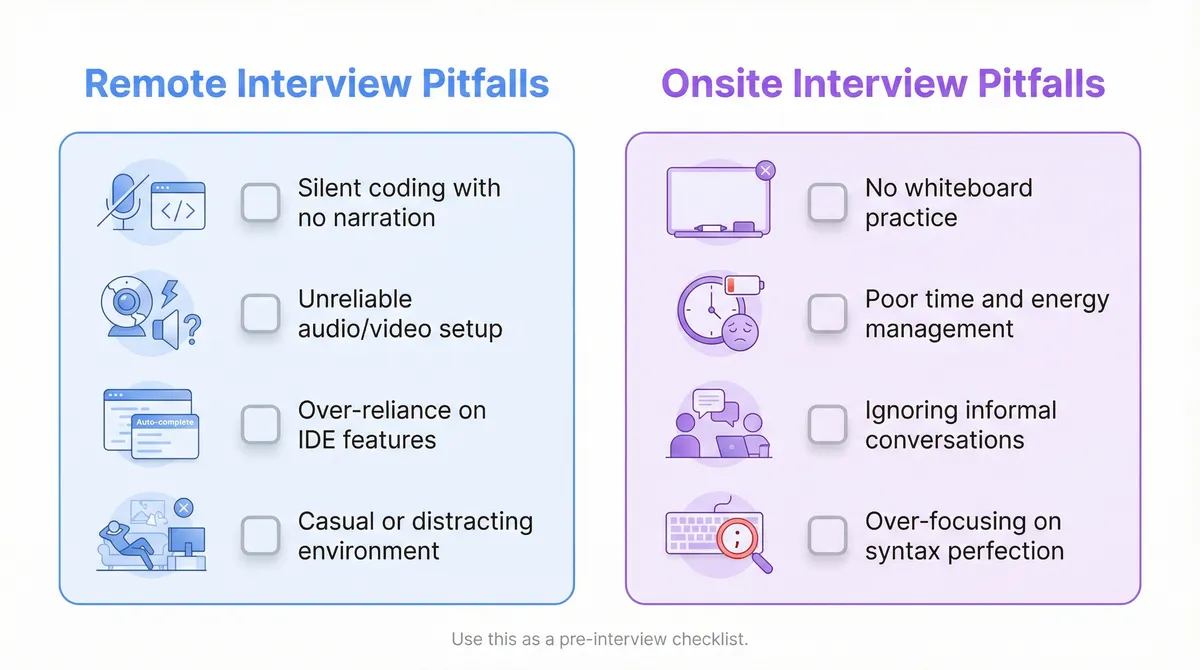
Common Mistakes in Remote Interviews (and How to Avoid Them)
1. Treating Remote as Less Formal
Mistake:
- Casual clothing beyond “smart casual”
- Distracting background
- Joining exactly at the scheduled time (or late)
Fix:
- Treat remote as seriously as onsite:
- Join 5–10 minutes early
- Check camera framing and lighting
- Use headphones to avoid echo
2. Silent Coding
Mistake:
- Long periods of silence while you think or type
- Interviewer has no idea what you’re doing
Fix:
- Narrate your mental process:
- “I’m thinking about whether we can do better than O(n²) here.”
- “I’m writing a helper function to parse the input; then I’ll handle the main logic.”
3. Over-Reliance on Tools
Mistake:
- Relying on auto-complete, linting, or running code constantly in practice
- Struggling when the interview platform is plain text only
Fix:
- Regularly practice in a plain text editor or in-browser collaborative editors
- Occasionally forbid yourself from running code while solving practice problems
4. Ignoring Audio/Video Quality
Mistake:
- Poor microphone; echo or background noise
- Camera pointing at ceiling, or face in shadow
Fix:
- Test your setup with a friend or mock interview
- Use a simple, front-facing light source (lamp behind your monitor)
Common Mistakes in Onsite Interviews (and How to Avoid Them)
1. Not Practicing Whiteboard Coding
Mistake:
- Only practicing in an IDE
- Writing messy, cramped code on the board
Fix:
- Weekly whiteboard/paper session:
- One or two problems
- Focus on legibility and structure
- Time-box to simulate pressure
2. Underestimating the Full-Day Effect
Mistake:
- Burning out by the third interview
- Letting one bad round affect the rest
Fix:
- Build stamina:
- Back-to-back practice sessions
- Learn to mentally “reset” after each problem
- During the day:
- Use breaks to breathe, drink water, and clear your head
3. Ignoring Non-Technical Interactions
Mistake:
- Treating lunch or hallway conversations as irrelevant
- Being overly quiet or disengaged
Fix:
- Prepare a few questions about:
- Team structure
- On-call rotation
- Code review process
- Deployment pipeline
These interactions often feed into “culture fit” or “team match” decisions.
4. Over-Focusing on Perfect Code
Mistake:
- Getting stuck polishing syntax instead of discussing trade-offs
- Not stepping back to see if the approach is correct
Fix:
- Prioritize:
- Correct algorithm and data structures
- Clear explanation and complexity analysis
- Code cleanliness and minor syntax details
If you notice a syntax uncertainty, say: “I might be slightly off on the exact syntax here, but the idea is…” and move on.
Adapting Behavioral and “Soft” Skills to Each Format
Remote: Intentional Warmth and Clarity
Remote conversations can feel colder. To counteract:
- Start with a brief, clear intro:
- “Hi, I’m Alex. I’ve been working on distributed systems in Go for the past 4 years, mostly on event-driven architectures.”
- Use slightly more explicit verbal feedback:
- “That makes sense.”
- “Good question; let me think about that for a moment.”
- Be explicit when thinking:
- “I’m going to take 20–30 seconds to think through edge cases before I answer.”
Onsite: Reading the Room
In person, you can:
- Notice when an interviewer looks confused
- Adjust your pace or level of detail
- Use humor and small talk more naturally (within reason)
Preparation:
- Practice explaining technical topics to:
- A peer
- A non-technical friend
- Ask them what was clear vs confusing
Remember: both remote and onsite interviewers are often evaluating how you’d work with them day-to-day. Your ability to communicate clearly under each format is part of the signal.
Using AI and Mock Interviews Effectively
Regardless of format, deliberate practice beats passive study.
Some practical ways to integrate AI and mock interviews:
-
Use AI mock interviews (e.g., platforms like AI Interview Practice: Free Mock Interview Simulator with Real-Time Feedback for Technical Interviews) to:
- Simulate remote coding rounds with time pressure
- Get instant feedback on your communication and solution quality
-
Use an AI coach or similar tools to:
- Generate follow-up questions on your system design solutions
- Challenge your assumptions and trade-offs
- Help you refine your behavioral stories
Crucially, treat these as simulations:
- Sit at your actual remote interview desk
- Use the same microphone and camera
- Time-box to real interview durations (45–60 minutes)
For onsite prep, you can still use AI-based tools, but pair them with:
- In-person mock sessions with friends/colleagues
- Solo whiteboard practice
Best Practices: Remote vs Onsite Interview Checklist
Remote Interview Best Practices
-
Technical:
- Practice in browser-based editors without IDE features
- Narrate your thought process while coding
- Prepare a few dry-run examples for each common pattern
-
Environment:
- Test audio/video and screen sharing ahead of time
- Use a quiet, well-lit room with a clean background
- Have backup internet and device options
-
Communication:
- Restate problems and confirm understanding
- Summarize your plan before coding
- Periodically check in: “Does this approach align with what you had in mind?”
Onsite Interview Best Practices
-
Technical:
- Practice whiteboard/paper coding weekly
- Build stamina with multi-hour practice blocks
- Prepare system design patterns and reusable components
-
Logistics:
- Plan your route and arrival time
- Sleep well the night before; eat light but sufficient
- Bring a notebook and pen (if allowed) for quick sketches
-
Communication:
- Use the whiteboard actively for explanations
- Engage in small talk and questions during breaks and lunch
- Treat each interview as a fresh opportunity
Key Takeaways
- Remote and onsite interviews test similar skills but under different constraints.
- For remote interviews, preparation should emphasize:
- Environment control and tooling familiarity
- Structured, explicit communication
- Handling technical issues gracefully
- For onsite interviews, preparation should emphasize:
- Whiteboard and low-tech problem solving
- Energy and time management across a full day
- In-person communication and social dynamics
- Your core technical prep—DSA patterns, system design fundamentals, language fluency—should be strong for both, but your practice environment should mirror the format you’re targeting.
If you align your preparation with the realities of remote vs onsite interviews, you’ll spend less energy fighting the format and more energy demonstrating what actually matters: your ability to think clearly, solve problems, and work effectively with other engineers.