
AI
How to Use AI Tools Like ChatGPT for Interview Preparation (Without Becoming Dependent)
Preparing for technical interviews has always been hard. Now there’s a new challenge: how do you use AI for interview preparation—tools like ChatGPT, Claude,...
Preparing for technical interviews has always been hard. Now there’s a new challenge: how do you use AI for interview preparation—tools like ChatGPT, Claude, or Thita’s AI coach—without letting them do the thinking for you?
If you’re not careful, ai study tools can become a crutch. You feel productive (“I solved 20 LeetCode problems with AI today!”), but your independent problem-solving muscles quietly atrophy. Then the real interview arrives, and there’s no autocomplete for your brain.
This guide is about using ai for interview preparation as a force multiplier, not a replacement. We’ll cover concrete workflows, prompts, and guardrails to help you learn faster while still building the skills you need to perform under pressure.
Why AI Is Both Powerful and Dangerous for Interview Prep
AI tools are extremely good at:
- Explaining concepts at different levels
- Generating variations of practice questions
- Providing instant feedback and hints
- Simulating interview scenarios
They are terrible at:
- Being in the room with you during a real interview
- Not over-explaining when you actually need to struggle
- Knowing how much you understood vs. just following instructions
So the core problem is not “Should I use ChatGPT for coding interviews?”—you probably should. The real question is:
How do I design an ai interview prep strategy where AI accelerates my learning, but I still own the thinking?
Let’s break this down into concrete workflows.
A Mental Model: AI as Coach, Not Teammate
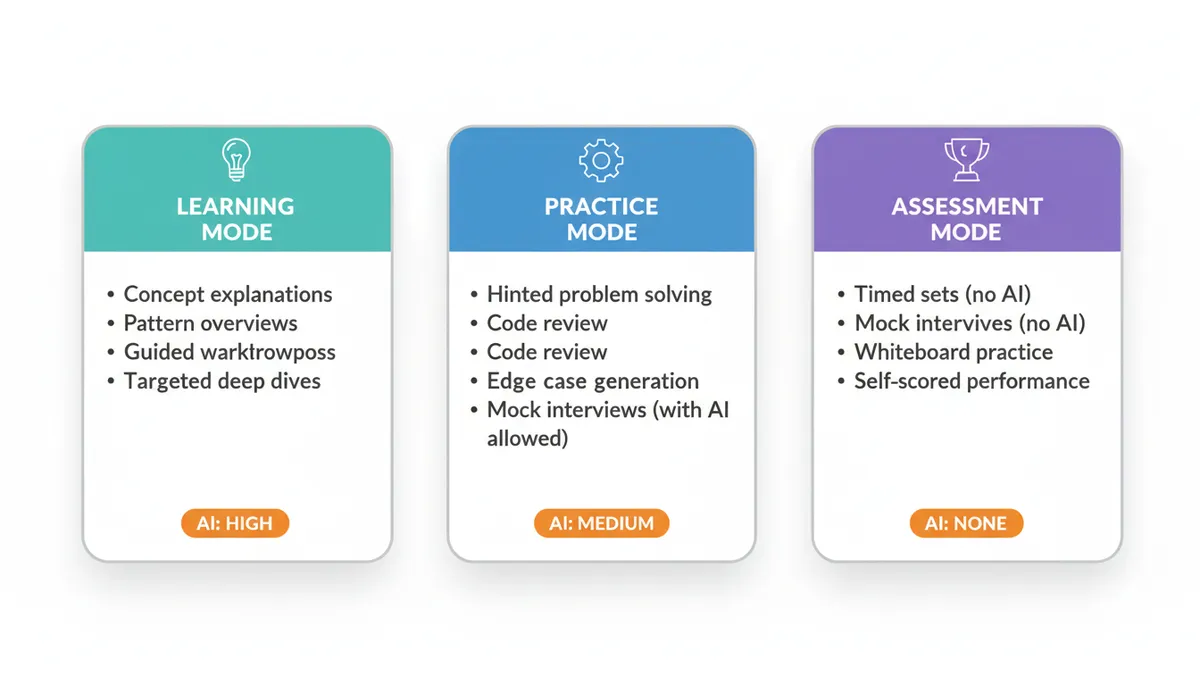
When you prepare for interviews, there are three distinct modes of work:
- Learning mode – understanding new concepts, patterns, and techniques
- Practice mode – solving problems to build fluency and speed
- Assessment mode – testing your true, unaided skill level
AI can help a lot with (1) and (2). For (3), it must be strictly limited or completely removed.
Think of AI as:
- Coach during learning and guided practice
- Sparring partner for mock interviews and feedback
- Referee when you want your solution evaluated
Never as a teammate during actual problem solving you intend to count as “my skill.”
Setting Rules: When You Can and Cannot Use AI
Before touching any ai study tools, define your personal “AI contract”:
Allowed Uses (Good)
- Explaining a data structure or algorithm you don’t understand
- Comparing two solution approaches you’ve already thought of
- Getting hints after you’ve tried for a fixed time (e.g., 25 minutes)
- Asking for edge cases or test scenarios for your solution
- Practicing behavioral questions with an AI interviewer
- Generating follow-up questions to deepen your understanding
Disallowed Uses (Dangerous)
- Asking AI for a full solution before you’ve attempted the problem
- Copying AI code and calling that “a solved problem”
- Using AI to debug every single error without trying yourself
- Letting AI write your entire system design answer
- Using AI during timed mock interviews you treat as “realistic”
Write these rules down. Treat them like a test environment config: if you violate them, your metrics (progress) are invalid.
Using AI for Interview Preparation: A Structured Daily Workflow
Here’s a practical 90–120 minute daily routine that uses AI effectively without dependence.
Step 1: Warm-Up (10–15 minutes)
Goal: Activate relevant knowledge and surface weak spots.
-
Pick a topic (e.g., “binary search,” “sliding window,” “graph BFS/DFS”).
-
Ask AI:
“Give me 5 quick conceptual questions to test my understanding of [topic]. Do not include answers yet.”
-
Answer them yourself in a notebook or editor.
-
Then ask:
“Now show me the answers. For any I got wrong, explain the reasoning and what concept I’m missing.”
This uses AI as a quiz generator + explainer, not as a source of ready-made understanding.
Step 2: Pattern-Based Problem Solving (45–60 minutes)
Pattern-based learning is one of the most effective ways to prepare for coding interviews. Thita, for example, structures 94 DSA patterns across 15 categories; you can build a similar mental map and then use AI to reinforce it.
Pick 1–2 patterns for the day, e.g.:
- Two pointers
- Sliding window
- Fast & slow pointers
- Top K elements
- Graph BFS/DFS
- DP on subsequences
For each pattern:
1. Recall the Pattern Yourself (No AI)
Before asking AI anything, write down:
- The core idea in 2–3 sentences
- A generic template or pseudocode from memory
- A simple example where this pattern applies
If you can’t do this, that’s a signal you need to revisit fundamentals.
2. Use AI to Check and Refine Your Understanding
Now ask AI:
“Here is my understanding of the [pattern] pattern and its generic pseudocode:
[paste your explanation and pseudocode]
Point out any inaccuracies, missing edge cases, or common mistakes. Then give me one simple example problem where this pattern applies and walk through the pattern step-by-step.”
This does two things:
- Validates your current mental model
- Fills in gaps without you passively consuming a full tutorial
3. Solve 1–2 Problems Without AI Help
Pick problems from a curated source (e.g., a DSA patterns sheet like The 90 DSA Patterns That Cover 99% of Coding Interviews or a problem list you trust). For each problem:
-
No AI until you’ve:
- Read and restated the problem in your own words
- Identified candidate patterns
- Sketched at least one approach (even if naive)
- Tried coding that approach
-
Set a timer: 25–30 minutes for medium difficulty.
-
Only after the timer expires (or you have a working solution) can you involve AI.
4. Use AI for Post-Solution Review
Once you have a solution (or you’re stuck after a real attempt):
-
If you solved it:
“Here is my solution to [problem] in [language].
- Analyze its time and space complexity.
- Suggest any improvements in clarity or performance.
- Are there alternative patterns or approaches that would also work here?”
-
If you’re stuck:
“I tried to solve [problem] using [pattern] with this approach:
[describe your idea or partial code]
I got stuck on [specific part].
Give me a small hint (not the full solution) focusing only on that part.”
Ask explicitly for hints, not full solutions. If AI gives too much away, stop reading and ask for a more incremental hint.
Step 3: AI-Powered Mock Interview (20–30 minutes)
AI mock interviews are one of the highest-leverage uses of ai for interview preparation—if structured correctly.
You can use platforms like Thita’s /ai-interview or a custom ChatGPT prompt.
1. Define the interview format
Prompt:
“Act as a senior software engineer conducting a 45-minute coding interview for a mid-level backend role.
- Ask me 1–2 coding questions, one at a time.
- For each question, first ask clarifying questions, then let me think out loud.
- Do not give me the solution unless I explicitly ask.
- After I finish, give detailed feedback on my communication, approach, and code quality.”
2. Follow real-interview constraints
- No switching to another tab to ask AI for help mid-question.
- Talk through your thought process as if someone is listening.
- Timebox: treat it as real—if you can’t finish optimally, explain trade-offs.
3. Use AI for feedback and reflection
After each mock:
“Based on my performance, identify:
- 3 specific strengths
- 3 specific areas to improve
- 2 concrete practice tasks for the next week to address these weaknesses.”
You’re using AI as a coach and reviewer, not as a collaborator.
For more insights on the effectiveness of AI in simulated environments, consider reading AI Mock Interviews vs Real Interviews: Do They Actually Help?.
Step 4: Concept Deep Dives (15–30 minutes)
After practice, you’ll usually find topics that feel shaky: e.g., “I kind of know Dijkstra’s, but not well enough to implement from scratch.”
Use AI for targeted deep dives:
-
Start with your current understanding:
“Here is how I currently understand Dijkstra’s algorithm:
[your explanation]
What’s missing or incorrect? Explain using simple language and then more formal terms.” -
Ask for multiple perspectives:
- Intuition: “Explain Dijkstra’s like I’m a junior engineer.”
- Formalism: “Now explain it with time/space complexity and invariants.”
- Implementation: “Show a clean implementation in [language], then walk through it on this example: [graph].”
-
Ask for contrast with related concepts:
“Compare Dijkstra’s and BFS in a table: when they apply, complexity, and typical interview use cases.”
This builds a richer mental model than just reading one explanation.
If you want to deepen your understanding of how AI is changing the interview landscape, check out How AI Is Changing Technical Interviews in 2026.
Using ChatGPT for Coding Interviews: Concrete Prompt Patterns
Here are some reusable prompt templates you can adapt.
1. Pattern Reinforcement Prompt
“I want to practice the [pattern] pattern for coding interviews.
- First, give me a brief summary of the pattern (2–3 sentences).
- Then give me 3 problems of increasing difficulty that are good examples of this pattern, without solutions.
- After I attempt each problem, I’ll paste my approach or code; then you give me feedback and point out if I misapplied the pattern.”
2. Code Review Prompt
“Act as a senior engineer reviewing my interview solution.
Here is the problem: [problem statement]
Here is my solution in [language]:
[code]Please:
- Evaluate correctness (including edge cases).
- Analyze time and space complexity.
- Suggest improvements in clarity, style, and robustness.
- Tell me if there’s a more optimal algorithmic approach and briefly outline it (no full code).”
3. Debugging Prompt (With Guardrails)
“I’m getting a bug in this code for [problem].
Here is the code:
[code]
Here is the failing test case and output:
[input/output]Don’t give me the fixed code yet.
- First, ask me 2–3 questions to guide my own debugging.
- Then, only if I ask, point me to the specific part of the logic that is likely wrong and explain why.”
This keeps you in the driver’s seat instead of letting AI instantly patch everything.
AI for System Design and Behavioral Interview Prep
So far we’ve focused on DSA. AI is also useful for higher-level interviews.
System Design
Use AI as a whiteboard companion after you’ve done your own thinking.
-
Self-attempt first:
- Requirements
- High-level architecture
- Data model
- Key APIs
- Scaling considerations
-
Then prompt AI:
“I attempted a system design for [problem, e.g., ‘design a URL shortener’].
Here is my design:
[your notes, diagrams described in text]Evaluate it as an interviewer:
- What did I do well?
- What important aspects did I miss?
- How could I better structure my answer to show senior-level thinking?”
-
Ask AI to propose an alternative design and compare:
“Now propose a strong alternative design and create a comparison table: my design vs yours, with trade-offs.”
Behavioral Interviews
AI can help you refine stories and practice delivery.
-
Draft STAR stories (Situation, Task, Action, Result).
-
Ask AI:
“Here is my story for ‘a time you disagreed with a teammate’:
[story]Critique it as a hiring manager:
- Is the Situation/Task clear and concise?
- Are my Actions concrete and specific?
- Is the Result measurable and impactful?
Suggest edits to improve clarity and impact without changing facts.”
-
Run mock behavioral interviews:
“Conduct a behavioral interview for a senior backend engineer role.
Ask me questions one at a time. After each answer, give feedback and suggest how I could improve it.”
For more on AI tools and pitfalls in interview prep, see AI Tools for Interview Preparation: Benefits and Pitfalls.
Common Mistakes When Using AI for Interview Prep
AI can subtly sabotage your learning if you’re not careful. Here are patterns to avoid.
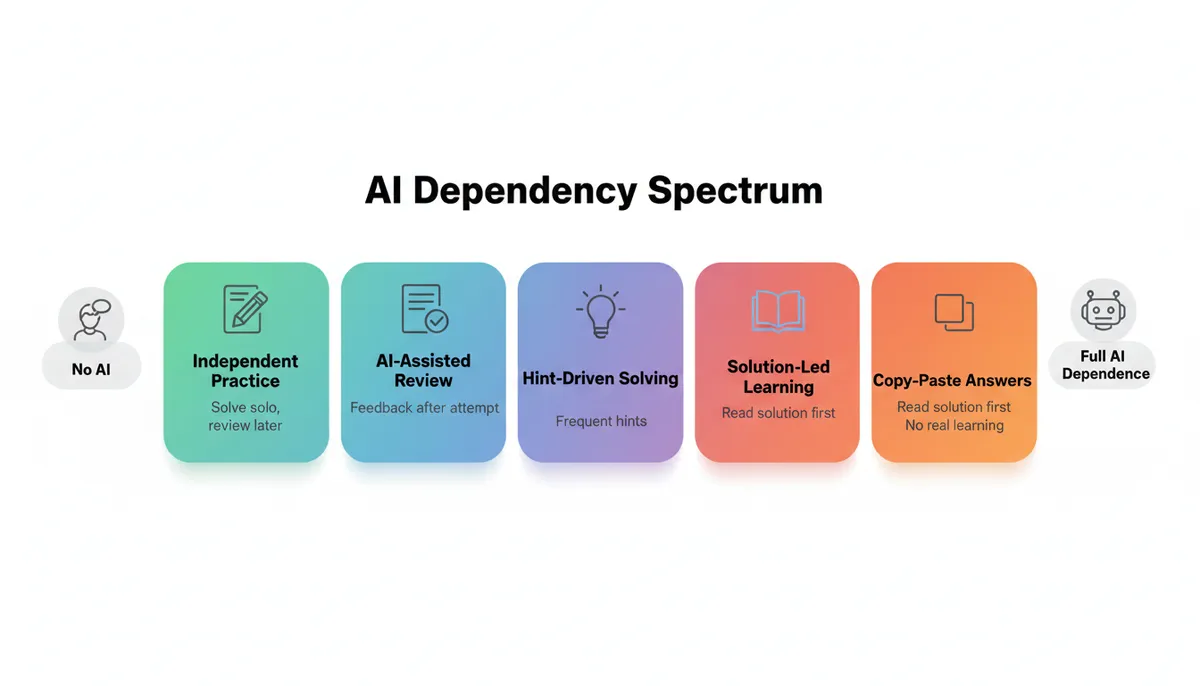
1. “Solution First” Learning
Symptom: You paste a problem into ChatGPT, read the solution, and think “Yeah, that makes sense.”
Problem: Recognition is not recall. In the interview, you need to:
- Identify the pattern without being told
- Derive the solution from first principles
- Implement it under time pressure
Fix: Use a strict rule—no AI solutions until you’ve spent at least 20–30 minutes on the problem yourself.
2. Passive Reading Instead of Active Practice
Symptom: You spend hours reading AI-generated explanations and feel like you “understand” everything.
Problem: Interviews measure your ability to produce solutions, not recognize them.
Fixes:
- For every concept explanation, ask AI to generate 2–3 micro-exercises:
- “Write a function that uses this concept to do X.”
- “Explain this concept back to me in your own words.”
- Teach-back method:
- After reading, explain the concept to AI as if it’s a junior dev and ask for critique.
3. Over-Reliance on AI Debugging
Symptom: Every time your code fails, you paste it into ChatGPT and ask “What’s wrong?”
Problem: Debugging is a core skill interviewers care about. If AI always finds your bugs, you never build an intuition for:
- Off-by-one errors
- Null/empty input handling
- State invariants
- Edge-case reasoning
Fix:
- Force yourself to:
- Reproduce the bug with a minimal test case
- Add print/log statements
- Use a debugger/IDE stepping
- Only then ask AI to confirm your hypothesis or suggest additional checks.
4. Treating AI as the Source of Truth
Symptom: You assume AI’s solution is always correct and optimal.
Problem: LLMs hallucinate. They can produce subtly incorrect or suboptimal solutions with high confidence.
Fix:
- Always verify:
- Run AI code on your own test cases.
- Ask AI to generate adversarial tests and then run them yourself.
- Ask meta-questions:
- “Is there any scenario where this approach might fail or be suboptimal?”
Best Practices: Making AI Work For You
Here are concrete, actionable guidelines for a healthy ai interview prep strategy.
1. Separate “AI-On” and “AI-Off” Sessions
- AI-Off sessions (assessment):
- Timed practice sets (e.g., 2–3 problems in 90 minutes)
- Mock interviews with a friend or platform that enforces no external tools
- AI-On sessions (learning/practice):
- Concept review
- Pattern drills
- Post-solution feedback
Track both separately. Improvement in AI-off performance is your true metric.
2. Use AI to Build a Pattern Library
Map problems to patterns explicitly:
-
After solving a problem, ask:
“What DSA patterns does this problem exemplify? How could I recognize this pattern faster next time?”
-
Maintain your own notes:
- Pattern name
- Typical problem signatures
- Template pseudocode
- 2–3 example problems
AI can speed up pattern identification, but you must internalize the mapping.
3. Ask AI to Challenge You, Not Just Help You
Instead of always asking for explanations, ask for tests:
- “Give me 5 edge cases that would break a naive solution for this problem.”
- “Ask me 3 follow-up questions a real interviewer might ask after I present this solution.”
- “Make the problem harder by one level and see if my approach still scales.”
This turns AI into an adversarial partner that stress-tests your understanding.
4. Use AI for Meta-Learning
Ask AI to help you improve how you study:
“Here is my current interview prep routine and recent performance:
- Days per week: [x]
- Hours per day: [y]
- Problems solved: [summary]
- Weak areas: [list]
Design a 4-week study plan to maximize my improvement for [target role/company]. Include:
- Daily schedule
- Pattern focus by week
- When to use AI and when not to
- How to measure progress objectively.”
This helps you step back from problem-by-problem grind and optimize your strategy.
Example: A Full AI-Assisted Practice Session (End-to-End)
To make this concrete, here’s what a 90-minute session might look like.
-
Warm-up (10 min)
Topic: Sliding window.- Ask AI for 5 quick conceptual questions (no answers).
- Answer them yourself.
- Get answers + explanations; note 1–2 weak spots.
-
Pattern review (10 min)
- Write your own sliding window pseudocode from memory.
- Ask AI to critique and provide one simple example walkthrough.
-
Problem 1 (30 min)
- Pick a medium sliding window problem.
- 25 minutes solo attempt, no AI.
- 5 minutes: paste your solution to AI for:
- Complexity analysis
- Code clarity feedback
- Alternative approaches
-
Problem 2 (25 min)
- Pick a slightly harder problem (maybe combining sliding window + hashmap).
- 20 minutes solo.
- If stuck, ask AI for a small hint only.
- Finish solution; get AI review.
-
Meta-review (15 min)
-
Ask AI:
“Based on these two problems and my solutions, what does my performance say about:
- My pattern recognition
- My implementation skills
- My ability to handle edge cases
Suggest 3 specific exercises to improve the weakest of these.”
-
Log learnings in your notes.
-
This is how you keep AI in a supporting role while you do the actual work.
For more structured interview preparation plans, see 7-Day, 30-Day, and 90-Day Coding Interview Preparation Plans Compared.
Visual Frameworks for AI-Assisted Interview Prep
Key Takeaways
- AI tools like ChatGPT are excellent coaches, but terrible crutches. Use them to accelerate learning, not to replace thinking.
- Structure your ai interview prep strategy around three modes: learning, practice, and assessment, with decreasing AI usage.
- Enforce “AI-off” time: any session you count as a true measure of readiness must be done without AI.
- Use AI for:
- Explaining concepts and patterns
- Generating targeted practice and edge cases
- Reviewing and critiquing your solutions
- Running mock interviews and giving feedback
- Avoid:
- Reading solutions before trying
- Letting AI debug everything
- Assuming AI is always correct
- Track your progress by how you perform without AI, even if most of your study time uses AI as a helper.
Used well, ai for interview preparation can compress months of unfocused grind into a few weeks of targeted, high-quality practice—while still ensuring that, when you’re in the interview room, it’s your own brain doing the work.