
Interview
Apple Coding Interview Questions: Patterns and Prep (2026)
Prepare for Apple coding interviews with the DSA patterns, difficulty mix, team-owned round shape, live-round habits, and a focused practice plan.
Apple coding interview questions are best prepared as pattern families, not as a memorised question list. Apple’s loop is commonly reported as coding-first, with data structures, core language depth and clear live reasoning doing most of the early technical filtering. The detail that changes the preparation strategy is that the loop is team-owned: reported accounts describe teams writing their own questions rather than drawing from a central question bank.
That means the highest-return preparation is broad pattern recognition plus adaptable communication. Apple’s interview kit holds 119 mapped DSA questions, 1 low-level design problems, 1 system design problems evidenced at Apple. Use it to learn the recurring coding shapes, then practise explaining how you reach an answer when the prompt is unfamiliar.
Apple’s system-design discussion is commonly reported for mid and senior candidates, but its content and rigour vary by team. Your preparation should therefore have a stable core: recognise the coding pattern quickly, write dependable code in your strongest language, and connect technical choices to the product context of the team.
Apple’s coding interview pattern mix
Apple’s DSA material is not one narrow speciality. The useful framing is a mix of common interview pattern families that reward good problem classification before implementation.
Arrays, strings and hashing matter because they test whether you can simplify a prompt into state, lookup and traversal decisions. Look for signals such as duplicate detection, frequency tracking, grouping, prefix state and “find the best segment” wording. These are rarely difficult because of syntax; they become difficult when a candidate misses the representation that turns repeated work into constant-time lookup.
Two pointers and sliding windows appear whenever a contiguous range, ordered input, pair relationship or constrained substring is hiding inside the wording. The key habit is to state the invariant before you code. What does each pointer mean? What makes the window valid? When does it expand, and when does it shrink? If you cannot answer those questions aloud, the implementation is likely to drift.
Trees, recursion and traversal test whether you can choose the right visit order and make recursive state explicit. In a live interview, do not simply announce “depth-first search”. Explain what your function returns, what the base case guarantees and whether shared state is necessary. That is how an interviewer can assess correctness rather than merely observe a familiar template.
Graphs and dependency problems are often recognisable from relationships, prerequisites, reachability, connected groups or shortest paths. The important decision is usually not whether you know graph traversal, but whether the prompt calls for breadth-first search, depth-first search, topological ordering or a more specialised shortest-path approach. Review graph traversal patterns with DFS and BFS to make that choice faster.
Binary search and monotonic answers are a separate recognition skill. The input does not need to be sorted for binary search to be relevant. Sometimes the ordered space is the answer itself: capacity, threshold, speed or another value where a feasibility test changes predictably. The binary search patterns guide is useful for building that instinct.
Dynamic programming is worth preparing as a way of identifying repeated subproblems, not as a collection of tables to reproduce. Ask whether a local choice affects later choices, whether a recursive formulation revisits the same state, and what the smallest sufficient state is. The dynamic programming patterns guide offers a practical way to organise this family.
The common thread is that Apple preparation rewards clean classification. You should be able to hear a prompt, identify the likely family, name the simplest viable approach and defend its complexity before your editor fills with code.
The reported Apple round shape
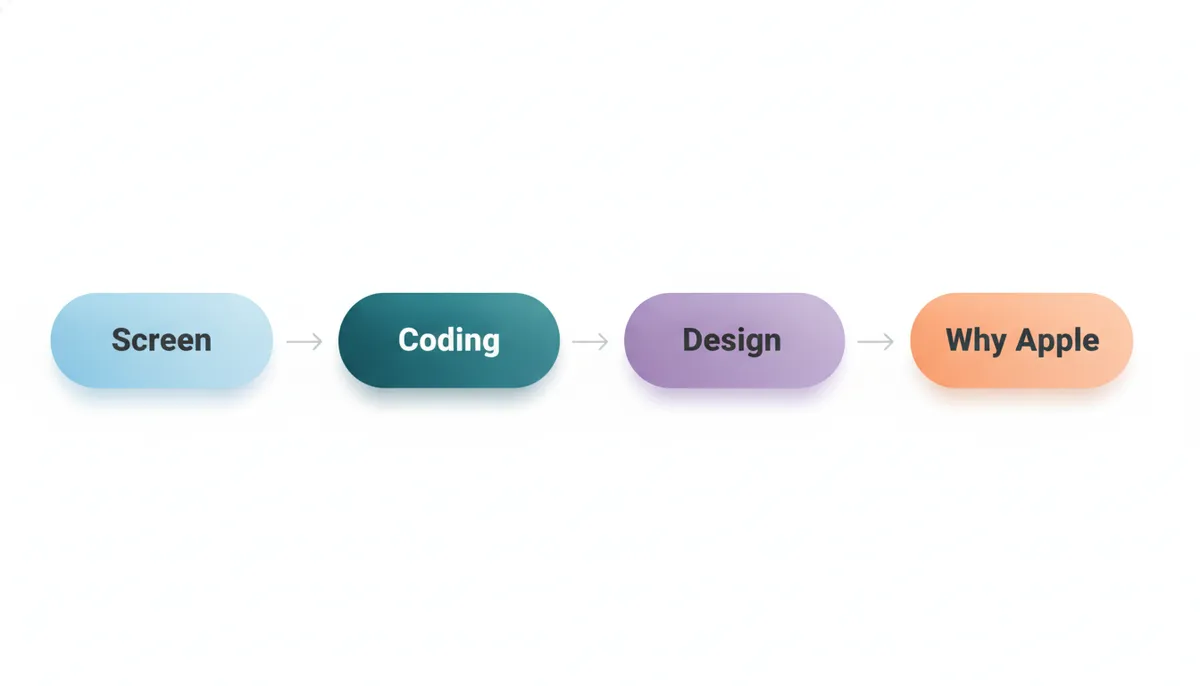
Candidate reports describe a recruiter or hiring-manager screen followed by coding screens and onsite coding rounds. These coding conversations are commonly reported to use CoderPad and to test data structures alongside depth in the programming language you choose. Mid and senior candidates commonly encounter a system-design conversation, followed by a behavioural discussion centred on a genuine “Why Apple?” exchange.
Treat that sequence as a shape, not a script. Apple’s team-owned process is the defining fact. The recruiter, interviewers and panel are reported to sit within the team you applied to, and the team’s domain affects what technical judgement is relevant. A systems-facing group may care more about performance and integration boundaries; another team may place more emphasis on product constraints, reliability or the practical details of a platform.
Reported accounts also describe team matching as happening after an offer rather than before it. That is another reason not to overfit preparation to a rumoured team prompt. Build portable skills: DSA fluency, lucid trade-off discussion, strong language fundamentals and the ability to ask useful clarifying questions.
For the coding core, Apple’s interview kit is a focused way to practise pattern families associated with the company. Use each problem as an opportunity to rehearse recognition, explanation and testing rather than merely reaching an accepted solution.
What recognition speed really means
Recognition speed does not mean blurting out a pattern name after reading the first line. It means reaching a sound first model quickly enough that you have time to validate it.
In a live Apple coding round, that process can look like this:
- Restate the objective and ask about inputs, constraints and edge cases.
- Identify the data relationship: sequence, range, hierarchy, dependency graph or repeated state.
- Offer a baseline approach so the interviewer can follow your reasoning.
- Improve it only when the cost of the baseline makes the improvement necessary.
- State the invariant, complexity and test cases before coding.
- Keep narrating the decisions that change the implementation.
A fast recogniser sees “contiguous range with a limit” and considers a sliding window. They see “minimum viable threshold” and test for a monotonic predicate. They see “relationships plus prerequisites” and think about graph representation and ordering. The speed comes from repeated comparison between prompt signals and solution shapes.
This is why random practice often plateaus. You may solve more problems without becoming better at choosing an approach under pressure. Instead, group sessions by pattern, then mix them deliberately. After every solution, write one sentence answering: What wording should have made me recognise this earlier?
For a deeper method, read how to identify the right DSA pattern in a coding interview. The DSA Patterns Sheet is free to browse and helps organise that repetition around patterns rather than topic labels.
The assessment and live coding rounds
An online assessment is rare in reported Apple processes, so candidates should not prepare as though a standard assessment is guaranteed. The coding screens and onsite conversations are the safer centre of gravity.
The transition from solitary practice to a live round changes the skill being evaluated. Your interviewer can see whether you clarify ambiguity, correct yourself, respond to hints and make sensible decisions when requirements are incomplete. A clean final answer helps, but invisible reasoning cannot be assessed.
Start every problem with a compact structure:
- clarify the inputs and expected output;
- identify constraints that alter the solution;
- describe a simple baseline;
- explain the more efficient approach;
- state time and space complexity;
- test ordinary and awkward cases.
That structure prevents two common failures. The first is coding too soon, then discovering that you misread a requirement. The second is jumping straight to an optimised solution without demonstrating why it works.
Practise speaking at the same time as you code. Say what the current variable represents. Announce a branch before taking it. Explain why a test case should pass. This may feel artificial in practice, but it makes your thinking legible in the interview. What interviewers actually look for in live coding rounds explains why this communication is part of the technical bar.
Core language depth also matters. Know the standard collections, string behaviour, sorting tools, iteration conventions, recursion limits and error-prone language details in your chosen language. Do not switch languages late in preparation because you think another one looks more impressive. Reliability and fluency are more valuable than novelty.
Preparing for Apple’s team-dependent design discussion
For mid and senior candidates, reported accounts describe a system-design onsite whose scope varies by team. Do not assume every Apple design conversation will have the same scale or scoring emphasis. Prepare to gather requirements first, then choose a level of detail that matches the prompt.
A good opening sequence is:
- define users, core actions and success criteria;
- establish the expected scale and latency sensitivity;
- identify the data and service boundaries;
- discuss failure modes, privacy and operational trade-offs;
- deepen one component after agreeing on the broad design.
Apple’s reported team ownership makes product context especially useful. Where relevant, be ready to discuss privacy-first architecture, data minimisation, local-versus-cloud processing, access boundaries and hardware–software integration. These should be informed trade-offs, not slogans. If a requirement does not call for extra complexity, say so.
The System Design Sheet and Low Level Design Sheet are free to browse. Use them to distinguish component-level design from broader service architecture. The guide to how much system design is enough for SDE-1 versus SDE-2 interviews can help you prioritise based on your level.
A focused practice plan
Start with pattern fluency
Build a rotating set of sessions around arrays and hashing, pointer-based methods, trees, graphs, binary search and dynamic programming. Work in your interview language. For each session, solve a few related prompts, then finish with one mixed prompt where you must identify the family without a hint.
Use Apple’s interview kit as the company-specific layer over that plan. Review solutions actively: compare representations, identify the invariant and note the point where your own approach became more complicated than necessary.
Add timed, spoken practice
Move from untimed study to short live-style simulations. Read a prompt aloud, clarify it, sketch the approach verbally and implement while narrating. Reserve time at the end for tests: empty input where applicable, single-item cases, duplicates, boundary values and the path most likely to break your invariant.
Code practice gives you an in-browser space to keep that routine consistent. The aim is not to race every prompt. It is to become calm enough that speed comes from a dependable process.
Rehearse design and project depth
If your level calls for design preparation, practise requirement discovery and trade-off discussion. Draw a simple system, state what you are assuming, and let a follow-up requirement force a revision. Separately, prepare project stories that show what you personally owned, which constraint mattered and what you would change now.
An AI interview can help you rehearse both technical explanation and behavioural answers aloud. For “Why Apple?”, avoid generic admiration. Connect a specific aspect of Apple’s products, engineering culture or the role’s technical domain to work you can credibly discuss.
Mistakes that make Apple preparation weaker
Treating the process as uniform. Team ownership means a rigid script can mislead you. Prepare a strong common core, then use recruiter information to tune the final stretch.
Collecting solutions without learning triggers. If you cannot name the clue that led to a pattern, you are storing answers rather than building recognition.
Optimising before clarifying. An elegant solution to the wrong interpretation is still wrong. Ask concise questions early.
Coding silently. The interviewer needs to understand how you reason, not just inspect the final editor state.
Ignoring language fundamentals. A candidate can recognise the right pattern and still lose momentum on library choices, mutability, recursion or edge-case handling.
Making “Why Apple?” generic. This conversation is commonly reported as genuine. Prepare an answer with substance, but keep it honest and connected to the work.
Frequently asked questions
Are Apple coding interview questions mostly DSA?
Reported accounts describe a coding-first process centred on data structures, problem solving and core language depth. System design is commonly reported for mid and senior candidates.
What patterns should I prioritise?
Prioritise arrays and hashing, two pointers, sliding windows, trees, graphs, binary search and dynamic programming. Learn the recognition signals, not just standard implementations.
Does Apple use an online assessment?
An online assessment is rare in reported accounts. Prepare primarily for coding screens and live coding conversations, while confirming the process with your recruiter.
How difficult are Apple coding rounds?
Difficulty varies by team, level and interviewer. The practical challenge is combining sound DSA reasoning with clear communication and dependable implementation.
How many technical rounds should I expect?
Candidate reports describe a variable, team-owned process with coding screens, onsite coding and, for relevant levels, design discussion. Confirm the exact sequence with your recruiter.
Is system design required for Apple interviews?
System design is commonly reported for mid and senior candidates. Its content and rigour can vary substantially by team.
What should I say in the “Why Apple?” conversation?
Give a specific, truthful connection between your experience, the role and Apple’s product or engineering context. Avoid a generic answer that could apply to any company.
Should I practise in a particular programming language?
Use the language in which you can write, test and explain code most reliably. Core language fluency is more useful than choosing a language for appearance.
How can I improve pattern recognition quickly?
Practise in families, record the clue that identifies each family and then use mixed sessions to test whether you can classify prompts without labels.
Prepare for the pattern, then adapt to the team
Apple’s reported process is coding-first, but its team-owned nature is the reason a flexible preparation plan wins. Build rapid pattern recognition, make your reasoning audible, know your language well and practise adapting your design discussion to the team’s context.
Explore Apple’s interview kit to work through the mapped DSA questions and the design problems evidenced at Apple. Then use the free sheets and an AI mock to turn private study into interview-ready explanation.
Interview processes change, and Apple’s reported team variation is substantial. Confirm the current round shape, role expectations and format with your recruiter.
Topics
Related on Thita
Your next step
Practise with AI mock interviews
A spoken interview that asks follow-up questions, runs your code and ends with a written report.