
Interview
Microsoft Explore 2027: Application Window, OA & Prep
Microsoft Explore 2027 application window status, resume tips, OA & interview style for first/second-year students, US vs India differences, 30-day plan.
If you're a first- or second-year college student dreaming of a software role at a big tech company, Microsoft Explore 2027 is one of the best entry points you can aim for. It's a summer internship built specifically for early-career students — you don't need a polished resume full of past internships, and you don't need to be a computer science major. You just need the right foundations and a clear plan.
That's exactly what this guide gives you. We'll cover who Explore is for, how it differs between the US and India, what your resume should actually say when you have limited experience, and the kind of online assessment (OA) and interview style you can expect. By the end, you'll have a concrete 30-day prep plan you can start today.
Want a head start? Run your resume through the Thita.ai Resume Analyzer and begin the beginner DSA learning path to build the problem-solving skills the OA tests.
Key Dates & Results (last checked 2026-09-07)
| Stage | Status |
|---|---|
| Application window (2027 cohort) | not announced yet (last checked 2026-09-07) — historically opens late summer through fall (roughly August–November) and can close early |
| Online Assessment | 60–90 minutes, opens once you're invited after applying |
| Offer spots | Historically only a few hundred per cycle, filled quickly once the window opens |
Microsoft has not published a fixed 2027 open/close date anywhere Thita could confirm — start checking the official Microsoft Explore listings from mid-2026 and apply the day the role goes live.
What Is the Microsoft Explore Program?
The Explore Microsoft program is a summer internship designed for students in their first or second year of a bachelor's degree. Unlike standard SWE internships that target juniors and seniors, Explore is intentionally beginner-friendly. According to Microsoft's official Explore page, interns work in small "pods" and rotate through the three core phases of product development — Design, Build, and Quality — so you experience the full software development lifecycle alongside mentors.
The program runs 12 weeks in the US and 8 weeks in India, with structured mentoring, community building, and networking baked in. A huge number of Explore interns convert into full-time-track Microsoft internships (and eventually offers) later in their degree, which is why this program is such a valuable early foothold.
Who Microsoft Explore Is For
- First-year students (US, Canada, Mexico) — apply through the dedicated first-year listing
- Second-year students (US, Canada, Mexico, and India) — apply through the second-year listing
- Students who have completed Introduction to Computer Science (or equivalent) and one semester of calculus (or equivalent)
- Anyone planning to major in a technical field — CS, computer engineering, software engineering, data science, electrical engineering, cybersecurity, and similar
💡 Pro Tip: You do not need to be a declared CS major to apply. Microsoft explicitly welcomes students who intend to major in a technical discipline. If you've taken intro CS and one calculus course, you likely meet the academic bar.
Why Explore Is a Great Early-Career Entry Point
Most internships expect you to already have experience — which creates a frustrating chicken-and-egg problem for first- and second-year students. Microsoft Explore is built to break that cycle.
- Low barrier to entry: It's designed for people with little or no prior industry experience.
- Real product work: You ship code on real teams, not throwaway "intern projects."
- Structured mentorship: You're paired with mentors and a pod of peers, so you're never figuring things out alone.
- A foot in the door: Strong Explore interns are well-positioned for Microsoft's later SWE internships and new-grad pipeline.
- Resume gold: "Microsoft" on your resume in your first or second year sets you apart for every future application.
⚠️ Important: Spots are extremely limited — historically only a few hundred Explore offers go out each cycle, and they fill quickly. Treat the application window as a hard deadline and apply the day it opens, not the week before it closes.
US vs India: Eligibility, Timeline & Process Differences
One of the most-asked microsoft explore india vs us questions is whether the program is the same in both regions. It isn't — duration, eligible year groups, and the interview funnel differ. Here's a side-by-side comparison.
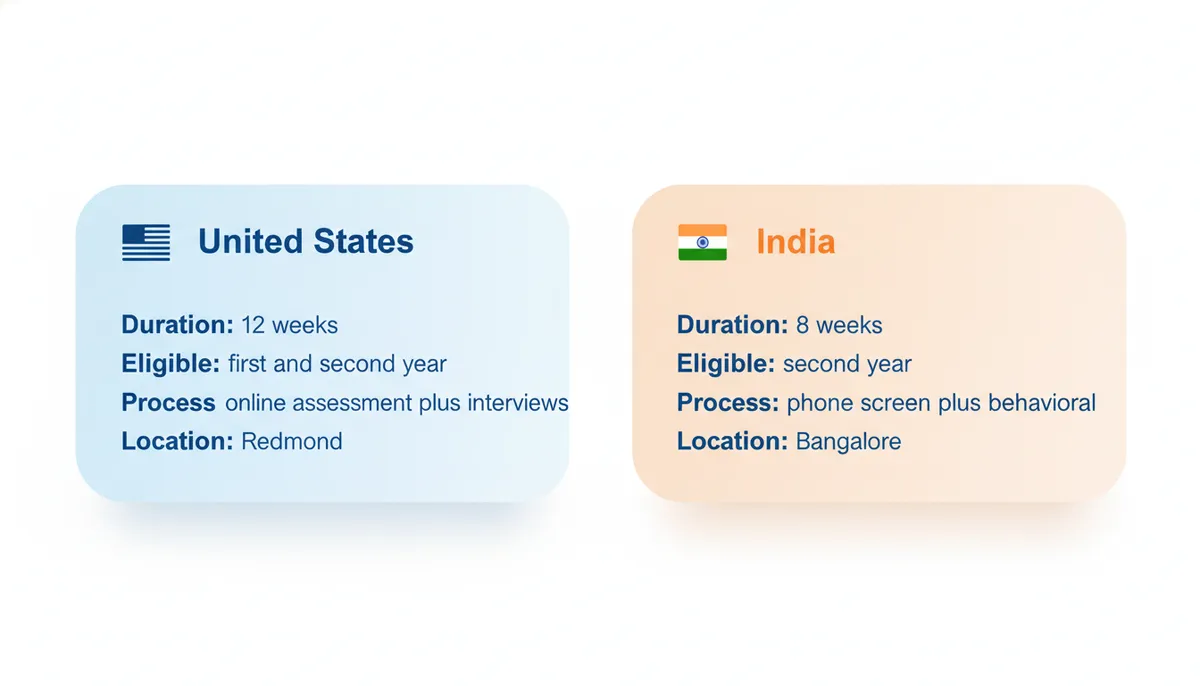
| Dimension | United States | India |
|---|---|---|
| Program length | 12 weeks | 8 weeks |
| Eligible students | 1st- and 2nd-year | Primarily 2nd-year |
| Also open to | Canada, Mexico (1st-year) | India campuses |
| Typical process | Recruiter phone screen, more behavioral/conceptual | Online Assessment (OA) followed by 1-2 technical interviews |
| Core requirement | Intro to CS + 1 semester calculus | Intro to CS + 1 semester calculus |
| Locations | Redmond, Atlanta | Multiple India campuses |
💡 Pro Tip: In the US, Explore candidates are often routed through a recruiter phone screen that's more behavioral and conceptual than a hardcore coding gauntlet. In India, expect a more traditional OA → technical interview funnel. Prepare for both styles so you're not caught off guard regardless of region.
When Do Microsoft Explore 2027 Applications Open?
Microsoft does not publish a single fixed open/close date, and the window shifts each year by region. Historically, Explore listings for the following summer have appeared in late summer through fall (roughly August–November) and have closed once enough applications are received — sometimes early. For the 2027 cohort, plan to start checking the official listings around mid-2026 and apply immediately when the role goes live.
⚠️ Important: Treat every date in this guide as evergreen guidance, not a guarantee. Always confirm the exact open and close dates on the official Microsoft Explore page and the Microsoft students careers hub before you build your timeline.
Microsoft Explore Resume Checklist for Early-Career Students
When you're in your first or second year, your resume won't have big-name internships — and that's completely fine. Recruiters reviewing Explore applications expect that. What they're looking for is evidence of curiosity, coding ability, and the willingness to build things. Here's how to make a thin resume look strong.
✅ Do lead with a clean, scannable structure: Education → Projects → Skills → Coursework/Activities. Keep it to one page.
✅ Do turn coursework into proof. A "Data Structures" class becomes a bullet like: "Built a route-finder in Java applying Dijkstra's algorithm over a 200-node campus map graph."
✅ Do quantify everything you can — even small projects. Numbers ("processed 5,000 rows," "cut runtime by 40%") signal engineering thinking.
✅ Do list 2-4 real projects, even class or personal ones. A working GitHub repo beats a vague claim every time.
❌ Don't pad with irrelevant high-school activities or list every programming language you've touched once. Depth over breadth.
❌ Don't use vague verbs like "worked on" or "helped with." Use action verbs: built, designed, implemented, optimized, automated.
❌ Don't submit without proofreading. A single typo on a one-page resume is disproportionately damaging.
💡 Pro Tip: For a quick, objective read on your bullet strength, keyword coverage, and formatting, run your draft through the Thita.ai Resume Analyzer. It flags weak verbs and missing metrics that human reviewers notice instantly.
A Strong Project Bullet (Before vs After)
Before: "Worked on a weather app using an API."
After: "Built a React weather dashboard that fetches and caches data from the OpenWeather API, reducing repeat API calls by ~60% and rendering 5-day forecasts for any searched city."
The second version shows a real tech stack, a concrete optimization, and a measurable outcome — all from the same beginner project.
Expected OA & Interview Style
For the microsoft explore OA, the assessment mirrors what's reported across recent Microsoft intern cycles: typically an online coding test followed (especially in India) by one or two technical interviews of about 45 minutes each.
What the Online Assessment Looks Like
- Questions: Usually 2 coding problems
- Difficulty: LeetCode easy-to-medium
- Time: Around 60-90 minutes total (many candidates finish well inside the window)
- Languages: Use whatever you're most comfortable with — Java, Python, C++, etc.
Most Common DSA Topics
Based on recent Microsoft intern assessments, these patterns show up repeatedly:
- Arrays & Strings — sliding window, two pointers, prefix sums
- Hash Maps — frequency counting, grouping, fast lookups
- Trees & Graphs — BFS/DFS traversal, shortest paths
- Dynamic Programming — 1D/2D DP, memoization (a recurring Microsoft favorite)
- Stacks & Queues — monotonic stacks, BFS queues
- Greedy — interval and optimization problems
You can drill every one of these in a structured order using the DSA Patterns Sheet — focus on arrays, strings, hash maps, and trees first, since those cover the majority of easy-medium OA problems.
Interview Style
- US Explore: Often a recruiter-led phone screen that leans behavioral and conceptual — be ready to talk through why you want to build software and walk through your projects clearly.
- India Explore: More likely technical interviews where you solve a problem live, explain your approach out loud, and discuss time/space complexity.
💡 Pro Tip: The single biggest interview skill at this level is thinking out loud. Interviewers care about how you reason, not just whether you reach the answer. Practice narrating your approach with Thita.ai's AI Mock Interview, which gives real-time feedback on both your solution and your communication.
Common Mistakes First/Second-Year Students Make
❌ Waiting until "later" to apply — Explore is for first- and second-years. Don't disqualify yourself by assuming you're too junior.
❌ Applying near the deadline — Limited spots fill fast. Apply on day one of the window.
❌ Only grinding LeetCode — A great OA score won't save a resume with vague, metric-free bullets. Balance both.
❌ Ignoring behavioral prep (US especially) — "Tell me about a project" is almost guaranteed. Have 2-3 stories ready.
❌ Solving in silence during interviews — Silent coding reads as not knowing what you're doing. Narrate.
❌ Skipping fundamentals for hard problems — At easy-medium difficulty, mastering arrays, strings, hash maps, and trees beats half-learning DP and graphs.
Your 30-Day Microsoft Explore Prep Plan
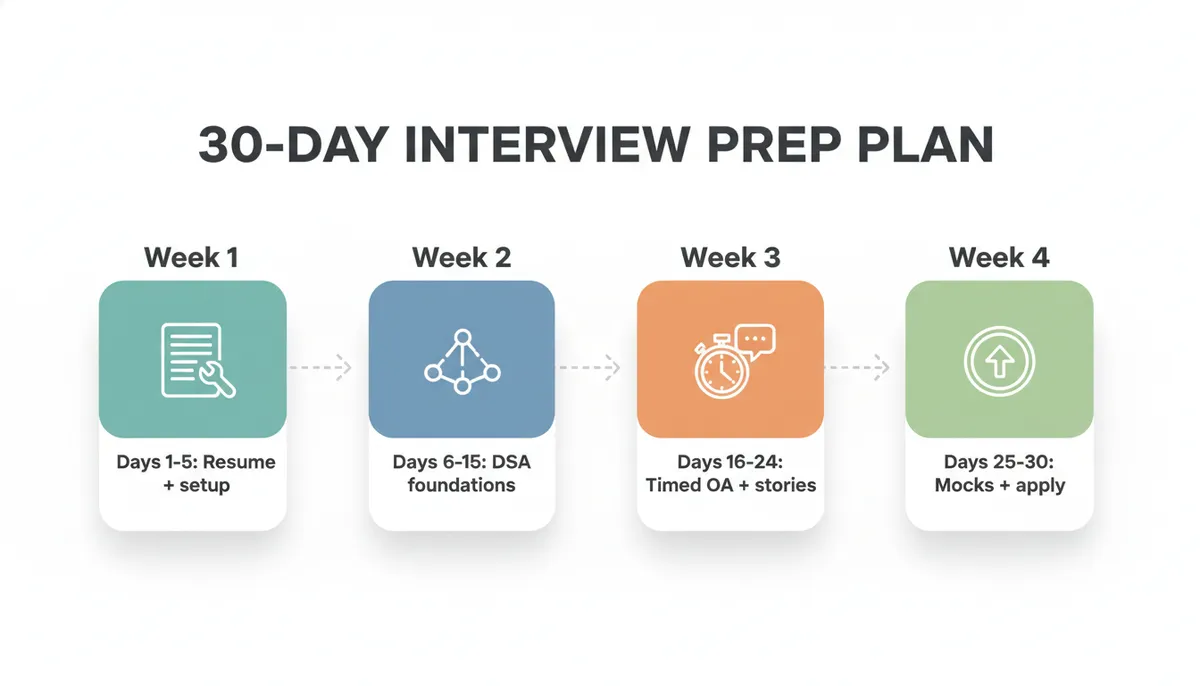
Here's a focused, beginner-friendly month that builds your resume, OA skills, and interview confidence in parallel. Adjust the pace to your schedule — consistency matters more than intensity.
- Day 1-2 — Audit & set up. Read the official Explore listing, confirm your eligibility, and note the regional process you'll face. Create a GitHub if you don't have one.
- Day 3-5 — Resume v1. Draft a one-page resume, then run it through the Resume Analyzer and fix every weak verb and missing metric it flags.
- Day 6-10 — DSA foundations. Start the DSA learning path: arrays, strings, and hash maps. Solve 2 easy-medium problems per day.
- Day 11-15 — Patterns deepen. Move to two pointers, sliding window, and trees (BFS/DFS) using the DSA Patterns Sheet. Keep the 2-problems-a-day habit.
- Day 16-20 — Timed OA practice. Simulate the real OA: 2 problems in 60 minutes. Add a light pass on DP and graphs.
- Day 21-24 — Behavioral stories. Write 2-3 STAR-style stories about projects, teamwork, and learning something new. Polish your "why Microsoft" answer.
- Day 25-28 — Mock interviews. Do daily AI mock interviews; practice narrating your approach and stating complexity out loud.
- Day 29-30 — Final polish & apply. Re-run your resume through the analyzer, do one last timed OA, and submit your application as soon as the window is open.
For a deeper beginner ramp beyond this month, our complete beginner's guide to coding interviews walks through fundamentals from zero.
Frequently Asked Questions
Do I need to be a computer science major to apply for Microsoft Explore?
No. Microsoft welcomes students who are majoring or planning to major in a technical field like CS, computer engineering, data science, or electrical engineering. The hard requirement is having completed an intro CS course and one semester of calculus (or equivalents).
What year of college do I need to be in?
Explore is for first- and second-year undergraduates. In the US, Canada, and Mexico, both first- and second-years can apply; in India, the program primarily targets second-year students. Always confirm the current year requirements on the official listing.
How hard is the Microsoft Explore OA?
The OA is approachable for prepared beginners — typically two LeetCode easy-to-medium problems within a 60-90 minute window. If you've practiced arrays, strings, hash maps, and trees, you'll be in good shape. DP and graphs occasionally appear, so a light pass on those helps.
When do Microsoft Explore 2027 applications open?
There's no fixed public date, and it varies by region. Listings for a given summer have historically appeared roughly in the late-summer-through-fall window and can close early once enough applications arrive. Check the official Microsoft Explore page regularly from mid-2026 and apply the day the role opens.
How long is the Microsoft Explore internship?
It's 12 weeks in the US and 8 weeks in India during the summer, including structured mentoring and networking.
Is the process different in the US versus India?
Yes. US Explore candidates often go through a recruiter phone screen that's more behavioral and conceptual, while India typically uses an online assessment followed by one or two technical interviews. Prepare for both coding and behavioral questions regardless of region.
What if my resume has almost no experience?
That's expected and fine. Lead with projects (even class or personal ones), quantify your impact, and show curiosity. Use the Resume Analyzer to make weak bullets stronger before you apply.
How competitive is Microsoft Explore?
Very — only a few hundred offers go out each cycle, and spots fill quickly. Thorough preparation across resume, OA, and interviews meaningfully improves your odds, and applying early matters a lot.
Final Thoughts
Microsoft Explore 2027 is one of the rare opportunities built specifically for students who are just getting started. You don't need a stacked resume — you need solid fundamentals, a clear and quantified resume, and steady OA and interview practice. Do that, and you put a major tech name on your resume years before most of your peers.
Start today:
- Polish your resume with the Thita.ai Resume Analyzer
- Build your problem-solving with the beginner DSA learning path and the DSA Patterns Sheet
- Rehearse with AI mock interviews
The effort you put in now pays off far beyond Explore — it sets the foundation for your entire tech career. Good luck.