
System Design
How to Start System Design Preparation from Zero (Beginner Guide)
Most engineers don’t start thinking about system design until they’re staring at a whiteboard in an interview, being asked: “Design Twitter.” If you’re readi...
Most engineers don’t start thinking about system design until they’re staring at a whiteboard in an interview, being asked: “Design Twitter.” If you’re reading this, you’re probably wondering how to learn system design from zero in a structured way—without getting lost in buzzwords like “eventual consistency,” “sharding,” or “CQRS.”
This guide is a practical roadmap to system design for beginners: what to learn first, how to practice, and how to get ready for system design interview prep and scalability interviews without already being a staff engineer at a FAANG company.
What is System Design (Really)?
At its core, system design is about making tradeoffs to build reliable, scalable, maintainable systems.
In interviews, “system design” usually means:
- You’re given a vague product requirement:
- “Design a URL shortener”
- “Design a chat system”
- “Design a news feed”
- You need to:
- Clarify requirements
- Propose a high-level architecture
- Discuss data models and APIs
- Address scalability, reliability, and performance
- Reason about tradeoffs
In real life, system design is the same thing—just with more constraints and more stakeholders.
If you’re starting system design from zero, your goal is not to memorize architectures, but to learn:
- A consistent approach to any design problem
- The fundamental building blocks (load balancers, caches, databases, queues, etc.)
- How to reason about scale and tradeoffs
Step 1: Get Comfortable With the Basics (Prerequisites)
You can start system design for beginners without being an expert, but a few foundations help a lot.
1.1 Programming and APIs
You should be comfortable with:
- Writing backend code in at least one language (Java, Go, Python, Node, etc.)
- Understanding HTTP basics:
- Methods: GET, POST, PUT, DELETE
- Status codes: 200, 400, 401, 404, 500
- Basic REST API concepts:
- Endpoints, request/response bodies, JSON
If you’ve built a small REST API (e.g., a TODO app), you’re ready.
1.2 Data Structures & Algorithms (At a Practical Level)
System design is not an algorithms contest, but you do need:
- Big-O intuition (O(1), O(log n), O(n), O(n log n))
- Understanding of:
- Hash maps (key–value lookup)
- Arrays/lists (ordered data)
- Queues/stacks
- Trees (especially B-trees conceptually for databases)
- How indexes work conceptually (extra data structure to speed up lookups)
If you’re already practicing patterns-based DSA (e.g., via a DSA for Beginners: What to Study First and in What Order), you’re in good shape.
1.3 Web and Networking Fundamentals
At minimum:
- What is a client and a server?
- What is a request–response cycle?
- What is latency vs throughput?
- Difference between:
- IP address vs domain name
- HTTP vs HTTPS
- TCP vs UDP (at a high level)
You don’t need to memorize TCP flags, but you should understand that networks are not perfect: packets can be lost, delayed, or reordered.
Step 2: Learn the Core Building Blocks of System Design
Most system design interview prep content throws dozens of components at you. Focus on the essentials first.
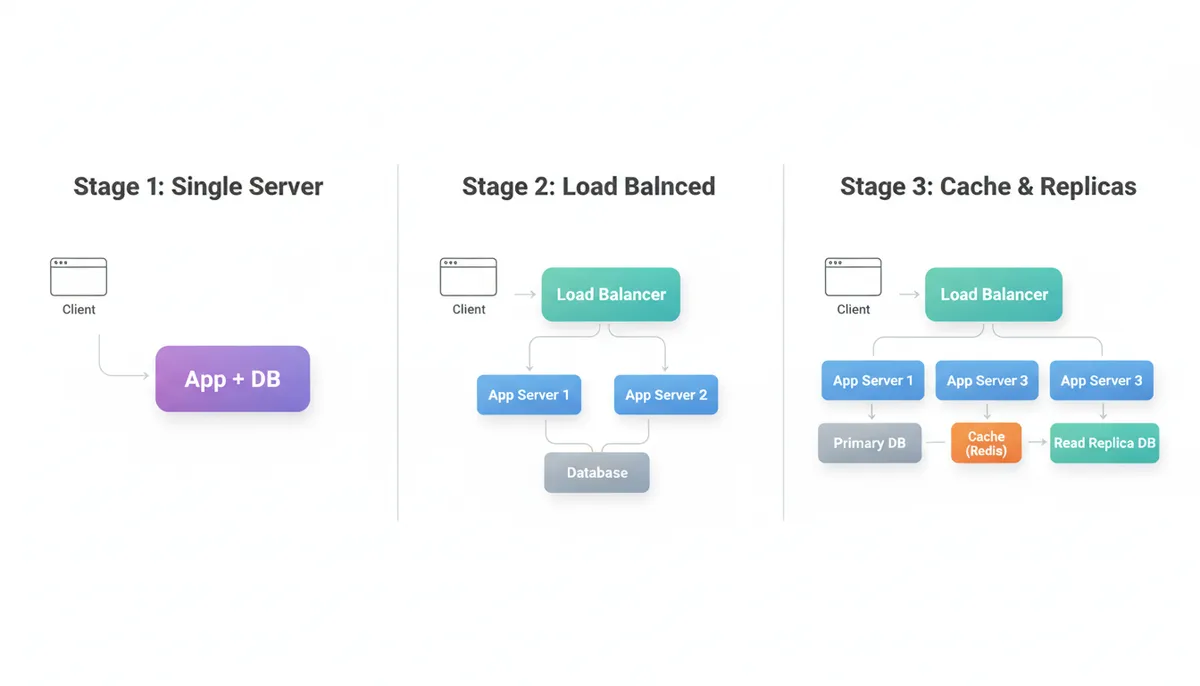
2.1 Single-Server Architecture
Start simple: one application server and one database.
- App server:
- Handles HTTP requests
- Contains business logic
- Database:
- Stores persistent data (users, posts, messages)
Typical flow:
- Client sends HTTP request to
api.example.com - Server processes request
- Server reads/writes to database
- Server returns response
Understand the limitations:
- Single point of failure
- Limited capacity (CPU, memory, disk, network)
- No redundancy
This is the baseline you’ll scale from.
2.2 Load Balancers
A load balancer sits in front of multiple servers and distributes traffic.
- Why:
- Horizontal scaling (add more servers)
- High availability (if one server fails, others handle traffic)
- Simple model:
- Client → Load Balancer → Multiple App Servers → Database
Key concepts:
- Health checks: detect down servers
- Routing strategies:
- Round-robin
- Least connections
- IP hash (for sticky sessions)
2.3 Caching
Caching is one of the most important tools in scalability interviews.
- What:
- Store frequently accessed data in a fast storage layer (RAM) to avoid repeated expensive operations
- Where:
- Client-side (browser cache)
- CDN (edge cache for static content)
- Application cache (Redis, Memcached)
- Database query cache
Common patterns:
- Read-heavy systems: cache database reads
- Write-through cache: write to cache and DB together
- Write-back cache: write to cache, flush to DB later
Tradeoffs:
- Stale data vs performance
- Cache invalidation complexity
2.4 Databases: Relational vs NoSQL
You don’t need to know every database, but you should understand:
Relational (SQL)
- Structured schema (tables, rows, columns)
- Strong consistency (usually)
- Good for:
- Transactions (banking)
- Complex queries and joins
- Examples: PostgreSQL, MySQL
NoSQL
- Flexible schema
- Often optimized for scale and specific access patterns
- Types:
- Key–value (Redis, DynamoDB)
- Document (MongoDB)
- Column-family (Cassandra)
- Graph (Neo4j)
- Often favor availability and partition tolerance over strict consistency
Understand CAP theorem at a high level:
- In a network partition, you can choose:
- Consistency (all nodes see the same data)
- Availability (system continues to serve requests)
- You can’t have both fully at the same time.
2.5 Message Queues and Asynchronous Processing
Queues decouple producers and consumers.
- Use cases:
- Sending emails
- Processing images
- Log processing
- Any long-running or non-critical path work
Benefits:
- Smooth out traffic spikes
- Improve latency for user-facing operations
- Increase system resilience
Examples: Kafka, RabbitMQ, SQS.
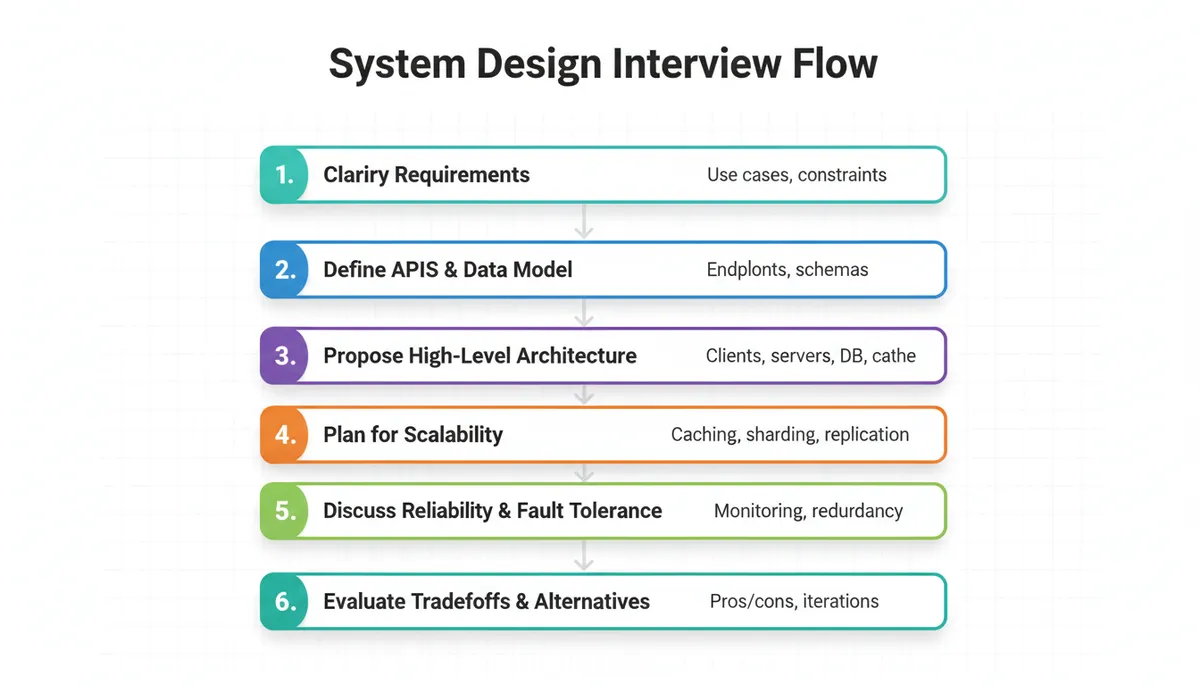
Step 3: A Repeatable Framework for System Design Interviews
System design for beginners often fails because people jump into drawing boxes without a process. Use a consistent framework.
3.1 Step 1: Clarify Requirements
Before any design:
- Who are the users?
- What are the core use cases?
- What are explicit non-goals?
- What are constraints?
- Scale: number of users, QPS (queries per second)
- Latency requirements
- Data size and retention
Example: “Design a URL shortener”
Clarify:
- Functional:
- Shorten a long URL
- Redirect from short URL to long URL
- Optional: custom aliases? analytics?
- Non-functional:
- High availability
- Low latency (<100ms for redirect)
- Scale: 100M URLs, 50K requests/sec
3.2 Step 2: Define APIs and Data Model
APIs:
POST /shorten→ returns short URLGET /{shortCode}→ redirects to long URL
Data model (simplified):
- Table:
urlsid(primary key)short_code(unique)long_urlcreated_atexpiry_date(optional)
Even in interviews, being explicit about APIs and schemas shows rigor.
3.3 Step 3: High-Level Architecture
Start with the simplest thing that could work:
- Client
- Load balancer
- Application servers
- Database
- Cache (for hot URLs)
Then iterate:
- Add a cache to reduce DB reads for redirects
- Add replicas for read scaling
- Add sharding if data grows huge
- Add a background cleanup job for expired URLs
Focus on data flow:
- For creation: Client → API → DB write → return short URL
- For redirect: Client → API → Cache lookup → fallback to DB → redirect
3.4 Step 4: Address Scalability
This is where scalability interviews focus.
Think about:
- Read vs write ratio
- Hot keys (e.g., very popular URLs)
- Horizontal vs vertical scaling
Common tools:
- Replication:
- Master–replica setup for databases
- Read scaling via replicas
- Sharding:
- Split data across multiple DB instances based on a key
- Caching strategy:
- What to cache, TTLs, eviction policies
3.5 Step 5: Reliability and Fault Tolerance
Discuss:
- Single points of failure:
- What happens if a DB node dies?
- What if a region goes down?
- Backups and recovery:
- Point-in-time recovery
- Snapshot + WAL (write-ahead log)
- Circuit breakers and retries:
- Avoid cascading failures
3.6 Step 6: Tradeoffs and Alternatives
No design is perfect. Interviewers care about how you reason:
- SQL vs NoSQL for this use case?
- Strong vs eventual consistency?
- Push vs pull model for notifications?
- Monolith vs microservices?
Explain pros/cons and why you’d pick one under given constraints.
Visual: A Beginner-Friendly System Design Flow
Step 4: Learn Through Concrete Example Systems
Instead of reading random “design X” posts, pick a few canonical problems and go deep.
4.1 URL Shortener
Covers:
- Key generation strategies (hashing vs base62 encoding)
- Read-heavy workloads
- Caching hot data
- Simple relational schema
Questions to explore:
- How do you avoid collisions in short codes?
- How do you migrate to sharded databases later?
- How do you handle abuse / spam URLs?
4.2 News Feed (e.g., Twitter/Instagram Feed)
Covers:
- Fan-out on write vs fan-out on read
- Denormalization and pre-computation
- Caching per-user feeds
- Pagination and ranking
Questions:
- For a user with 10M followers, do you precompute their posts into every follower’s feed?
- How do you handle cold start for new users?
4.3 Chat System or Messaging
Covers:
- Real-time updates (WebSockets, long polling)
- Message ordering and delivery semantics
- Storing conversation history
- Presence (online/offline indicators)
Questions:
- How do you ensure messages are delivered at least once?
- How do you partition chats across servers?
4.4 File Storage (e.g., Dropbox-lite)
Covers:
- Large object storage (blobs)
- Metadata vs file content separation
- Consistency between index and storage
- Versioning and deduplication
For each system:
- Apply the 6-step framework
- Draw the architecture
- Identify bottlenecks and failure scenarios
- Iterate on the design
Over time, patterns will emerge.
Step 5: From Theory to Practice – How to Actually Practice
5.1 Whiteboard-Style Practice
Even if you’re not in an interview yet, simulate one:
- Pick a problem (e.g., “Design a rate limiter”)
- Set a 45–60 minute timer
- Talk through:
- Requirements
- APIs
- High-level design
- Scaling and reliability
- Draw diagrams (paper, tablet, or online whiteboard)
If you’re using an AI interview platform (e.g., an AI Mock Interviews vs Real Interviews: Do They Actually Help?), you can get structured feedback, but you can also do this solo.
5.2 Write Design Docs
Writing forces clarity.
- Take one system you use daily (e.g., “Notification system for a social app”)
- Write a 2–3 page design doc:
- Problem statement
- Requirements
- Proposed design
- Alternatives and tradeoffs
- Focus on explaining why you made each choice
This mirrors how real engineering teams evaluate designs.
5.3 Implement Tiny Prototypes
You don’t need to build Twitter, but you can:
- Implement a simple URL shortener:
- Single service + DB
- Add caching with Redis
- Implement a notification fan-out:
- Write events to a queue
- Background worker processes them
Code prototypes help you internalize constraints and failure modes you don’t see on diagrams.
Step 6: Key Concepts You Should Gradually Learn
Don’t try to learn everything at once. As you progress, layer in these concepts.
6.1 Scalability Concepts
- Vertical vs horizontal scaling
- Stateless vs stateful services
- Sticky sessions and session storage
- Throttling and rate limiting
6.2 Data Partitioning and Replication
- Sharding strategies:
- Hash-based
- Range-based
- Geo-based
- Replication:
- Synchronous vs asynchronous
- Read replicas
- Leader–follower patterns
Tradeoffs:
- Latency vs consistency
- Hot shard problems
6.3 Caching Strategies
- Cache-aside (lazy loading)
- Read-through / write-through
- Write-back
- Eviction policies:
- LRU, LFU, FIFO
6.4 Consistency Models
- Strong consistency
- Eventual consistency
- Read-your-writes
- Monotonic reads
Where eventual consistency is acceptable (e.g., likes count), and where it’s not (e.g., payments).
6.5 Observability
- Metrics (latency, error rate, throughput)
- Logging
- Tracing
- Dashboards and alerts
In interviews, mentioning how you’d monitor and operate the system is a strong signal.
Visual: Scaling a Simple Web Application
Common Mistakes Beginners Make in System Design Interviews
Understanding what not to do is as important as knowing what to do.
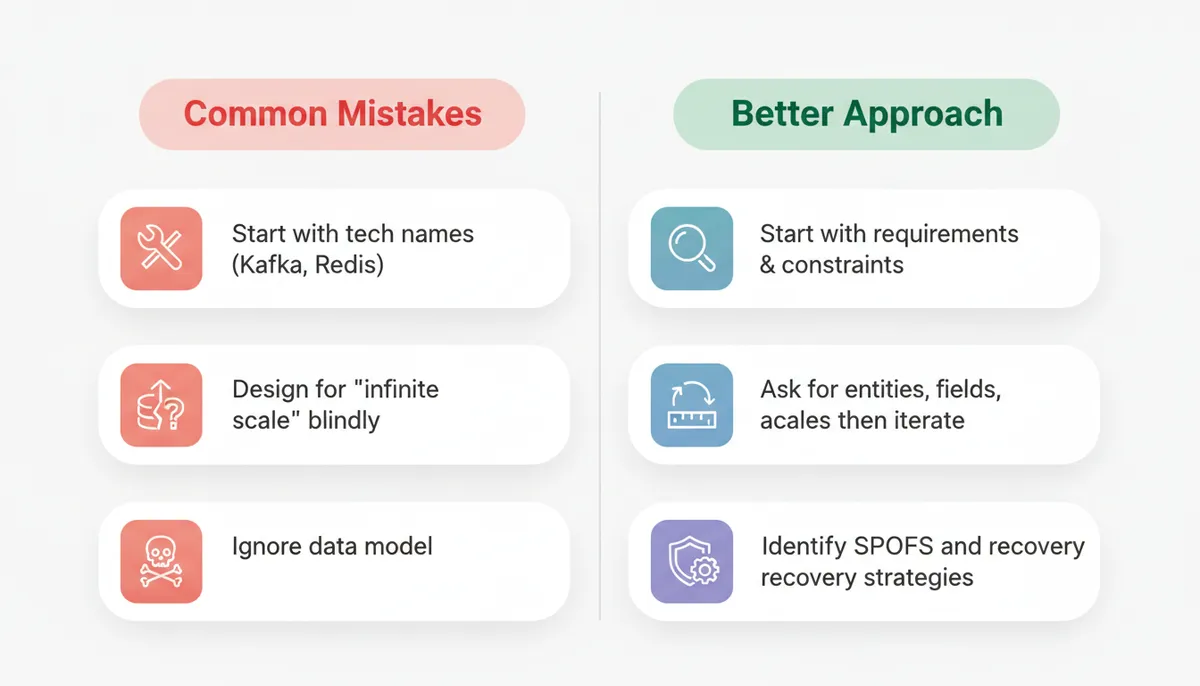
7.1 Jumping Into Components Too Early
Mistake:
- Starting with “We’ll use Kafka, Redis, and Cassandra” before clarifying requirements.
Fix:
- Spend the first 5–10 minutes on requirements and APIs.
- Components come after you understand the problem.
7.2 Over-Optimizing for Scale Without Justification
Mistake:
- Designing for billions of users when the prompt suggests a small startup-scale product.
Fix:
- Ask for scale constraints.
- Start with a simple design.
- Then say: “If we need to scale to X, I’d evolve the design like this…”
7.3 Ignoring Bottlenecks and Failure Modes
Mistake:
- Drawing a pretty diagram but never asking:
- Where is the bottleneck?
- What happens if this node dies?
Fix:
- For each component, ask:
- Is this a single point of failure?
- How do we scale this horizontally?
- How do we recover from failure?
7.4 Not Quantifying Anything
Mistake:
- Using vague terms: “a lot of users”, “huge traffic”.
Fix:
- Make reasonable assumptions:
- “Let’s assume 10M daily active users and 1000 writes/sec.”
- Use back-of-the-envelope calculations:
- Storage per day
- QPS per service
7.5 Forgetting About Data Models
Mistake:
- Only talking about services and ignoring how data is stored and accessed.
Fix:
- Always define:
- Core entities
- Their fields
- Access patterns (read/write queries)
Visual: Common Beginner Mistakes vs Better Approach
How to Structure a 30–45 Minute System Design Answer
Here’s a timeboxed structure you can practice for scalability interviews:
-
0–5 min: Requirements
- Clarify functional and non-functional requirements
- Confirm scale assumptions
-
5–10 min: API & Data Model
- Define key APIs
- Outline main entities and relationships
-
10–20 min: High-Level Architecture
- Draw components: clients, load balancers, app servers, DB, cache, queues
- Explain data flow for core operations
-
20–30 min: Scalability & Reliability
- Discuss:
- Caching strategy
- DB replication and sharding
- Asynchronous processing
- Talk through failure scenarios
- Discuss:
-
30–40 min: Deep Dives & Tradeoffs
- Pick one or two areas (e.g., feed generation, search indexing)
- Explore design options and tradeoffs
-
Last 5 minutes: Recap
- Summarize:
- Requirements
- Architecture
- Key tradeoffs and future improvements
- Summarize:
Practice this structure until it feels natural.
Actionable 4-Week Plan to Start System Design from Zero
If you’re serious about system design interview prep, here’s a focused plan.
Week 1: Foundations
- Review:
- HTTP basics
- REST APIs
- Latency vs throughput
- Read about:
- Load balancers
- Caches
- SQL vs NoSQL
- Exercise:
- Draw architecture of a simple “single-server web app” and then add a load balancer.
Week 2: Canonical Systems
- Deep dive into:
- URL shortener
- News feed
- For each:
- Clarify requirements
- Define APIs and data model
- Design architecture
- Identify bottlenecks and failure modes
Week 3: Advanced Patterns
- Learn:
- Sharding and replication
- Asynchronous processing with queues
- Caching strategies
- Exercise:
- Revisit your Week 2 designs and “scale them up” using these techniques.
Week 4: Interview Simulation
- 3–4 mock sessions:
- 45–60 minutes each
- Problems like:
- Design a chat system
- Design a notifications system
- Design a rate limiter
- After each:
- Write a short reflection:
- What went well?
- What did you miss?
- What concepts felt weak?
- Write a short reflection:
Using an AI-based coach or mock interviewer can help you get consistent feedback on structure and coverage, but you can also record yourself and self-review.
Key Takeaways
- System design is about tradeoffs, not memorizing architectures.
- Start with foundations: HTTP, APIs, databases, caching, queues.
- Use a repeatable framework:
- Requirements → APIs & data model → architecture → scalability → reliability → tradeoffs.
- Learn via canonical problems (URL shortener, news feed, chat, file storage).
- Avoid common pitfalls:
- Jumping to tech buzzwords
- Ignoring data models
- Skipping failure analysis
- Practice like the real thing:
- Timeboxed sessions
- Diagrams
- Design docs
- Small prototypes
If you approach system design for beginners systematically—layering concepts, practicing with structure, and reflecting on tradeoffs—you can go from zero to confident in interviews and in real-world design discussions.