
Interview
Phone Screen vs Technical Interview: Key Differences and Preparation Strategy
Every engineer knows the anxiety of that first call: is this a **phone screen interview** or a **technical interview**? Will they ask about your resume, or w...
Every engineer knows the anxiety of that first call: is this a phone screen interview or a technical interview? Will they ask about your resume, or will you be live-coding on a shared doc? And how should your preparation change from one stage to the next in a typical software interview process?
Understanding the difference between a phone screen and a technical interview—and aligning your prep accordingly—is one of the most effective ways to reduce uncertainty and improve your performance.
This guide breaks down how modern tech companies run these interview stages, what they’re actually testing, and how to prepare with a clear, pattern-based strategy.
1. The Modern Software Interview Process: Where Phone Screens Fit
Before comparing a phone screen interview to a technical interview, it helps to see the full pipeline.
Typical interview stages in tech
Most software engineering roles follow a variant of this pipeline:
- Application & resume review
- Recruiter phone screen (non-technical or lightly technical)
- Technical phone interview / online screen
- Onsite (or virtual onsite): multiple technical interviews
- System design interview (for mid/senior roles)
- Behavioral / culture fit interviews
- Offer & negotiation
Different companies compress or expand these stages, but the phone screen and technical interview usually serve distinct purposes:
- Phone screen interview: “Should we invest more time in this candidate?”
- Technical interview: “Can this person actually do the job at our bar?”
2. What Is a Phone Screen Interview?
“Phone screen” is overloaded. It can mean different things at different companies. Broadly, there are two types:
- Recruiter phone screen (non-technical or light technical)
- Technical phone screen (a real coding interview, but shorter)
2.1 Recruiter phone screen: goals and structure
This is usually the first live conversation after you apply or get referred.
Primary goals:
- Validate basic fit:
- Work authorization, location, timeline
- Seniority and role alignment (SWE, SRE, ML, etc.)
- Calibrate compensation expectations
- Confirm baseline technical alignment:
- Tech stack (e.g., backend vs frontend, Python vs Java)
- Kind of problems you’ve worked on
Typical structure (20–30 minutes):
- 5 min: Introductions and company overview
- 10–15 min: Your background and projects
- 5–10 min: Clarifying role, team, and process; your questions
Some companies add light technical questions:
- “What’s the difference between a process and a thread?”
- “How would you debug a slow API endpoint?”
- “Explain REST vs RPC in one minute.”
No live coding, but they are checking whether you can talk about engineering at a reasonable level.
2.2 Technical phone interview (technical phone screen)
This is the first real technical filter. It may still be over audio/video, but the focus is coding.
Typical formats:
- 45–60 minutes
- One interviewer (sometimes two)
- Shared coding environment:
- Google Docs / CoderPad / HackerRank / internal tool
- One or two algorithmic / data structure problems
- Sometimes a few minutes on your past work
What they test:
- Core DSA: arrays, strings, hash maps, trees, graphs, recursion
- Problem solving: Can you reason under time pressure?
- Code quality: Clean, correct, and reasonably idiomatic
- Communication: Do you explain your approach?
This is often called a technical phone interview or online assessment, but functionally it’s a technical interview with a lower time budget.
3. What Is a Technical Interview (Beyond the Phone Screen)?
Once you pass the phone screen, you usually move to onsite rounds (virtual or in-person). These are deeper, more varied, and more consequential.
3.1 Types of technical interviews
A typical onsite loop includes:
-
Coding interviews (DSA)
- 1–3 rounds
- Similar to technical phone screens, but:
- Slightly more complex problems
- Interviewers may go deeper on edge cases and optimization
- Sometimes multiple smaller questions per round
-
System design interviews (mid/senior)
- 1–2 rounds
- Design a system like:
- URL shortener
- News feed
- Rate limiter
- Evaluate:
- Architecture choices
- Tradeoffs (consistency vs availability, latency vs cost)
- Scaling, reliability, observability
-
Role-specific technical interviews
- Frontend: React component design, state management, performance
- Backend: APIs, database modeling, concurrency
- Infra/SRE: incident response, capacity planning, monitoring
-
Behavioral / “values” interviews
- Still technical context: debugging stories, team conflict, ownership
- Evaluates how you work, not just what you know
3.2 What’s different from a technical phone interview?
Compared to a technical phone screen:
- Breadth: More interviews, more dimensions (coding, design, behavior)
- Depth: Follow-up questions, alternative designs, failure modes
- Signal strength: Each onsite interview is a major input to the final decision
Phone screens ask: “Do we see enough promise?”
Onsites ask: “Do we want to work with this person?”
4. Phone Screen vs Technical Interview: Side-by-Side Comparison
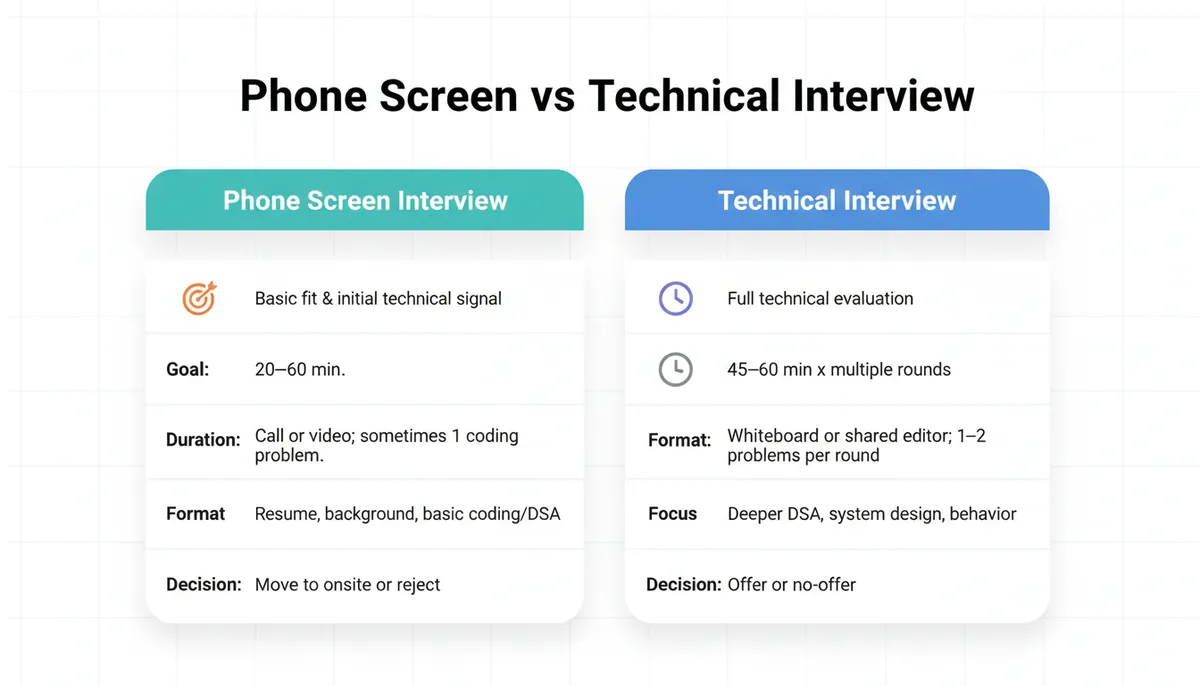
| Dimension | Phone Screen Interview | Technical Interview (Onsite) |
|---|---|---|
| Primary goal | Filter out clear mismatches; decide if you move forward | Decide if you meet the engineering bar for an offer |
| Length | 20–60 minutes | 3–6 hours total (multiple rounds) |
| Format | Phone/video; sometimes 0–1 coding problems | Video/in-person; multiple coding + design + behavioral |
| Technical depth | Light to moderate | Moderate to deep across several areas |
| Scope | Resume, background, basic coding/DSA | DSA, system design, debugging, collaboration, ownership |
| Pressure | High leverage, but single shot | High leverage, multiple chances to recover across rounds |
5. What Exactly Changes in a Technical Phone Interview vs Onsite Coding Round?
Because both are “technical,” it’s easy to treat them the same. The differences are subtle but important for preparation.
5.1 Problem difficulty and structure
-
Technical phone interview:
- 1 main problem, sometimes a follow-up
- Typically medium difficulty on LeetCode scale
- Emphasis on getting to a working solution quickly
-
Onsite coding interview:
- 1–2 problems per round
- Mix of medium and medium-hard
- More likely to involve:
- Multiple phases (brute-force → optimize → edge cases)
- Follow-ups that change constraints or requirements
5.2 Evaluation emphasis
-
Technical phone screen:
- Can you communicate a clear approach?
- Can you implement a solution in the chosen language?
- Do you know basic DSA patterns: two pointers, sliding window, BFS/DFS, etc.?
Mastering these patterns is crucial, as detailed in Most Important DSA Topics for Coding Interviews (Ranked by Frequency).
-
Onsite technical interview:
- All of the above, plus:
- How do you handle ambiguity?
- Do you proactively consider tradeoffs?
- Do you ask clarifying questions and push back on unclear requirements?
- All of the above, plus:
5.3 Interaction style
- Phone screens tend to be more guided:
- Interviewer might nudge you if you’re stuck.
- Onsites can be more independent:
- You’re expected to drive the problem-solving process.
6. Preparation Strategy: From Phone Screen to Final Technical Interview
You shouldn’t prepare identically for every stage. The constraints and expectations are different.
6.1 Foundation: technical skills that apply to all stages
Before worrying about stages, ensure your fundamentals are solid.
Core areas:
- Data structures:
- Arrays, strings, hash maps, sets
- Linked lists, stacks, queues
- Trees (BST, heaps), graphs
- Algorithms / patterns:
- Two pointers, sliding window
- Binary search
- DFS, BFS, topological sort
- Backtracking
- Dynamic programming (1D, 2D, knapsack-style)
- Greedy strategies
- Complexity:
- Big-O time and space
- Tradeoffs (e.g., time vs memory)
Using a pattern-based approach (grouping problems by underlying technique rather than topic name) is especially effective. For example, instead of memorizing 50 individual array problems, you master:
- Sliding window for subarray/substring problems
- Two pointers for sorted arrays and partitioning
- Prefix sums for range queries
If you use a structured pattern sheet (e.g., something like /dsa-patterns-sheet), you can track coverage across patterns rather than random problems. For a comprehensive guide, see What Are DSA Patterns? A Complete Guide for Beginners.
7. How to Prepare Specifically for a Phone Screen Interview
7.1 Recruiter phone screen preparation
Focus areas:
-
Your story
- A concise, 60–90 second narrative:
- Who you are
- What you’ve worked on
- What you’re looking for
- Example structure:
- “I’m a backend engineer with 4 years of experience at X and Y, mostly in distributed systems and APIs. Recently, I led a project to reduce latency in our recommendation service from 400ms to 120ms by redesigning our caching layer. I’m now looking for roles where I can work on high-scale backend systems and mentor junior engineers.”
- A concise, 60–90 second narrative:
-
Project deep-dives
- Choose 2–3 projects:
- Be ready to explain:
- Problem and constraints
- Architecture and design decisions
- Metrics and impact
- Tradeoffs and what you’d do differently
- Be ready to explain:
- Choose 2–3 projects:
-
Light technical refresh
- Be prepared for:
- Basic OS/CS concepts (process vs thread, HTTP basics)
- Simple high-level design questions (“How would you build a simple URL shortener?”—at a conceptual level)
- Be prepared for:
-
Questions to ask
- Show you understand the software interview process:
- “What does the technical phone interview usually cover?”
- “What are the main technologies the team uses?”
- “How is success measured for this role in the first 6–12 months?”
- Show you understand the software interview process:
7.2 Technical phone interview preparation
Here’s a focused plan for the technical phone screen.
7.2.1 Practice under realistic constraints
- 45–60 minute sessions
- One medium problem per session
- Use a plain text editor or shared-doc-like environment:
- No auto-complete, no syntax highlighting
- Practice:
- Restating the problem
- Walking through examples
- Describing your approach before coding
- Analyzing complexity
7.2.2 Focus on high-yield patterns
For phone screens, you typically see problems from a few high-frequency buckets:
- Arrays & strings:
- Sliding window (longest substring with k distinct chars, max subarray sum)
- Two pointers (remove duplicates, partitioning, palindrome checks)
- Hash maps & sets:
- Frequency counting, lookup, de-duplication
- Trees & graphs:
- BFS/DFS traversals, shortest path in unweighted graphs
- Simple dynamic programming:
- 1D DP (climbing stairs, house robber)
- Basic 2D DP (grid paths)
Example: a classic technical phone interview problem.
PYTHON
When practicing, narrate:
- Why a sliding window works
- How you update
start - What the complexity is
7.2.3 Communication template
Use a simple repeatable structure:
-
Clarify:
- “Let me restate the problem to check my understanding…”
- Ask about input size, constraints, edge cases.
-
Outline approach:
- “Brute-force would be O(n²)… we can do better with a sliding window in O(n). The idea is…”
-
Implement:
- Write readable code
- Use clear variable names
- Handle edge cases explicitly
-
Test and analyze:
- Walk through small examples
- State time/space complexity
8. How to Prepare for Onsite Technical Interviews
Once you’ve passed the technical phone screen, your preparation needs to broaden.
8.1 Coding interviews (onsite)
The coding rounds are similar to your technical phone interview, but with:
- More variation in problem types
- More follow-up questions
- More emphasis on tradeoffs and edge cases
Preparation upgrades:
-
Increase difficulty range
- Mix of medium and medium-hard problems
- Practice problems that require:
- Combining multiple patterns (e.g., BFS + bitmask DP)
- Non-trivial data structures (priority queues, union-find)
-
Depth of explanation
- For each solution, be ready to discuss:
- “What if the input size is 10⁵ vs 10⁷?”
- “Can we reduce memory usage?”
- “How would you parallelize this?”
- For each solution, be ready to discuss:
-
Debugging on the fly
- Practice writing code that compiles mentally
- Intentionally introduce a bug and then fix it:
- Off-by-one errors
- Null/empty inputs
- Overflow or performance issues
8.2 System design interviews
For mid/senior roles, system design is often as important as coding.
Focus on:
- Core concepts:
- Load balancers, caches, databases (SQL/NoSQL), queues
- Consistency models, sharding, replication
- A repeatable approach:
- Clarify requirements
- Define APIs and data model
- High-level architecture
- Deep dive on components (e.g., cache strategy, DB schema)
- Scaling and bottlenecks
- Reliability, monitoring, failure handling
You don’t need to know every distributed system detail, but you should be comfortable reasoning about tradeoffs. For a structured system design prep, see Beginner-Friendly System Design Concepts Every Engineer Should Know.
8.3 Behavioral interviews (often embedded in technical rounds)
Even in coding/system design rounds, interviewers will assess:
- Collaboration:
- Do you listen to hints?
- Do you respond constructively to feedback?
- Ownership:
- Do you proactively handle edge cases?
- Do you think about testing and maintainability?
Prepare 6–8 STAR stories (Situation, Task, Action, Result) around:
- A challenging bug or incident
- A conflict with a teammate
- A project you led
- A failure and what you learned
9. Common Mistakes Across Phone Screens and Technical Interviews
9.1 Treating all stages the same
- Using the same prep plan for recruiter screen, technical phone interview, and onsite.
- Fix: Tailor prep:
- Story + background for recruiter
- Core DSA patterns for phone screen
- Depth + breadth (DSA + design) for onsite
9.2 Over-indexing on rote LeetCode grinding
-
Solving hundreds of problems without:
- Recognizing patterns
- Practicing communication
- Simulating real interview constraints
-
Fix: Practice by pattern, not by raw count:
- E.g., “Today I’ll focus on sliding window and two pointers,” not “Today I’ll do 10 random medium problems.”
This approach is supported by insights in LeetCode Patterns vs Topic-Wise Preparation: Which One Works Better?.
- E.g., “Today I’ll focus on sliding window and two pointers,” not “Today I’ll do 10 random medium problems.”
9.3 Under-communicating
-
Silent coding
-
Not explaining tradeoffs
-
Not asking clarifying questions
-
Fix: Use a talk-first approach:
- Restate problem
- Propose approach
- Get alignment
- Then code
9.4 Ignoring constraints
- Proposing O(n²) solutions when constraints imply O(n log n) or O(n) is needed.
- Fix: Always ask:
- “What’s the maximum input size?”
- “Are there any latency or memory requirements?”
9.5 Panicking on unknown problems
- Freezing when you don’t recognize the problem template.
- Fix:
- Break the problem down:
- “Can I handle a simpler version first?”
- “Can I do brute-force and then optimize?”
- Interviewers care about your process, not just recognition.
- Break the problem down:
10. A Pattern-Based Prep Plan from Phone Screen to Offer
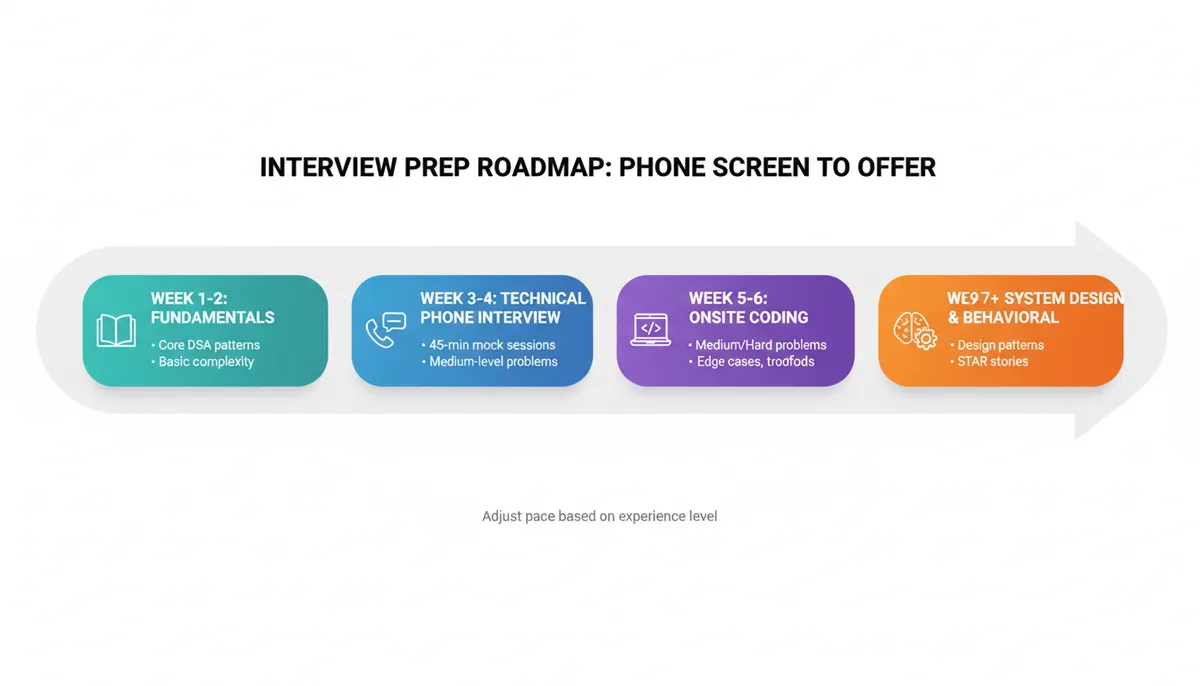
Here’s a concrete way to structure your preparation over several weeks. Adjust intensity based on your timeline.
Weeks 1–2: Fundamentals and pattern recognition
- Cover core DSA patterns:
- Arrays/strings (two pointers, sliding window)
- Hash maps/sets
- Trees/graphs (BFS/DFS)
- Simple DP
- For each pattern:
- Learn the idea
- Solve 3–5 representative problems
- Write a 2–3 sentence summary of when to use it
Weeks 3–4: Technical phone interview simulation
- 3–4 mock technical phone screens:
- 45–60 minutes
- One medium problem each
- Focus on:
- Clear communication
- Clean implementation in a bare-bones editor
- Time/space analysis
If you have access to a mock interview tool (e.g., something like AI Interview Practice: Free Mock Interview Simulator with Real-Time Feedback for Technical Interviews), use it to simulate the environment and get feedback on your reasoning and code.
Weeks 5–6: Onsite coding depth
- Increase difficulty:
- Mix medium and medium-hard problems
- Add constraints:
- Interviewer interrupts with follow-ups
- You must explain optimizations and tradeoffs
- Practice debugging and refactoring your own code
Week 7+: System design and behavioral
- For system design:
- Do 3–5 full-length practice designs
- Focus on clarity and tradeoffs over memorized templates
- For behavioral:
- Prepare STAR stories
- Practice concise, structured answers
11. Example: Same Candidate, Different Stage Expectations
Consider a candidate solving a graph traversal problem.
In a technical phone interview
- Problem: “Given a grid of 0s and 1s, count the number of islands.”
- Good performance:
- Explains idea: “Use DFS/BFS to traverse connected components.”
- Implements clean DFS or BFS
- Handles edge cases (empty grid)
- States complexity: O(m × n) time, O(m × n) space in worst case
In an onsite technical interview
- Follow-up questions might include:
- “What if the grid is extremely large and doesn’t fit in memory?”
- “What if we’re streaming the grid row by row?”
- “Can we parallelize the counting?”
Now they’re looking at:
- Ability to adapt the solution
- Understanding of memory constraints
- High-level reasoning about distributed computation
The underlying problem is the same, but the depth of reasoning expected is higher.
12. Visualizing the Flow: From Phone Screen to Offer
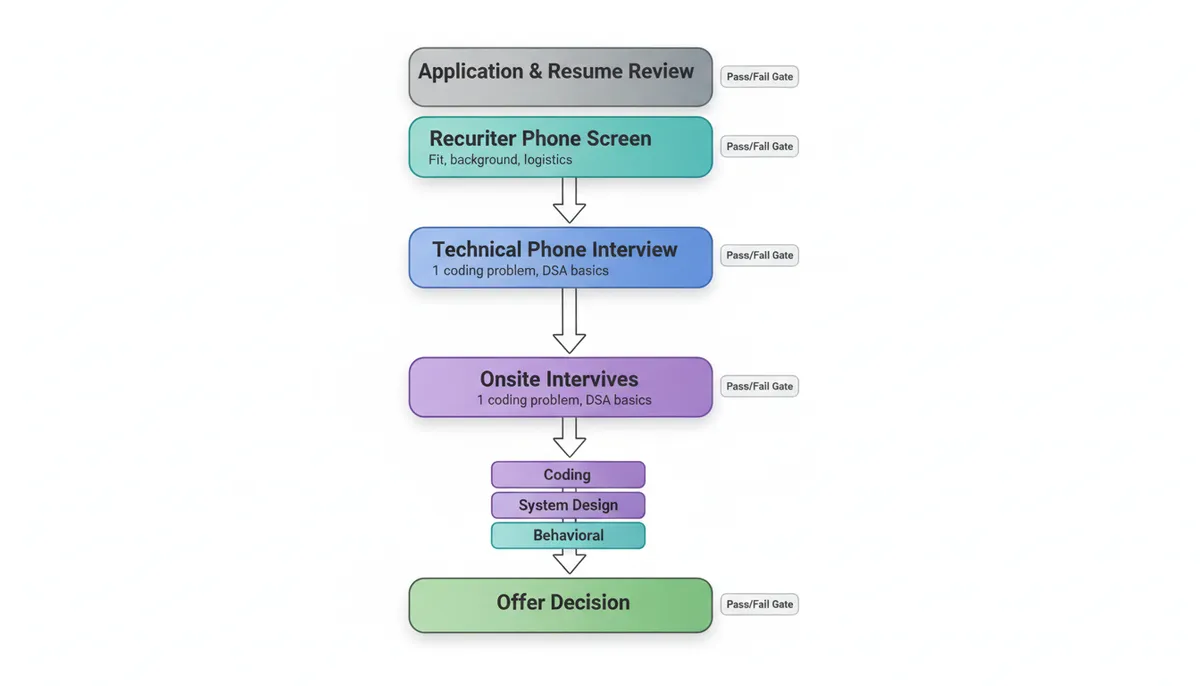
This is the path you’re navigating. Each stage has its own purpose and bar; your preparation should mirror that structure rather than treating the process as a single monolithic “interview.”
13. Key Takeaways
-
A phone screen interview is primarily a filter:
- Recruiter screens: fit, background, logistics
- Technical phone screens: basic DSA and coding ability in 45–60 minutes
-
A technical interview (onsite) is a holistic evaluation:
- Multiple rounds: coding, system design, behavioral
- Deeper reasoning, tradeoffs, collaboration
-
Preparation should be stage-specific:
- Story + projects for recruiter screens
- Core DSA patterns and clear communication for technical phone interviews
- Depth in DSA, system design, and behavioral skills for onsite
-
Use a pattern-based approach to studying:
- Focus on reusable techniques (sliding window, BFS/DFS, DP)
- Practice under realistic constraints (time, editor, communication)
For guidance on using AI tools effectively in interview prep, consider How to Use AI Tools Like ChatGPT for Interview Preparation (Without Becoming Dependent).
-
Avoid common pitfalls:
- Treating all stages the same
- Rote problem grinding without pattern recognition
- Under-communicating your thought process
If you align your preparation with the actual goals of each interview stage, you replace guesswork with a deliberate, engineering-style plan. That’s ultimately what companies are looking for: someone who can understand constraints, design a strategy, and execute under pressure—starting with your very first phone screen.